Simple jQuery Plugin For Auto Twitter Links - Twitter Autolink
| File Size: | 8.7 KB |
|---|---|
| Views Total: | 917 |
| Last Update: | |
| Publish Date: | |
| Official Website: | Go to website |
| License: | MIT |
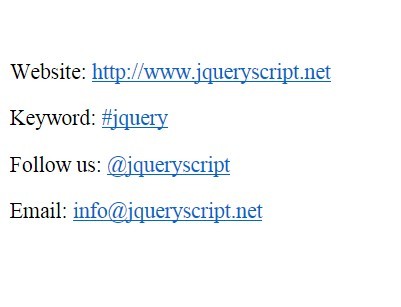
Twitter Autolink is a small jQuery plugin that rewrites links (URLs, email addresses, @mentions, and #hashtags) in plaintext tweets as appropriate links.
How it works:
It will turn the following html elements:
<p class="tweet">Website: https://www.jqueryscript.net</p>
<p class="tweet">Keyword: #jquery</p>
<p class="tweet">Follow us: @jqueryscript</p>
<p class="tweet">Email: [email protected]</p>
Into these...
<p class="tweet">Website: <a href="https://www.jqueryscript.net">https://www.jqueryscript.net</a></p>
<p class="tweet">Keyword: <a href="http://twitter.com/search/%23jquery">#jquery</a></p>
<p class="tweet">Follow us: <a href="http://twitter.com/jqueryscript">@jqueryscript</a></p>
<p class="tweet">Email: <a href="mailto:[email protected]">[email protected]</a></p>
How to use it:
1. Include jQuery javascript library and jQuery Twitter Autolink at the bottom of your page to reduce the page load time.
<script src="http://code.jquery.com/jquery-latest.min.js"></script>
<script src="jquery.twitter.autolink.min.js"></script>
2. Call the plugin on the target text content. That's it.
$(document).ready(function() {
  $(".tweet").twitter_autolink();
});
This awesome jQuery plugin is developed by thinkswan. For more Advanced Usages, please check the demo page or visit the official website.