Moment.js: JavaScript Date Formatting, Parsing & Validation Library
| File Size: | 1.71 MB |
|---|---|
| Views Total: | 15471 |
| Last Update: | |
| Publish Date: | |
| Official Website: | Go to website |
| License: | MIT |
Moment.js is a JavaScript date and time library for parsing, validating, manipulating, comparing, and formatting dates.
It works in browser and Node.js projects, including legacy jQuery codebases where Moment handles date values for form fields, date pickers, and other UI components.
Features
- Date and time parsing from strings, arrays, objects, and JavaScript Date values.
- Strict parsing and calendar-date validation.
- Token-based date and time formatting.
- Date arithmetic with
add(),subtract(),startOf(), andendOf(). - Date comparison and difference calculations.
- Getters and setters for individual date and time units.
- Relative time output with methods such as
fromNow()andtoNow(). - Locale-aware month, weekday, and relative-time output.
- UTC and fixed-offset date and time handling.
- Named time zone handling through the Moment Timezone extension.
Table of Contents
- Does Moment.js Require jQuery?
- Installation
- Format Dates with Moment.js
- Moment.js Format Tokens
- Parse and Validate Dates
- Compare Dates
- Add, Subtract, and Manipulate Dates
- Get and Set Date Parts
- Relative Time
- Locales and Localized Dates
- UTC, Offsets, and Moment Timezone
- Moment.js with jQuery Example
- Project Status and Alternatives
- Changelog
- Related Date and Time Resources
Does Moment.js Require jQuery?
No. Moment.js has no jQuery dependency and runs on its own in the browser or through npm. Older jQuery date pickers and form scripts can use Moment.js for parsing, validation, date math, and formatted output.
Installation
npm
Install Moment.js from npm:
npm install moment
CommonJS
CommonJS projects can load the package with require():
var moment = require('moment');

console.log(moment().format('YYYY-MM-DD'));
ES Modules and TypeScript
When the runtime, bundler, or TypeScript configuration handles CommonJS interoperability, use the default import:
import moment from 'moment';

console.log(moment().format('YYYY-MM-DD'));
Browser CDN
The core build includes English locale data. Use the all-locales build only when the page needs several locales.
<script src="https://cdn.jsdelivr.net/npm/[email protected]/min/moment.min.js"></script>
<script src="https://cdn.jsdelivr.net/npm/[email protected]/min/moment-with-locales.min.js"></script>
Format Dates with Moment.js
format() converts a Moment object to a string with case-sensitive date and time tokens.
var date = moment('2026-09-19T14:35:00');

date.format('YYYY-MM-DD');              // 2026-09-19
date.format('MM/DD/YYYY');              // 09/19/2026
date.format('MMM D, YYYY');             // Sep 19, 2026
date.format('dddd, MMMM D, YYYY');      // Saturday, September 19, 2026
date.format('YYYY-MM-DD HH:mm:ss');     // 2026-09-19 14:35:00
date.format('h:mm A');                  // 2:35 PM
Common Moment.js Date Formats
| Format | Example Output |
|---|---|
YYYY-MM-DD |
2026-09-19 |
MM/DD/YYYY |
09/19/2026 |
DD/MM/YYYY |
19/09/2026 |
MMM D, YYYY |
Sep 19, 2026 |
MMMM D, YYYY |
September 19, 2026 |
dddd, MMMM D, YYYY |
Saturday, September 19, 2026 |
YYYY-MM-DD HH:mm:ss |
2026-09-19 14:35:00 |
h:mm A |
2:35 PM |
Moment.js Format Tokens
Token letters are case-sensitive. For example, MM means month and mm means minutes.
| Token | Value |
|---|---|
YYYY |
Four-digit year, such as 2026 |
YY |
Two-digit year, such as 26 |
M / MM |
Month number, such as 9 or 09 |
MMM / MMMM |
Short or full month name, such as Sep or September |
D / DD |
Day of month, such as 9 or 09 |
Do |
Ordinal day of month, such as 1st or 19th |
ddd / dddd |
Short or full weekday name, such as Sat or Saturday |
H / HH |
24-hour time, 0 through 23 |
h / hh |
12-hour time, 1 through 12 |
A / a |
Uppercase or lowercase meridiem marker |
m / mm |
Minutes |
s / ss |
Seconds |
S / SS / SSS |
Fractional seconds |
Z / ZZ |
UTC offset, such as -07:00 or -0700 |
X |
Unix timestamp in seconds |
x |
Unix timestamp in milliseconds |
Parse and Validate Dates
Pass the expected input format when parsing non-ISO date strings. Strict mode requires the input and format to match exactly, including separators.
var validDate = moment('09/19/2026', 'MM/DD/YYYY', true);
var invalidDate = moment('09.19.2026', 'MM/DD/YYYY', true);

validDate.isValid();    // true
invalidDate.isValid();  // false
Accept Multiple Input Formats
Moment.js can try several known input formats when an application accepts more than one date pattern:
var date = moment(
    '19-09-2026',
    ['YYYY-MM-DD', 'DD-MM-YYYY', 'MM/DD/YYYY'],
    true
);

date.isValid();                 // true
date.format('YYYY-MM-DD');      // 2026-09-19
Validate Real Calendar Dates
moment('2026-02-28', 'YYYY-MM-DD', true).isValid(); // true
moment('2026-02-30', 'YYYY-MM-DD', true).isValid(); // false
moment('2025-02-29', 'YYYY-MM-DD', true).isValid(); // false
Compare Dates
Moment.js includes direct comparison methods for dates and times. Pass a unit such as day, month, or year when the comparison should ignore smaller units.
var date = moment('2026-09-19');

date.isBefore('2026-09-20');                  // true
date.isAfter('2026-09-18');                   // true
date.isSame('2026-09-19', 'day');             // true
date.isSameOrBefore('2026-09-19', 'day');     // true
date.isSameOrAfter('2026-09-19', 'day');      // true

date.isBetween(
    '2026-09-18',
    '2026-09-20',
    'day',
    '[]'
); // true, including both boundaries
Get the Difference Between Two Dates
diff() returns an integer by default. Pass true as the third argument when a fractional result is needed.
var start = moment('2026-09-19');
var end = moment('2026-09-26');

end.diff(start, 'days');        // 7
end.diff(start, 'hours');       // 168
end.diff(start, 'weeks', true); // 1
Add, Subtract, and Manipulate Dates
add(), subtract(), startOf(), and endOf() change the Moment object they are called on.
var date = moment('2026-09-19');

date.clone().add(7, 'days').format('YYYY-MM-DD');       // 2026-09-26
date.clone().subtract(1, 'month').format('YYYY-MM-DD'); // 2026-08-19
date.clone().startOf('day').format('HH:mm:ss');         // 00:00:00
date.clone().endOf('day').format('HH:mm:ss');           // 23:59:59
Clone Before Date Math When the Original Value Must Stay Unchanged
Moment objects are mutable. Use clone() before a date calculation when another part of the application needs the original value.
var createdAt = moment('2026-09-19');
var expiresAt = createdAt.clone().add(30, 'days');

createdAt.format('YYYY-MM-DD'); // 2026-09-19
expiresAt.format('YYYY-MM-DD'); // 2026-10-19
Get and Set Date Parts
Moment.js getters return individual date or time values. Passing an argument to the corresponding method changes that value.
var date = moment('2026-09-19 14:35', 'YYYY-MM-DD HH:mm');

date.year();        // 2026
date.month();       // 8 (September; months are zero-indexed)
date.date();        // 19
date.hour();        // 14
date.minute();      // 35

date.year(2027);
date.month(0);      // January
date.date(15);

date.format('YYYY-MM-DD'); // 2027-01-15
Relative Time
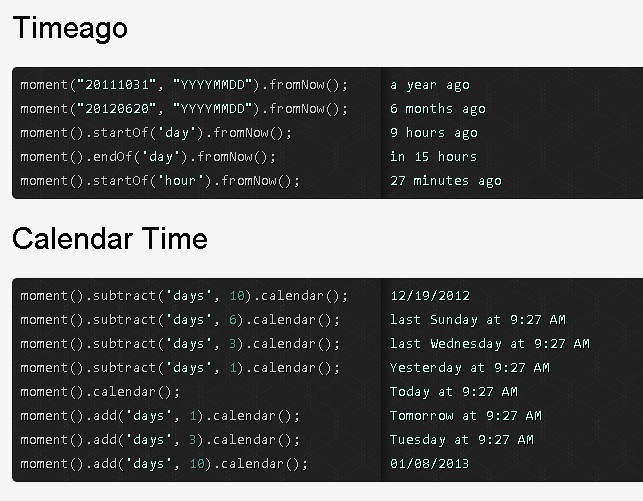
fromNow() formats a date as relative time such as "a few minutes ago" or "in 3 days". Pass true to omit the suffix.
moment().subtract(5, 'minutes').fromNow();
moment().add(3, 'days').fromNow();

moment().subtract(2, 'hours').fromNow(true);
Locales and Localized Dates
A locale changes month names, weekday names, long date formats, and relative-time output. Load the locale before selecting it with moment.locale().
Browser Locale
<script src="https://cdn.jsdelivr.net/npm/[email protected]/min/moment.min.js"></script>
<script src="https://cdn.jsdelivr.net/npm/[email protected]/locale/fr.js"></script>

<script>
moment.locale('fr');

console.log(moment('2026-09-19').format('LL')); // 19 septembre 2026
</script>
npm and Bundler Locale
Import only the locale modules the application uses:
import moment from 'moment';
import 'moment/locale/fr.js';

moment.locale('fr');
console.log(moment('2026-09-19').format('LL')); // 19 septembre 2026
UTC, Offsets, and Moment Timezone
UTC and Fixed Offsets
moment() parses and displays in local time by default. Use moment.utc() for UTC mode and utcOffset() for a fixed numeric offset.
var localDate = moment('2026-09-19 14:35', 'YYYY-MM-DD HH:mm');
var utcDate = moment.utc('2026-09-19 14:35', 'YYYY-MM-DD HH:mm');

localDate.format();
utcDate.format();

moment().utcOffset('+08:00').format('YYYY-MM-DD HH:mm Z');
Named Time Zones with Moment Timezone
IANA time zone names such as America/New_York and Asia/Tokyo require Moment Timezone.
<script src="https://cdn.jsdelivr.net/npm/[email protected]/min/moment.min.js"></script>
<script src="https://cdn.jsdelivr.net/npm/[email protected]/builds/moment-timezone-with-data.min.js"></script>
var date = moment.tz(
    '2026-09-19 14:35',
    'YYYY-MM-DD HH:mm',
    'America/New_York'
);

date.clone().tz('Europe/London').format('YYYY-MM-DD HH:mm z');
date.clone().tz('Asia/Tokyo').format('YYYY-MM-DD HH:mm z');
Moment.js with jQuery Example
This example reads a U.S. date from an input, validates it with strict parsing, converts it to YYYY-MM-DD, and writes the result back to the page.
<input id="date-input" type="text" value="09/19/2026">
<button id="format-date" type="button">Format Date</button>
<div id="date-result"></div>

<script src="https://code.jquery.com/jquery-3.7.1.min.js"></script>
<script src="https://cdn.jsdelivr.net/npm/[email protected]/min/moment.min.js"></script>
$('#format-date').on('click', function () {
    var value = $('#date-input').val();
    var date = moment(value, 'MM/DD/YYYY', true);

    $('#date-result').text(
        date.isValid()
            ? date.format('YYYY-MM-DD')
            : 'Invalid date'
    );
});
Moment.js Project Status and Alternatives
Moment.js is a legacy project in maintenance mode. The maintainers prioritize stability for existing applications and do not accept new user-facing features. For a new project, evaluate other date libraries before choosing Moment.js as a dependency.
Extension
- Moment Timezone adds IANA time zone data and named-zone conversion to Moment.js.
Alternative
- Lightweight Date & Time Manipulation Library - Day.js uses a Moment-like API with immutable date objects and a smaller core package.
Related Date and Time Resources
- Beautiful Datetime Picker With jQuery And Moment.js
- Simple Date & Date Range Picker with jQuery and Moment.js
- Customizable Date & Time Picker For Bootstrap 4
- 10 Best Date Time Picker JavaScript Plugins with Examples
- 7 Best JavaScript Time Ago Libraries (Timeago.js & 6 Alternatives)
- Moment.js Documentation
Changelog
v2.31.0 (09/14/2026)
- Security fix for CVE-2026-17495.
- Format-token, locale-loading, parsing, UTC-offset validation, and relative-time fixes.
- Pashto and Amharic locale additions plus updates to existing locales.
This awesome jQuery plugin is developed by timrwood. For more Advanced Usages, please check the demo page or visit the official website.