Multipurpose jQuery Counter / Timer Plugin - Missofis
| File Size: | 10.5 KB |
|---|---|
| Views Total: | 3768 |
| Last Update: | |
| Publish Date: | |
| Official Website: | Go to website |
| License: | MIT |
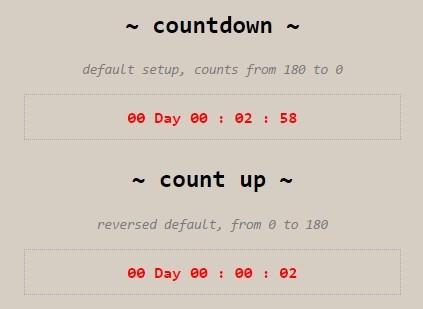
Missofis is a jQuery plugin which allows you to create countdown timers, count-up timers and time counters with custom callbacks and output patterns on your web page.
How to use it:
1. Download the plugin and include the jquery.missofis-countdown.js script after jQuery JavaScript library.
<script src="//code.jquery.com/jquery-1.11.3.min.js"></script>
<script src="src/jquery.missofis-countdown.js"></script>
2. Create a basic countdown timer that counts from 180 to 0.
$( '#timer-countdown' ).countdown( {
  from: 180, // 3 minutes (3*60)
  to: 0, // stop at zero
  movingUnit: 1000, // 1000 for 1 second increment/decrements
  timerEnd: undefined,
  outputPattern: '$day Day $hour : $minute : $second',
  autostart: true
} );
3. Create a basic count-up timer that counts from 0 to 180.
$( '#timer-countup' ).countdown( {
  from: 0,
  to: 180
} );
4. Create a counter that counts from 30 to 20.
$( '#timer-countinbetween' ).countdown( {
  from: 30,
  to: 20
} );
5. Custom output pattern.
$( '#timer-outputpattern' ).countdown( {
  outputPattern: '$day Days $hour Hours $minute Miniuts $second Seconds',
  from: 60 * 60 * 24 * 3
} );
6. Callback function.
$( '#timer-countercallback' ).countdown( {
  from: 10,
  to: 0,
  timerEnd: function() {
      // do someting
  }
} );
7. Disable auto start.
$( '#timer-diable' ).countdown( {
  from: 10,
  to: 0,
  autostart: false
} );
This awesome jQuery plugin is developed by xkema. For more Advanced Usages, please check the demo page or visit the official website.