Responsive Dynamic Tile Grid Layout with jQuery - tileWall
| File Size: | 18.5 KB |
|---|---|
| Views Total: | 19112 |
| Last Update: | |
| Publish Date: | |
| Official Website: | Go to website |
| License: | MIT |
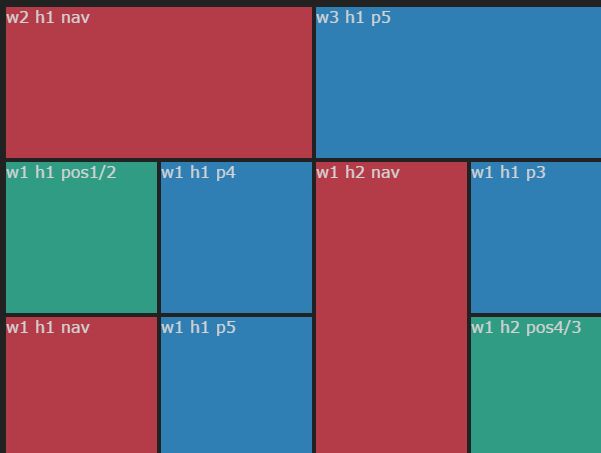
tileWall is a lightweight & easy-to-use jQuery layout plugin for positioning differently sized tiles in a responsive, fully configurable, mosaic-style grid.
Basic usage:
1. Add normal tiles to the grid.
<div id="tilewall">
  <div class="tile"
       data-width="1"
       data-height="1"
       data-priority="1">
       ...
    </div>
  <div class="tile"
       data-width="3"
       data-height="2"
       data-priority="1">
       ...
  </div>
  <div class="tile"
       data-width="2"
       data-height="4"
       data-priority="1">
       ...
    </div>
</div>
2. Add fixed tiles to the grid using data-position-x and data-position-y attributes.
<div class="tile"
     data-width="1"
     data-height="1"
     data-position-x="1"
     data-position-y="2">
     ...
</div>
<div class="tile"
     data-width="2"
     data-height="2"
     data-position-x="8"
     data-position-y="1">
     ...
</div>
<div class="tile"
     data-width="1"
     data-height="2"
     data-position-x="4"
     data-position-y="3">
     ...
</div>
3. Add navigation tiles to the grid using data-nav attribute.
<div class="tile"
     data-width="1"
     data-height="1"
     data-nav="1">
     ...
</div>
4. Include the jQuery Tile Wall plugin after jQuery library but before the closing body tag.
<script src="//code.jquery.com/jquery-1.11.3.min.js"></script>
<script src="dist/jquery.tilewall.min.js"></script>
5. Call the tileWall() method on the top element and done.
$("#tile-wall").tileWall({
  // options here
});
6. Plugin's default options which can be passed as an object during initialization.
$("#tile-wall").tileWall({

  //  minimum milliseconds between two resize events to refresh the tile wall
  debounceTime: 100,

  // if > 0, hide navigation tiles on viewports less wide than the given pixels
  hideNavTilesOnViewportWidthSmallerThan: 0,

  // maximum number of columns
  maxNumCols: 12,

  // minimum number of columns
  minNumCols: 3,

  // minimum width of a tile
  minTileWidth: 130,

  // if > 0, shrink all tiles to 1x1 size on viewports less wide than the given pixels
  shrinkTilesOnViewportWidthSmallerThan: 0,

  // CSS class for tiles
  tileClassName: "tile",

  // space between tiles
  tileMargin: 2,

  // use (1) or don't use (0) css transitions
  transition: 0

});
This awesome jQuery plugin is developed by martinwilmer. For more Advanced Usages, please check the demo page or visit the official website.