Easy Dynamic jQuery 24 Hours Schedule Calendar Plugin - Skeduler
| File Size: | 12.3 KB |
|---|---|
| Views Total: | 20742 |
| Last Update: | |
| Publish Date: | |
| Official Website: | Go to website |
| License: | MIT |
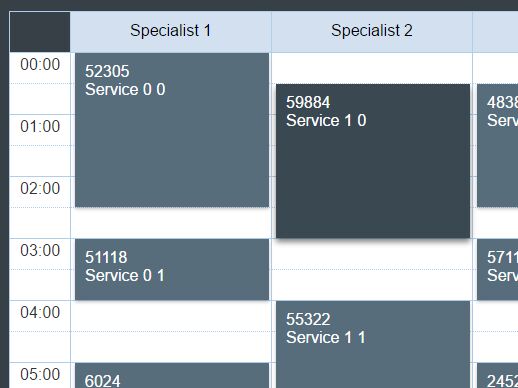
Skeduler is a very small jQuery plugin that provides a simple way to generate a dynamic timesheet-style 24-hour schedule calendar on the webpage.
How to use it:
1. Place jQuery library together with the Skeduler plugin's files into the webpage as follows:
<link rel="stylesheet" href="jquery.skeduler.css">
<script src="//code.jquery.com/jquery-3.1.0.slim.min.js"></script>
<script src="jquery.skeduler.js"></script>
2. Create a DIV container to place the schedule calendar.
<div id="skeduler-container"></div>
3. Define an array of tasks in the JavaScript.
var tasks = [
    {
      startTime: startTime1,
      duration: duration1,
      column: 1,
      id: 1,
      title: 'title 1'
    },
    {
      startTime: startTime2,
      duration: duration2,
      column: 2,
      id: 2,
      title: 'title 2'
    },
    {
      startTime: startTime3,
      duration: duration3,
      column: 3,
      id: 3,
      title: 'title 3'
    },
    ...
];
4. Call the plugin to present the tasks in the schedule calendar.
$("#skeduler-container").skeduler({
  headers: ["Specialist 1", "Specialist 2", "Specialist 3", ...],
  tasks: tasks,
  cardTemplate: '<div>${id}</div><div>${title}</div>'
});
5. Call the plugin to present the tasks in the schedule calendar.
$("#skeduler-container").skeduler({

  // String[] - Array of column headers
  headers: [],

  // Task[] - Array of tasks. Required fields:
  // id: number, startTime: number, duration: number, column: number
  tasks: [],

  // Card template - Inner content of task card.
  // You're able to use ${key} inside template, where key is any property from task.
  cardTemplate: '<div>${id}</div>',

  // OnClick event handler
  onClick: function (e, task) {},

  // Css classes
  containerCssClass: 'skeduler-container',
  headerContainerCssClass: 'skeduler-headers',
  schedulerContainerCssClass: 'skeduler-main',
  taskPlaceholderCssClass: 'skeduler-task-placeholder',
  cellCssClass: 'skeduler-cell',

  // height of one half-hour line in grid
  lineHeight: 30,

  // width of board of grid cell
  borderWidth: 1,

  // debug mode
  debug: false

});
Change log:
2017-07-30
- v0.1.1
This awesome jQuery plugin is developed by decease. For more Advanced Usages, please check the demo page or visit the official website.