jQuery Plugin To Create Date Ribbons with CSS3 Transitions
| File Size: | 39.8 KB |
|---|---|
| Views Total: | 3140 |
| Last Update: | |
| Publish Date: | |
| Official Website: | Go to website |
| License: | MIT |
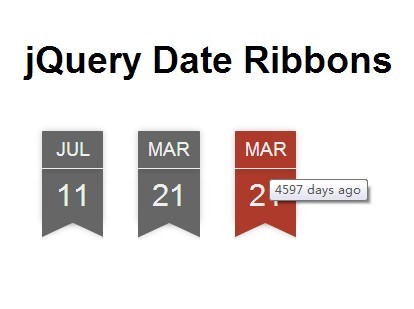
A fancy jQuery plugin used to generate beautiful date ribbons for your posts & articles, animated with CSS3 transitions and transforms. Also has the ability to show a human-friendly relative date tooltip when your hover over a date ribbon.
How to use it:
1. Load the JQuery Date Ribbon's stylesheet in the header of your document.
<link rel="stylesheet" href="date.ribbon.css">
2. Load the jQuery date ribbon's script after jQuery library.
<script src="http://code.jquery.com/jquery-1.11.1.min.js"></script>
<script src="blue.json.date.ribbon.min.js"></script>
3. Create an empty container for the date ribbon.
<div id="ribbon"></div>
4. Initialize the plugin to generate a date ribbon with custom date format.
$("#ribbon").dateRibbon({
  titleFormate:"days",
  date:new Date(2014,10,20)
});
5. All the settings available.
// change title of the date ribbon.
title: null,

// value - days,weeks,months,years.
titleFormat: "days",

// set class or theme of date ribbon.
className: "ribbon",

// date ribbon href location or JavaScript function name.
href:"#",

// href location target (_blank|_self|_parent|_top|frame-name)
target:null,

// date to show in date ribbon.
date:new Date(),

// fire a function just before date ribbon load.
functionBefore: function () { return true; },

// fire a function just after date ribbon load.
functionAfter: function () {}
This awesome jQuery plugin is developed by yoku2010. For more Advanced Usages, please check the demo page or visit the official website.