Simple jQuery Plugin For Image Magnify Effect
| File Size: | Unknown |
|---|---|
| Views Total: | 5337 |
| Last Update: | |
| Publish Date: | |
| Official Website: | Go to website |
| License: | MIT |
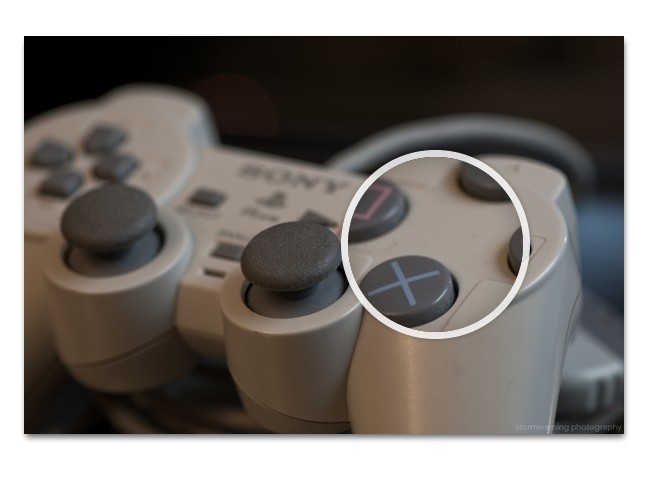
A simple jQuery plugin which allows you to apply a full-scaled zoomed effect on your image thumbnail when hovers over it. The effect is also known as Image Magnification Effect, which is widely used on many e-commerce websites for displaying image details of their products.
See also:
- Simple Image Magnification Effect - Aui-core
- Image Inner Zoom & Magnifier Plugin - JQZoom
- Photo Inner Zoom and Magnifier Plugin - Loupe
- mlens - Compact Magnifying Glass Plugin
- GS Inner Zoom - Image Inner Zoom and Magnifier Plugin
How to use it:
1. Include the latest jQuery library and this plugin on your web page
<script type="text/javascript" src="js/jquery-1.9.1.min.js"></script>
<script type="text/javascript" src="js/magnify.js"></script>
2. Markup html structure
<div class="magnify">
<div class="large"></div>
<!-- This is the magnifying glass which will contain the original/large version -->

<div class="imgbox"><img src="image-thumbnail.jpg" class="thumb" /></div>
</div>
3. The CSS
.large {
display: none;
width: 175px;
height: 175px;
position: absolute;
-webkit-border-radius: 100%;
-moz-border-radius: 100%;
border-radius: 100%;
/* box shadows to achieve the glass effect */
-webkit-box-shadow: 0 0 0 7px rgba(255, 255, 255, 0.85), 0 0 7px 7px rgba(0, 0, 0, 0.25), inset 0 0 40px 2px rgba(0, 0, 0, 0.25);
-moz-box-shadow: 0 0 0 7px rgba(255, 255, 255, 0.85), 0 0 7px 7px rgba(0, 0, 0, 0.25), inset 0 0 40px 2px rgba(0, 0, 0, 0.25);
box-shadow: 0 0 0 7px rgba(255, 255, 255, 0.85), 0 0 7px 7px rgba(0, 0, 0, 0.25), inset 0 0 40px 2px rgba(0, 0, 0, 0.25)
}
/* To solve overlap bug at the edges during magnification */
.thumb {
display: block;
}
4. Done
This awesome jQuery plugin is developed by unknown. For more Advanced Usages, please check the demo page or visit the official website.