jQuery Plugin For Chrome-Like Draggable Tabbed Content - Chrome Tabs
| File Size: | 4.66 KB |
|---|---|
| Views Total: | 4706 |
| Last Update: | |
| Publish Date: | |
| Official Website: | Go to website |
| License: | MIT |
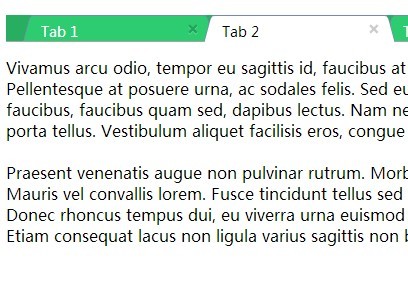
A lightweight jQuery plugin for creating a Google Chrome-like tabs interface which allows you to rearrange tabs by clicking and dragging.
How to use it:
1. Create tabs using Html unordered list and use data-target attribute to point to target content.
<ul class="tabs">

  <li class="tab" data-target="#page1"> <span>Tab 1</span>
    <button type="button" class="close">×</button>
  </li>

  <li class="tab active" data-target="#page2"> <span>Tab 2</span>
    <button type="button" class="close">×</button>
  </li>

  <li class="tab" data-target="#page3"> <span>Tab 3</span>
    <button type="button" class="close">×</button>
  </li>

</ul>
2. Create tabbed content following the Html structure like this.
<div class="tab-content">
  <div class="tab-pane" id="page1">Section 1</div>
  <div class="tab-pane active" id="page2">Section 2</div>
  <div class="tab-pane" id="page3">Section 3</div>
</div>
3. Load the jQuery Chrome Tabs plugin after jQuery library at the bottom of the web page.
<script src="//ajax.googleapis.com/ajax/libs/jquery/1.11.1/jquery.min.js"></script>
<script src="chrometab.js"></script>
4. Style the tabs, close buttons and tabbed content in the CSS.
*,
*:after,
*:before { box-sizing: border-box; }

.tabs {
  list-style: none;
  background: #27ae60;
  position: relative;
  padding: 0 25px;
  color: #fff;
}

.tabs:after {
  content: '';
  width: 100%;
  height: 5px;
  background: #FFF;
  position: absolute;
  z-index: 5;
  bottom: -5px;
  left: 0;
  border-top: 1px solid #a5a5a5;
}

.tab {
  display: inline-block;
  width: 175px;
  height: 26px;
  background: #2ecc71;
  padding: 5px 10px;
  position: relative;
  border-top: 1px solid #728cad;
  margin-right: 6px;
  font-size: 0;
}

.tab > span {
  font-family: sans-serif;
  font-size: 14px;
}

.tab:before,
.tab:after {
  content: '';
  width: 8px;
  height: 27px;
  background: #2ecc71;
  position: absolute;
  top: 0;
  border-radius: 4px 4px 0 0;
}

.tab:before {
  left: -5px;
  border-left: 1px solid #728cad;
  z-index: 3;
  -webkit-transform: rotate(15deg);
  -moz-transform: rotate(15deg);
  -ms-transform: rotate(15deg);
  -o-transform: rotate(15deg);
  transform: rotate(15deg);
}

.tab:after {
  right: -5px;
  border-right: 1px solid #728cad;
  z-index: 4;
  -webkit-transform: rotate(-15deg);
  -moz-transform: rotate(-15deg);
  -ms-transform: rotate(-15deg);
  -o-transform: rotate(-15deg);
  transform: rotate(-15deg);
}

.tab.active {
  background: #fff;
  border-bottom: 1px solid #fff;
  height: 27px;
  margin-bottom: -1px;
  z-index: 10;
  color: #000;
}

.tab.active:before,
.tab.active:after { background: #fff; }

button.close {
  padding: 0;
  cursor: pointer;
  background: 0 0;
  border: 0;
  -webkit-appearance: none;
  -moz-appearance: none;
}

.close {
  position: absolute;
  right: 5px;
  top: 5px;
  font-size: 20px;
  font-weight: 700;
  line-height: 0;
  width: 16px;
  height: 16px;
  color: #000;
  text-shadow: 0 1px 0 #FFF;
  opacity: .2;
  filter: alpha(opacity=20);
  border-radius: 16px;
}

.close:hover,
.close:focus {
  color: #fff;
  text-decoration: none;
  cursor: pointer;
  opacity: .5;
  filter: alpha(opacity=50);
  background: red;
  font-weight: normal;
  text-shadow: none;
}

.tab-content { }

.tab-pane { display: none; }

.tab-pane.active { display: block; }
5. Initialize the plugin.
$('.tabs').chrometab();
This awesome jQuery plugin is developed by Decad. For more Advanced Usages, please check the demo page or visit the official website.