Minimal EU Cookies Law Notice Plugin For jQuery - Cookiebar
| File Size: | 9.86 KB |
|---|---|
| Views Total: | 4034 |
| Last Update: | |
| Publish Date: | |
| Official Website: | Go to website |
| License: | MIT |
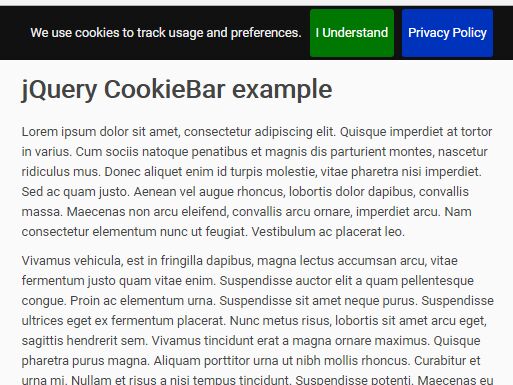
Cookiebar is a fully configurable EU Cookies Law Notice plugin for jQuery that displays a sliding top or bottom notification bar with accept/decline/policy buttons to informing the users your website has cookies.
How to use it:
1. Ensure you have jQuery, jQuery CookieBar and jQuery CookieBar's CSS uploaded to your website and linked in the header of your website
<link rel="stylesheet" href="jquery.cookiebar.css">
<script src="jquery.min.js"></script>
<script src="jquery.cookiebar.js"></script>
2. Make sure you then include the following line of code within document ready:
$.cookieBar();
3. That's it. If you find that the bar appears even after accepting/declining, make sure "forceShow" is set to false.
$.cookieBar{
  forceShow: true
});
4. Customize the cookie notice bar with the following options:
$.cookieBar{

  // Message displayed on bar
  message: 'We use cookies to track usage and preferences.',

  // Set to true to show accept/enable button
  acceptButton: true,

  // Text on accept/enable button
  acceptText: 'I Understand',

  // Function to run after accept
  acceptFunction: function(cookieValue){if(cookieValue!='enabled' && cookieValue!='accepted') window.location = window.location.href;},

  // Set to true to show decline/disable button
  declineButton: false,

  // Text on decline/disable button
  declineText: 'Disable Cookies',

  // Function to run after decline
  declineFunction: function(cookieValue){if(cookieValue=='enabled' || cookieValue=='accepted') window.location = window.location.href;},

  // Set to true to show Privacy Policy button
  policyButton: false,

  // Text on Privacy Policy button
  policyText: 'Privacy Policy',

  // URL of Privacy Policy
  policyURL: '/privacy-policy/',

  // Set to true for cookies to be accepted automatically. Banner still shows
  autoEnable: true,

  // Set to true to accept cookies when visitor moves to another page
  acceptOnContinue: false,

  // Set to true to accept cookies when visitor scrolls X pixels up or down
  acceptOnScroll: false,

  // Set to true to accept cookies when visitor clicks anywhere on the page
  acceptAnyClick: false,

  // Number of days for cookieBar cookie to be stored for
  expireDays: 365,

  // Renew the cookie upon revisit to website
  renewOnVisit: false,

  // Force cookieBar to show regardless of user cookie preference
  forceShow: false,

  // Options: slide, fade, hide
  effect: 'slide',

  // Element to append/prepend cookieBar to.
  // Remember "." for class or "#" for id.
  element: 'body',

  // Set to true for cookieBar HTML to be placed at base of website.
  // Actual position may change according to CSS.
  append: false,

  // Set to true to add the class "fixed" to the cookie bar.
  // Default CSS should fix the position.
  fixed: false,

  // Force CSS when fixed, so bar appears at bottom of website
  bottom: false,

  // Can be set in CSS, although some may prefer to set here
  zindex: '',

  // Location of privacy policy
  domain: String(window.location.hostname),

  // Where visitor has come from
  referrer: String(document.referrer)

});
5. Override the default styles in the CSS.
#cookie-bar {background:#111111; height:auto; line-height:24px; color:#eeeeee; text-align:center; padding:3px 0;}
#cookie-bar.fixed {position:fixed; top:0; left:0; width:100%; z-index: 1200}
#cookie-bar.fixed.bottom {bottom:0; top:auto;}
#cookie-bar p {margin:0; padding:0;}
#cookie-bar a {color:#ffffff; display:inline-block; border-radius:3px; text-decoration:none; padding:0 6px; margin-left:8px;}
#cookie-bar .cb-enable {background:#007700; cursor: pointer;}
#cookie-bar .cb-enable:hover {background:#009900;}
#cookie-bar .cb-disable {background:#990000; cursor: pointer;}
#cookie-bar .cb-disable:hover {background:#bb0000;}
#cookie-bar .cb-policy {background:#0033bb; cursor: pointer;}
#cookie-bar .cb-policy:hover {background:#0055dd;
This awesome jQuery plugin is developed by missing-code. For more Advanced Usages, please check the demo page or visit the official website.