JsBarcode: JavaScript Barcode Generator for SVG and Canvas
| File Size: | 510 KB |
|---|---|
| Views Total: | 28528 |
| Last Update: | |
| Publish Date: | |
| Official Website: | Go to website |
| License: | MIT |
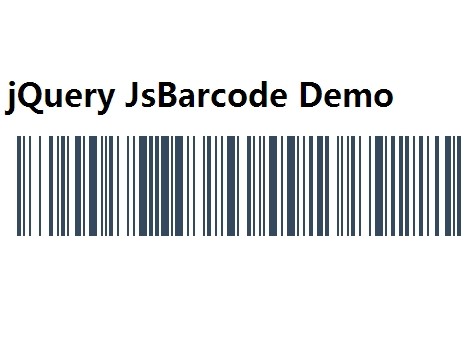
JsBarcode is a dependency-free JavaScript barcode generator that renders CODE128, EAN, UPC, CODE39, ITF, MSI, Pharmacode, Codabar, and CODE93 barcodes to SVG, canvas, or image elements.
You can use it for product labels, inventory codes, shipping identifiers, and printable barcode output in browser applications or Node.js environments.
Note that JsBarcode no longer requires jQuery library, but the package retains its original jQuery wrapper.
Supported Barcode Formats:
CODE128: Uses automatic mode selection by default and also exposesCODE128A,CODE128B, andCODE128C.EANandUPC:EAN13,EAN8,EAN5,EAN2,UPC, andUPCE.CODE39: Standard Code 39 values.ITFandITF14: Interleaved 2 of 5 and shipping-container barcodes.MSI:MSI,MSI10,MSI11,MSI1010, andMSI1110.Pharmacode,Codabar, andCODE93: Specialized 1D barcode requirements.
Features:
- Selects Code 128 modes automatically or through explicit A, B, and C encoders.
- Controls dimensions, margins, colors, and human-readable text.
- Reads barcode values and per-target settings from
jsbarcode-*ordata-*attributes. - Initializes many barcode targets at once in product grids, inventory lists, and print sheets.
- Builds multi-part barcode output through chained encoder calls and
blank()spacing. - Reports valid and invalid input through the
validcallback.
Alternatives & Related Resources:
- Simple jQuery Based Barcode Generator - Barcode
- jQuery Plugin To Generate International Article Number Barcode - EAN13
- Code 128 Barcode Generator In JavaScript – code128.js
- 10 Best Custom QR Code Generators In JavaScript
How to use it:
Include The Browser Script
Load the complete build when the page needs several barcode formats. JsBarcode has no CSS file and no jQuery requirement.
<script src="https://cdn.jsdelivr.net/npm/[email protected]/dist/JsBarcode.all.min.js"></script>
Add A Render Target
Use an svg, canvas, or img element. SVG works well for labels that need to remain part of the page markup.
<svg id="order-barcode"></svg>
Render A Basic Barcode
Pass the target selector, value, and an options object to JsBarcode(). The default format is automatic CODE128 selection, but an explicit format keeps product and shipping data predictable.
JsBarcode("#order-barcode", "ORDER-2026-0042", {
  format: "CODE128",
  width: 2,
  height: 64,
  displayValue: true,
  margin: 0
});
Install With npm
Use the package when a bundler or Node.js workflow manages project dependencies.
npm install jsbarcode
Use JsBarcode In Node.js
Node.js output needs a target object such as a canvas instance. The example below uses node-canvas.
const JsBarcode = require("jsbarcode");
const { createCanvas } = require("canvas");

const canvas = createCanvas();

JsBarcode(canvas, "SHIP-000042", {
  format: "CODE128",
  height: 60,
  margin: 0
});
All Configuration Options
Format And Encoding Options
format: Selects the barcode encoder. Type: String. Default:"auto"(CODE128).ean128: Uses GS1-128 or EAN-128 behavior for CODE128 output. Type: Boolean. Default:false.flat: Applies the flat EAN presentation forEAN8andEAN13. Type: Boolean. Default:false.lastChar: Adds a trailing character to EAN-13 output. Type: String. Default: Not specified.
Dimensions And Colors
width: Sets the width of one barcode bar. Type: Number. Default:2.height: Sets barcode height. Type: Number. Default:100.background: Sets the barcode background color. Type: CSS color String. Default:"#ffffff".lineColor: Sets the bar and displayed-text color. Type: CSS color String. Default:"#000000".
Displayed Text Options
displayValue: Shows or hides the human-readable value. Type: Boolean. Default:true.text: Replaces the text displayed under or above the barcode. Type: String. Default:undefined.fontOptions: Sets text styling such as"bold","italic", or"bold italic". Type: String. Default: Empty String.font: Sets the font family for the displayed value. Type: String. Default:"monospace".textAlign: Aligns the displayed value. Type: String. Default:"center".textPosition: Places the displayed value above or below the bars. Type: String. Default:"bottom".textMargin: Sets space between the bars and displayed value. Type: Number. Default:2.fontSize: Sets the displayed-value font size. Type: Number. Default:20.
Margins And Validation
margin: Sets the default space around all barcode edges. Type: Number. Default:10.marginTop: Overrides the top margin. Type: Number. Default:undefined.marginBottom: Overrides the bottom margin. Type: Number. Default:undefined.marginLeft: Overrides the left margin. Type: Number. Default:undefined.marginRight: Overrides the right margin. Type: Number. Default:undefined.valid: Receives the validation result for the current barcode call. Type: Function. Default: Empty function.xmlDocument: Supplies the XML document for SVG generation in Node.js. Type: XMLDocument. Default: Not specified.
API Methods:
Core Rendering Methods
JsBarcode(target, value, options): Encodes and renders one barcode in a single call. Parameters: Target, String value, optional options object. Returns: API instance after rendering.api.options(options): Sets options shared by later chained barcode calls. Parameters: Options object. Returns: API instance.api.blank(size): Inserts blank space between chained barcode segments. Parameters: Number of blank units. Returns: API instance.api.render(): Renders the barcode segments built through the chained API. Parameters: None. Returns: API instance.api.init(): Renders every matched element that containsjsbarcode-*ordata-*attributes. Parameters: None. Returns: Nothing.JsBarcode(dataObject, value, options): Writes barcode encoding data todataObject.encodingsinstead of a DOM target. Parameters: Plain object, String value, optional options object. Returns: API instance.
Barcode Chain Methods
CODE39(value, options): Appends a Code 39 segment. Parameters: String value, optional options object. Returns: API instance.CODE128(value, options): Appends an automatically selected Code 128 segment. Parameters: String value, optional options object. Returns: API instance.CODE128A(value, options): Appends a Code 128A segment. Parameters: String value, optional options object. Returns: API instance.CODE128B(value, options): Appends a Code 128B segment. Parameters: String value, optional options object. Returns: API instance.CODE128C(value, options): Appends a Code 128C segment. Parameters: String value, optional options object. Returns: API instance.EAN13(value, options): Appends an EAN-13 segment. Parameters: String value, optional options object. Returns: API instance.EAN8(value, options): Appends an EAN-8 segment. Parameters: String value, optional options object. Returns: API instance.EAN5(value, options): Appends an EAN-5 add-on segment. Parameters: String value, optional options object. Returns: API instance.EAN2(value, options): Appends an EAN-2 add-on segment. Parameters: String value, optional options object. Returns: API instance.UPC(value, options): Appends a UPC-A segment. Parameters: String value, optional options object. Returns: API instance.UPCE(value, options): Appends a UPC-E segment. Parameters: String value, optional options object. Returns: API instance.ITF(value, options): Appends an interleaved 2 of 5 segment. Parameters: String value, optional options object. Returns: API instance.ITF14(value, options): Appends an ITF-14 segment. Parameters: String value, optional options object. Returns: API instance.MSI(value, options): Appends a standard MSI segment. Parameters: String value, optional options object. Returns: API instance.MSI10(value, options): Appends an MSI segment with a Mod 10 checksum. Parameters: String value, optional options object. Returns: API instance.MSI11(value, options): Appends an MSI segment with a Mod 11 checksum. Parameters: String value, optional options object. Returns: API instance.MSI1010(value, options): Appends an MSI segment with two Mod 10 checksums. Parameters: String value, optional options object. Returns: API instance.MSI1110(value, options): Appends an MSI segment with Mod 11 and Mod 10 checksums. Parameters: String value, optional options object. Returns: API instance.pharmacode(value, options): Appends a Pharmacode segment. Parameters: String value, optional options object. Returns: API instance.codabar(value, options): Appends a Codabar segment. Parameters: String value, optional options object. Returns: API instance.CODE93(value, options): Appends a Code 93 segment. Parameters: String value, optional options object. Returns: API instance.CODE93FullASCII(value, options): Appends a full-ASCII Code 93 segment. Parameters: String value, optional options object. Returns: API instance.
Data Attributes And Batch Rendering
Use jsbarcode-* or data-* attributes when a product grid, inventory table, or print sheet contains several barcode targets. Place the value in jsbarcode-value or data-value.
<svg class="inventory-barcode"
  jsbarcode-format="CODE128"
  jsbarcode-value="BIN-A-042"
  jsbarcode-width="1"
  jsbarcode-height="40"
  jsbarcode-margin="0">
</svg>

<svg class="inventory-barcode"
  data-format="EAN13"
  data-value="4006381333931"
  data-width="2"
  data-height="64"
  data-margin="0">
</svg>
JsBarcode(".inventory-barcode")
  .options({
    displayValue: false,
    lineColor: "#111827"
  })
  .init();
Validation Hook
JsBarcode exposes no library-specific DOM events. Use valid to update form state when a barcode format rejects the supplied value.
const barcodeStatus = document.getElementById("barcode-status");

JsBarcode("#retail-barcode", "4006381333931", {
  format: "EAN13",
  valid: function (isValid) {
    barcodeStatus.textContent = isValid
      ? "Barcode ready."
      : "Enter a valid EAN-13 value.";
  }
});
EAN-13 accepts a 12-digit value and calculates its check digit. EAN-8 and ITF-14 follow the same pattern with 7-digit and 13-digit input values.
jQuery Wrapper Syntax
The package retains .JsBarcode() for jQuery-based projects. Load jQuery before JsBarcode, then call the wrapper on the selected element.
<script src="/path/to/jquery.min.js"></script>
<script src="https://cdn.jsdelivr.net/npm/[email protected]/dist/JsBarcode.all.min.js"></script>
$("#jquery-barcode").JsBarcode("ORDER-042", {
  format: "CODE128",
  margin: 0
});
Changelog:
v3.12.3 (2026-06-21)
- Refactor
v3.11.0 (2018-09-02)
- Fixed some dev dependency versions
v3.9.0 (2018-05-26)
- Update
2014-06-02
- Ensured that the CODE128 parameter is a string
This awesome jQuery plugin is developed by lindell. For more Advanced Usages, please check the demo page or visit the official website.