Simple jQuery Plugin For Customizable Weather Widget - MetCast
| File Size: | 49KB |
|---|---|
| Views Total: | 22186 |
| Last Update: | |
| Publish Date: | |
| Official Website: | Go to website |
| License: | MIT |
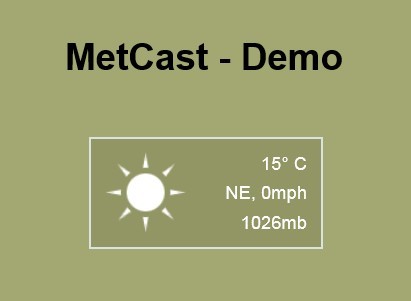
MetCast is a simple and fast jQuery plugin that fetches the real time local weather conditions of any locations worldwide from worldweatheronline.com and displays as a customizable weather widget on your website.
See also:
- jQuery Plugin For Displaying Weather Status For Users - Weathro
- HTC-Like Weather and Clock Plugin - jDigiClock
- Simple Weather Plugin with jQuery - simpleWeather
- jQuery Plugin For Displaying Weather Data On Your Website - WhatWeather
How to use it:
1. Create a container for the weather widget
<div id="weather"></div>
2. Include jQuery library and jQuery MetCast plugin on the web page
<script src="http://ajax.googleapis.com/ajax/libs/jquery/1.10.1/jquery.min.js"></script>
<script src="metcast.jquery.js"></script>
3. The CSS for the widget
/*-------------------------------------------------------------------
	MetCast styles
-------------------------------------------------------------------*/

.metCast-wrapper {
width: 200px;
height: 94px;
background: transparent url('img/bg.png') repeat 0 0;
border: 2px solid rgba(236,246,254,0.8);
font-family: arial;
}
#metCast-icon {
width: 94px;
height: 94px;
background: transparent url('img/icon-sprite.png') no-repeat;
}
#metCast-text {
width: 97px;
float: right;
height: 80px;
overflow: hidden;
padding: 6px 12px 0 0;
text-align: right;
}
#metCast-text p {
margin: 7px 0;
color: #fff;
}
#metCast-text p.Temp,  #metCast-text p.Wind,  #metCast-text p.Pressure {
display: block;
}
/*---- Weather Sprite Icon Co-ordinates -----*/

#metCast-icon.sunny {
background-position: 0 0;
}
#metCast-icon.rain {
background-position: -94px 0;
}
#metCast-icon.cloudy {
background-position: -188px 0;
}
#metCast-icon.thunder {
background-position: -282px 0;
}
#metCast-icon.partlycloudy {
background-position: -470px 0;
}
#metCast-icon.snow {
background-position: -564px 0;
}
4. Get a free weather API Key from worldweatheronline.com and insert it into javascript
<script>

$('#weather').metCast({
key: '***', // the api key
location: 'London'
});

</script>s worldwide
This awesome jQuery plugin is developed by christill89. For more Advanced Usages, please check the demo page or visit the official website.