SpriteSpin: Versatile jQuery Product Image Viewer Plugin
| File Size: | 160 KB |
|---|---|
| Views Total: | 35286 |
| Last Update: | |
| Publish Date: | |
| Official Website: | Go to website |
| License: | MIT |
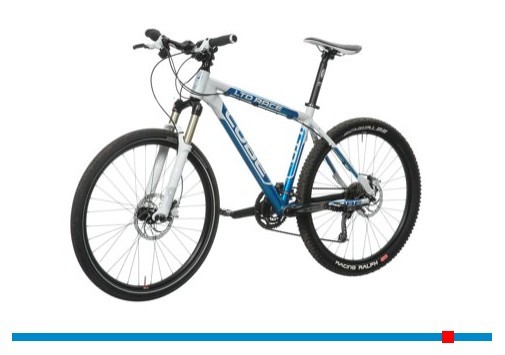
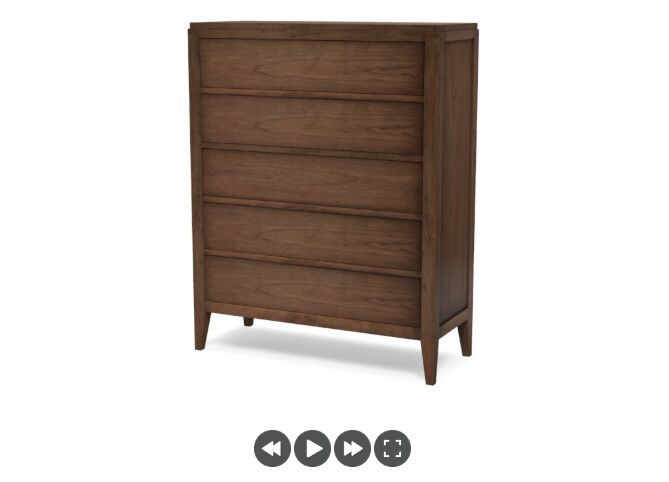
SpriteSpin is an amazing jQuery plugin for playing sprite image animations to provide a 360 degree (or panorama and gallery) view of your product image. The idea is to take an array of images or a stitched sprite sheet and plays them frame by frame like a flip book.
Features:
- Plenty of option parameters.
- 3 modules: 360 degree, panorama and gallery.
- Supports for drag, click and swipe behaviors.
- Touch enabled and mobile friendly.
See also:
- jQuery Plugin For 360 Degree 3D Panoramic View - 3dEye.js
- jQuery Plugin For Draggable 360 Degrees Product Image View - j360
- AJAX-ZOOM - 3D Spin Rotate & Zoom 360 Plugin
- Cyclotron - 360°Panorama Image Display Plugin
- jQuery Plugin For Draggable 360s Image Sequences - threesixtyjs
- Panning and Zooming Any Elements - panzoom
Basic Usage:
1. Load jQuery and SpriteSpin in your document.
<script src="https://ajax.googleapis.com/ajax/libs/jquery/3.7.1/jquery.min.js"></script>
<script src="https://cdn.jsdelivr.net/npm/[email protected]/release/spritespin.min.js"></script>
2. Create a container for the image viewer
<div id="360frames"></div>
3. Initialize a 360-degree spin using 34 image frames. The images/ paths below refer to image files in your project.
$(function(){
  var frames = [
    "images/rad_zoom_001.jpg",
    "images/rad_zoom_002.jpg",
    "images/rad_zoom_003.jpg",
    "images/rad_zoom_004.jpg",
    "images/rad_zoom_005.jpg",
    "images/rad_zoom_006.jpg",
    "images/rad_zoom_007.jpg",
    "images/rad_zoom_008.jpg",
    "images/rad_zoom_009.jpg",
    "images/rad_zoom_010.jpg",
    "images/rad_zoom_011.jpg",
    "images/rad_zoom_012.jpg",
    "images/rad_zoom_013.jpg",
    "images/rad_zoom_014.jpg",
    "images/rad_zoom_015.jpg",
    "images/rad_zoom_016.jpg",
    "images/rad_zoom_017.jpg",
    "images/rad_zoom_018.jpg",
    "images/rad_zoom_019.jpg",
    "images/rad_zoom_020.jpg",
    "images/rad_zoom_021.jpg",
    "images/rad_zoom_022.jpg",
    "images/rad_zoom_023.jpg",
    "images/rad_zoom_024.jpg",
    "images/rad_zoom_025.jpg",
    "images/rad_zoom_026.jpg",
    "images/rad_zoom_027.jpg",
    "images/rad_zoom_028.jpg",
    "images/rad_zoom_029.jpg",
    "images/rad_zoom_030.jpg",
    "images/rad_zoom_031.jpg",
    "images/rad_zoom_032.jpg",
    "images/rad_zoom_033.jpg",
    "images/rad_zoom_034.jpg"
  ];

  $("#360frames").spritespin({
    width : 480,
    height: 327,
    frames: frames.length,
    plugins: ["360", "drag"],
    sense : -1,
    source: frames,
    animate : true,
    loop: true,
    wrap : true,
    frameTime : 60,
    renderer : "canvas"
  });

});
4. Available plugin options and callbacks.
// Optional target override. The jQuery selector normally supplies the target.
target: undefined,

// Stitched sprite sheet URL or array of frame image URLs
source: undefined,

// actual display width
width : undefined,

// actual display height
height: undefined,

// Total number of frames
frames: undefined,

// Number of frames across and down in a sprite sheet
framesX: undefined,
framesY: undefined,

// Number of image sequences and frame-sizing mode
lanes: 1,
sizeMode: 'fit',

// Presentation and interaction plugins
plugins: ['360', 'drag'],

// The rendering mode to use
renderer  : 'canvas',

lane  : 0,

// Initial (and current) frame number
frame : 0,

// Time between updates. Set to 40 which is 25 frames per second
frameTime : 40,

// Starts animation and controls behavior after user interaction
animate: true,
retainAnimate: false,

// If true animation is played backward
reverse   : false,

// Loops the animation
loop  : true,

// Stops the animation at this frame if loop is disabled
stopFrame : 0,

// Same as 'loop' but for user interaction
wrap  : true,
wrapLane  : false,

// Interaction sensitivity used by behavior implementations
sense : 1,

// Interaction sensitivity used by behavior implementations
senseLane : undefined,

orientation: 'horizontal',
detectSubsampling: true,

// Optional preload count, CSS-responsive sizing, touch timing, and CORS mode
preloadCount: undefined,
responsive: false,
touchScrollTimer: undefined,
crossOrigin: undefined,

// Occurs when plugin has been initialized, but before loading the source files
onInit: undefined,

// Occurs when any source file has been loaded
onProgress: undefined,

// Occurs when all source files have been loaded
onLoad: undefined,

// Occurs when the frame number has been updated (e.g. during animation)
onFrame: undefined,

// Occurs when the frame number changes
onFrameChanged: undefined,

// Occurs when the frame can be drawn
onDraw: undefined,

// Occurs after the first complete drawing operation
onComplete: undefined
Changelog:
2020-08-29
- v4.1.0: updated
2019-05-02
- v4.0.11: improved types
2019-04-30
- v4.0.10: zoom module fixes
2018-05-01
- v4.0.5: fixed blurCss default value
2018-04-06
- enabled rendering of multiple sprite sheets
2018-03-22
- retain animation after drag
2018-03-15
- v4.0.1
2017-02-14
- v3.4.3: fixed responsive with fullscreen
2016-09-29
- v3.4.2: fixed fullscreen api. reboot plugin on orientation change
2016-09-03
- v3.4.1: Bugfix
2016-08-06
- v3.4: Bugfix
2015-03-18
- v3.3.3
2015-02-25
- fixed flickering for internet explorer
2015-02-09
- invert drag direction on zoom module for touch interaction
2015-01-19
- Fixed touch scrolling
2014-12-08
- v3.2.2
2014-12-06
- added option to enable or disable detection of subsampling
2014-11-03
- build and bump to version 3.2.0
2014-06-25
- fixed playTo
2014-06-24
- added options to playTo api method
2014-06-13
- spritespin is chainable
2014-05-29
- fixed mobile event handling
2014-05-17
- styling and fixes
This awesome jQuery plugin is developed by giniedp. For more Advanced Usages, please check the demo page or visit the official website.