Simple Extensible jQuery Carousel / Slideshow Plugin - neoslide
| File Size: | 6.65 KB |
|---|---|
| Views Total: | 1518 |
| Last Update: | |
| Publish Date: | |
| Official Website: | Go to website |
| License: | MIT |
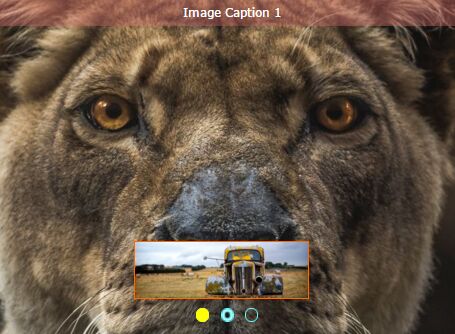
neoslide is a simple, flexible, extensible jQuery carousel plugin which helps you render a fully customizable image slider / slideshow on the webpage.
Features:
- Cross browser.
- Supports keyboard and mousewheel navigation.
- Supports unlimited number of images.
- Fade and slide animations.
- Autoplay.
- Animated image caption bar.
- Thumbnail preview.
- Easy to customize and extend.
Basic usage:
1. Include the jQuery neoslide plugin's CSS file in the head section of the webpage.
<link href="neoslide.css" rel="stylesheet">
2. The required markup structure for the carousel.
<div class="banner-wrap">
  <div class="banner">
    <ul class="banner-img">
      <li><img /></li>
      <li><img /></li>
      <li><img /></li>
    </ul>
    <div class="top"><p></p></div>
     <ul class="list">
       <li class="curr"></li>
     </ul>
  </div>
  <img class="prew-img" />
</div>
3. Include jQuery library the jQuery neoslide plugin's JavaScript file at the bottom of the webpage.
<script src="//code.jquery.com/jquery.min.js"></script>
<script src="jquery.neoslide.js"></script>
4. Initialize the pluign and insert an array of images with captions to the carousel.
$('div.banner').neoSlide({

  // width of the carousel
  'w':'1390',

  // height of the carousel
  'h':'450',

  // 'right' or 'left'
  'direction':'right',

  // autoplay interval
  'delay':'4000',

  // 'slide' or 'fade'
  'type':'slide',

  // shows bottom list
  'bot_list':true,

  // shows top image caption bar
  'top_info':true,

  // enable mouse wheel
  'mousewheel':true,

  // enable keyboard navigation
  'keyboard':true,

  // an array of images
  'img':[
  {
      'top':'Image Caption 1',
      'src':'1.jpg'
  },
  {
      'top':'Image Caption 2',
      'src':'2.jpg'
  },
  {
      'top':'Image Caption 3',
      'src':'3.jpg'
  }
  ]
});
This awesome jQuery plugin is developed by neove. For more Advanced Usages, please check the demo page or visit the official website.