Split Vertical Product Showcase Plugin With jQuery
| File Size: | 224 KB |
|---|---|
| Views Total: | 6860 |
| Last Update: | |
| Publish Date: | |
| Official Website: | Go to website |
| License: | MIT |
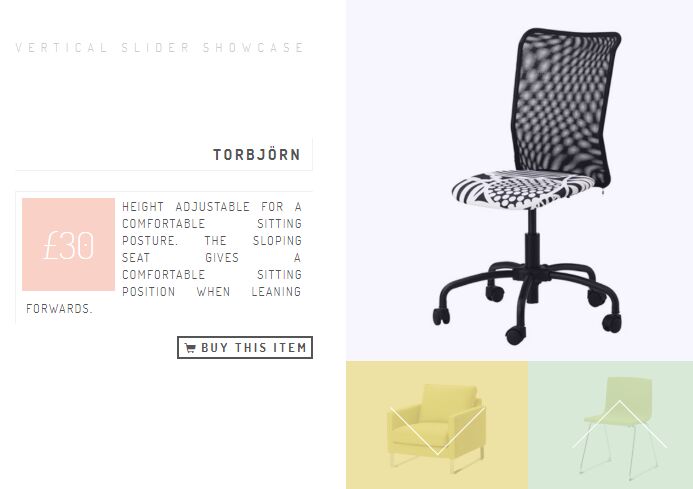
A fancy responsive fullscreen vertical page slider plugin for jQuery that can be used to showcase your products (images, descriptions, action buttons) with a split panel transition.
Works on modern browsers which support CSS3 transitions and media queries.
See it in action:
How to use it:
1. Load the necessary JavaScript and CSS files in the document.
<link rel="stylesheet" href="css/style.css">
<noscript><link rel="stylesheet" href="css/noscript.css" /></noscript>
<script type="text/javascript" src="js/modernizr.custom.js"></script>
<script src="https://code.jquery.com/jquery-3.3.1.min.js"
        integrity="sha384-tsQFqpEReu7ZLhBV2VZlAu7zcOV+rXbYlF2cqB8txI/8aZajjp4Bqd+V6D5IgvKT"
        crossorigin="anonymous">
</script>
<script  src="js/slider.js"></script>
2. Add your products to the Vertical Product Showcase.
<section id="ps-container" class="ps-container">

  <div class="ps-header">
      <h1>Vertical Slider Showcase Example</h1>
  </div>

  <div class="ps-contentwrapper">

    <div class="ps-content">
        <h2>Product 1</h2>
        <span class="ps-price">$100</span>
        <p>Description 1</p>
        <a href="#">Buy this item</a>
    </div>

    <div class="ps-content">
        <h2>Product 2</h2>
        <span class="ps-price">$200</span>
        <p>Description 2</p>
        <a href="#">Buy this item</a>
    </div>

    <div class="ps-content">
        <h2>Product 3</h2>
        <span class="ps-price">$300</span>
        <p>Description 3</p>
        <a href="#">Buy this item</a>
    </div>

    ...

  </div>

  <div class="ps-slidewrapper">

    <div class="ps-slides">
        <div style="background-image:url(./images/1.jpg);"></div>
        <div style="background-image:url(./images/2.jpg);"></div>
        <div style="background-image:url(./images/3.jpg);"></div>
        ...
    </div>

    <nav>
        <a href="#" class="ps-prev"></a>
        <a href="#" class="ps-next"></a>
    </nav>

  </div>

</section>
3. Initialize the plugin to activate the Vertical Product Showcase.
$(function () {

  Slider.init();

});
This awesome jQuery plugin is developed by maskend. For more Advanced Usages, please check the demo page or visit the official website.