jquery.countup.js: Animated Number Counter on Scroll
| File Size: | 7.6 KB |
|---|---|
| Views Total: | 87707 |
| Last Update: | |
| Publish Date: | |
| Official Website: | Go to website |
| License: | MIT |
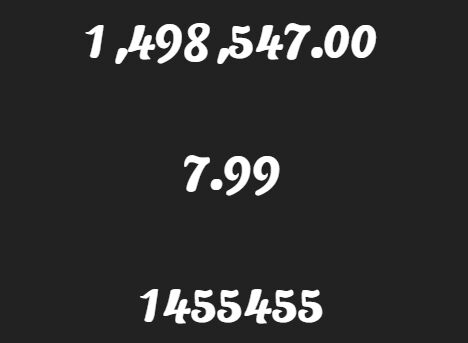
jquery.countup.js is a jQuery number counter plugin that animates positive integers, decimals, and comma-formatted values from zero when they enter the viewport.
It requires jQuery and the Waypoints plugin, and each counter runs once when its element reaches the bottom of the visible page.
Features:
- Scroll-triggered number animation through jQuery Waypoints.
- Positive integer, decimal, and comma-grouped number support.
- Automatic preservation of the source value's decimal places.
- One-time animation for each matched counter element.
- Configurable animation duration and update delay.
- Per-element timing overrides through HTML data attributes.
Use Cases:
- Company profile pages animate customer totals, downloads, or completed projects as the statistics section enters view.
- Dashboard KPI cards reveal revenue, order, or user totals only when the reader reaches that section.
- Portfolio and annual report pages retain decimal places and comma separators in visible metrics.
- CMS-managed statistic blocks set different animation speeds through HTML data attributes.
How To Use jquery.countup.js:
Load The Required Scripts
Load jQuery first, the jQuery build of Waypoints second, and jquery.countup.js last. The plugin does not include its dependencies.
<script src="/path/to/jquery.min.js"></script>
<script src="/path/to/jquery.waypoints.min.js"></script>
<script src="/path/to/jquery.countup.min.js"></script>
The package also supports npm installation:
npm install jquery.countup.js
Add The Counter Values
Place the final numeric value inside each counter element. The plugin reads this text, stores it as the target, replaces it with zero, and starts the animation when the element enters view.
<section class="company-stats">
  <div>
    <span class="counter">1,250,000</span>
    <span>downloads</span>
  </div>

  <div>
    $<span class="counter">48,500.00</span>
  </div>

  <div>
    <span class="counter">18.7</span>%
  </div>
</section>
Keep currency symbols, percent signs, and other text outside the element with the counter class. The parser expects the counter element itself to contain a positive number.
Initialize The Counters
Call countUp() after the DOM is ready. One call initializes every element matched by the selector.
$(function() {
  $('.counter').countUp();
});
The default setup uses a 2,000 millisecond total duration and a 10 millisecond update delay.
Set Global Timing Options
Pass time and delay when every selected counter should use the same timing.
$(function() {
  $('.counter').countUp({
    time: 2500,
    delay: 20
  });
});
Set Timing Per Counter
Use data-counter-time and data-counter-delay for individual elements. These values take priority over the options passed to countUp().
<span
  class="counter"
  data-counter-time="3000"
  data-counter-delay="15">75,000</span>

<span
  class="counter"
  data-counter-time="1200"
  data-counter-delay="20">99.9</span>
Options
time: Sets the total animation duration in milliseconds. Type: Number. Default:2000.delay: Sets the delay between number updates in milliseconds. Type: Number. Default:10.
Data Attributes
data-counter-time: Overrides thetimeoption for one counter element. Use a positive integer in milliseconds.data-counter-delay: Overrides thedelayoption for one counter element. Use a positive integer in milliseconds.
Plugin Method And Runtime Behavior
// Initialize the matched elements.
$('.counter').countUp({
  time: 2000,
  delay: 10
});
countUp(options) is the plugin's only public method. It returns the matched jQuery collection, so the call remains chainable. The plugin does not expose replay, reset, update, pause, callback, or custom event APIs.
Waypoints starts the animation at a 100% offset and uses one-time triggering. Scrolling away and returning to the element does not replay the counter.
Implementation Notes And Limitations
- The animation always starts at zero and ends at the numeric text stored in the element.
- The numeric parser handles positive integers, decimal values, and comma grouping. It does not parse negative numbers, currency symbols, percentage signs, or text inside the counter element.
- The source value controls decimal precision. A target of
18.70keeps two decimal places during the animation. - The plugin calculates the number of updates from
time / delay. The default settings produce about 200 updates for each counter.
Alternatives And Related Resources:
- CountUp.js Guide: Animated Number Counter Options & Examples
- Animating Numbers Counting Up with jQuery Counter-Up Plugin
- Numbers That Count When Scrolled Into View
- jQuery Plugin For Counting Up Number While Scrolling - numscroller
FAQs:
Q: Why does the counter stay at its original value?
A: Check the script order. jQuery must load before the jQuery Waypoints file, and jquery.countup.js must load after both dependencies. Initialize the plugin after the counter elements exist in the DOM.
Q: How do I display currency symbols or percentage signs?
A: Put the symbol in a separate element or text node next to the counter. Keep only the numeric value inside the element passed to countUp().
Q: Can the plugin replay, reset, count down, or update a target value?
A: No. The plugin counts from zero once when the element enters view. Choose CountUp.js or another counter library when the project needs lifecycle methods or count-down behavior.
This awesome jQuery plugin is developed by AGMStudio. For more Advanced Usages, please check the demo page or visit the official website.