Image Color Palette Generating Plugin - Color Thief
| File Size: | 1.72 MB |
|---|---|
| Views Total: | 10813 |
| Last Update: | |
| Publish Date: | |
| Official Website: | Go to website |
| License: | MIT |
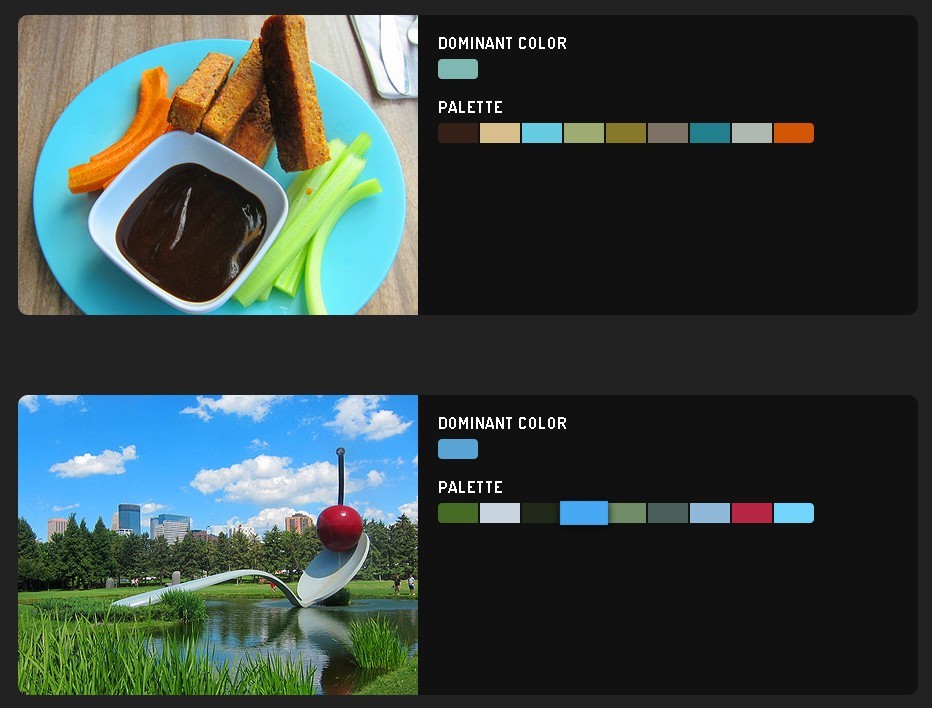
Color Thief is a vanilla JavaScript library that extracts dominant colors, color palettes, and semantic swatches from images, videos, canvas elements, and Node.js image sources.
You can use it to create image-matched backgrounds, product-card accents, media-player ambient lighting, gallery themes, and upload-preview color tools.
Color Thief Version 3.0 is a complete rewrite that drops the old jQuery dependency. You can now use it straight in the browser, in Node.js, or as a CLI tool.
Features:
- Extracts the dominant color from image, video, and canvas sources.
- Generates multi-color palettes sorted by visual dominance.
- Creates semantic color groups for accents, backgrounds, and text areas.
- Returns color objects with hex, RGB, HSL, OKLCH, and CSS output.
- Calculates readable foreground colors and contrast data.
- Processes live video and canvas sources for reactive UI color updates.
How To Use It:
1. Install Or Include Color Thief
For a browser page on jQueryScript, the CDN version gives the fastest setup path. Color Thief v3 does not need CSS and does not need jQuery.
<script src="https://unpkg.com/colorthief@3/dist/umd/color-thief.global.js"></script>
For a module or bundler project, install the npm package.
npm install colorthief
import { getColorSync, getPaletteSync, getSwatchesSync, observe } from 'colorthief';
For Node.js image files or buffers, install sharp as the image decoder peer dependency.
npm install colorthief sharp
2. Add An Image Source
Color Thief reads pixel data from a loaded image. Add crossorigin="anonymous" when the image comes from another domain and that server supports CORS.
<img
  id="product-photo"
  src="images/headphones.jpg"
  alt="Wireless headphones"
  crossorigin="anonymous"
/>

<div class="product-theme">
  <h2 id="product-title">Wireless Headphones</h2>
  <p id="product-color">Waiting for image color...</p>
</div>
3. Extract The Dominant Color
<script>
  const img = document.getElementById('product-photo');
  const card = document.querySelector('.product-theme');
  const label = document.getElementById('product-color');

  function applyDominantColor() {
    const color = ColorThief.getColorSync(img);

    if (!color) {
      label.textContent = 'No color found.';
      return;
    }

    card.style.backgroundColor = color.css();
    card.style.color = color.textColor;
    label.textContent = color.hex();
  }

  if (img.complete) {
    applyDominantColor();
  } else {
    img.addEventListener('load', applyDominantColor);
  }
</script>
The image must finish loading before extraction. The code checks img.complete first, then waits for the standard load event when the image is still loading.
4. Generate A Color Palette
<img id="gallery-cover" src="images/gallery-cover.jpg" alt="Gallery cover" crossorigin="anonymous" />

<ul id="palette-list"></ul>

<script>
  const cover = document.getElementById('gallery-cover');
  const paletteList = document.getElementById('palette-list');

  function renderPalette() {
    const palette = ColorThief.getPaletteSync(cover, {
      colorCount: 6,
      quality: 10,
      colorSpace: 'oklch'
    });

    if (!palette) return;

    paletteList.innerHTML = palette.map((color) => {
      return `
        <li style="background:${color.css()};color:${color.textColor}">
          ${color.hex()} (${Math.round(color.proportion * 100)}%)
        </li>
      `;
    }).join('');
  }

  cover.complete ? renderPalette() : cover.addEventListener('load', renderPalette);
</script>
This example builds a palette list from one image. colorCount controls the number of colors, quality controls the pixel sampling rate, and colorSpace controls the quantization model.
5. Use Semantic Swatches For UI Roles
<img id="article-image" src="images/editorial.jpg" alt="Editorial cover" crossorigin="anonymous" />

<header id="story-header">
  <h1 id="story-title">Design Notes</h1>
  <p id="story-summary">A palette generated from the cover image.</p>
</header>

<script>
  const articleImage = document.getElementById('article-image');
  const header = document.getElementById('story-header');
  const title = document.getElementById('story-title');
  const summary = document.getElementById('story-summary');

  function applySwatches() {
    const swatches = ColorThief.getSwatchesSync(articleImage);

    if (swatches.DarkMuted) {
      header.style.backgroundColor = swatches.DarkMuted.color.css();
      header.style.color = swatches.DarkMuted.bodyTextColor.css();
    }

    if (swatches.LightVibrant) {
      title.style.color = swatches.LightVibrant.color.css();
    }

    if (swatches.Muted) {
      summary.style.borderColor = swatches.Muted.color.css();
    }
  }

  articleImage.complete ? applySwatches() : articleImage.addEventListener('load', applySwatches);
</script>
Semantic swatches help you map extracted colors to real UI roles. DarkMuted works well for dark panels, LightMuted works well for card backgrounds, and Vibrant works well for visual accents.
6. Observe A Video Or Canvas Source
<video id="promo-video" src="media/promo.mp4" controls muted></video>
<section id="ambient-panel">
  <h2 id="ambient-heading">Live Palette</h2>
</section>

<script>
  const video = document.getElementById('promo-video');
  const panel = document.getElementById('ambient-panel');
  const heading = document.getElementById('ambient-heading');

  const controller = ColorThief.observe(video, {
    throttle: 250,
    colorCount: 5,
    quality: 15,
    onChange(palette) {
      const dominant = palette[0];

      if (!dominant) return;

      panel.style.backgroundColor = dominant.css();
      heading.style.color = dominant.textColor;
    }
  });

  window.addEventListener('pagehide', () => {
    controller.stop();
  });
</script>
observe() watches a video, canvas, or image element and runs onChange with a fresh palette. Call stop() when the component, page, modal, or media player no longer needs updates.
7. Use Color Thief In Node.js
import { getColor, getPalette } from 'colorthief';

const imagePath = './uploads/campaign-banner.jpg';

const dominant = await getColor(imagePath);
const palette = await getPalette(imagePath, {
  colorCount: 5,
  quality: 10
});

console.log('Dominant:', dominant?.hex());
console.log('Palette:', palette?.map((color) => color.hex()));
The async API works in Node.js with file paths and buffers. Use the sync API only for supported browser sources.
8. Use The CLI
npx colorthief-cli photo.jpg
colorthief-cli palette photo.jpg --count 5
colorthief-cli swatches photo.jpg
colorthief-cli photo.jpg --json
colorthief-cli palette photo.jpg --css
The CLI works well for build scripts, static-site color extraction, design-token generation, and quick checks during asset preparation.
All configuration options:
colorCount(Number, default:10): Sets the number of colors for palette extraction. Use values from2to20.quality(Number, default:10): Sets the pixel sampling rate.1samples every pixel. Higher values sample fewer pixels.colorSpace(String, default:'oklch'): Sets the quantization color space. Accepted values are'oklch'and'rgb'.region(Object, default:null): Sample a sub-rectangle: { x, y, width, height } as 0–1 fractions.ignoreWhite(Boolean, default:true): Skips pixels that appear white.whiteThreshold(Number, default:250): Sets the RGB channel threshold for white pixel detection.alphaThreshold(Number, default:125): Skips pixels below the specified alpha value.minSaturation(Number, default:0): Skips pixels below the specified HSV saturation value.signal(AbortSignal, default: not specified): Cancels a running async extraction. Async API only.worker(Boolean, default:false): Moves browser async quantization to a Web Worker. Browser async API only.
API Methods:
Extraction Functions
getColor(source, options?): Extracts the dominant color. ReturnsPromise<Color | null>.getColorSync(source, options?): Extracts the dominant color synchronously in the browser. ReturnsColor | null.getPalette(source, options?): Extracts a palette sorted by dominance. ReturnsPromise<Color[] | null>.getPaletteSync(source, options?): Extracts a palette synchronously in the browser. ReturnsColor[] | null.getSwatches(source, options?): Extracts semantic swatches. ReturnsPromise<SwatchMap>.getSwatchesSync(source, options?): Extracts semantic swatches synchronously in the browser. ReturnsSwatchMap.observe(source, options): Watches an image, video, or canvas source and sends palette updates tooptions.onChange.configure(options): Sets a custom pixel loader or custom quantizer for extraction functions.createColor(r, g, b, population, proportion?): Creates a Color object from RGB values and population data.
Color Object Methods
rgb(): Returns{ r, g, b }.hex(): Returns a hex color string.hsl(): Returns{ h, s, l }.oklch(): Returns{ l, c, h }.css(format?): Returns a CSS color string. Supported formats arergb,hsl, andoklch.array(): Returns[r, g, b].toString(): Returns the hex color string.
Color Object Properties
textColor: Returns'#ffffff'or'#000000'for readable foreground text.isDark: Returnstruewhen the color is perceptually dark.isLight: Returnstruewhen the color is perceptually light.contrast: Returns contrast data for white, black, and recommended foreground color.population: Returns the relative pixel count from the quantizer.proportion: Returns the sampled-image share for the color as a0to1value.
Swatches
getSwatches() and getSwatchesSync() return a SwatchMap with six semantic roles.
Vibrant: Bright saturated color for primary accents.Muted: Desaturated medium-brightness color for backgrounds.DarkVibrant: Saturated dark color for headers and status bars.DarkMuted: Desaturated dark color for text panels.LightVibrant: Saturated light color for highlights.LightMuted: Desaturated light color for cards and borders.
Each swatch includes these properties.
color: The extractedColorobject.role: The semantic role name.titleTextColor: Recommended title text color over the swatch.bodyTextColor: Recommended body text color over the swatch.
Observe Options And Controller
source: Accepts anHTMLVideoElement,HTMLCanvasElement, orHTMLImageElement.onChange: Required callback. Receives(palette: Color[]).throttle(Number, default:200): Sets the minimum time between updates in milliseconds.colorCount(Number, default:5): Sets the number of colors for each observed palette.quality(Number, default:10): Sets the pixel sampling rate.colorSpace(String, default:'oklch'): Sets the quantization color space.ignoreWhite,whiteThreshold,alphaThreshold,minSaturation: Reuse the standard filter options.
The returned controller exposes one method.
stop(): Stops observation and cleans up listeners and animation-frame work.
Alternatives And Related Resources:
- jQuery Plugin For Grabbing Image Color - imgcolr
- jQuery Plugin To Extract The Dominant Color of An Image - Primarycolor.js
- jQuery Plugin To Get Color Of Each Pixel Of An Image - Broilerjs
- jQuery Plugin For Basic Image Color Manipulations - Colorimazer
- jQuery Plugin For Getting Color Palette From An Image - Chameleon.js
- Extracting The Average Color From Images Or Videos – Fast Average Color
- 10 Best Color Picker Plugins In JavaScript: Use this roundup when the project needs user-selected colors rather than colors extracted from an image.
FAQs:
Q: Why does Color Thief return no color from my image?
A: The image may not have finished loading, or the browser may block canvas pixel access for a cross-origin image. Wait for the load event and use crossorigin="anonymous" only when the remote server sends proper CORS headers.
Q: Should I use the sync or async API?
A: Use the sync API for small browser examples and immediate UI updates after an image loads. Use the async API for Node.js, Web Workers, cancellation, large images, or batch extraction.
Q: Does Color Thief work with cross‑origin images?
A: The image must be served with the crossorigin="anonymous" attribute and appropriate CORS headers. Otherwise, the canvas becomes tainted and extraction returns null.
Q: I get an error when importing the module from a CDN. What's wrong?
A: Make sure you use the correct file path: /dist/color-thief.modern.js. The global UMD build (color-thief.global.js) creates a colorthief global variable instead of ESM exports.
Q: The palette has fewer colors than I set in colorCount. Why?
A: Pixels that match the whiteThreshold or fall below minSaturation are filtered out. Lower those thresholds to include more subtle colors.
Q: How do I use Color Thief in a React component?
A: Import the async function inside useEffect. Wait for the image ref to load, then call getColor() and store the result in state. The sync functions also work if you call them inside the load event handler.
Q: Can I stop the live observation started with observe()?
A: Yes. The method returns a controller object with a stop() function. Always call stop() when the source element is removed to release resources.
Changelog:
v3.5.0 (2026-08-04)
- New region option
- The worker option is now a no-op
v3.4.0 (2026-07-03)
- Wide-gamut (Display P3) support
v3.4.0 (2026-07-03)
- Wide-gamut (Display P3) support
v3.3.0 (2026-06-11)
- Adds colorthief CLI with color, palette, and swatches subcommands. Supports --json, --css, and ANSI output formats, stdin piping, multi-file input, and a friendly error message when sharp is not installed.
v2.4.0 (2023-03-02)
- fix: Use image naturalHeight and naturalHeight
v2.3.2 (2020-07-06)
- fix: Use image naturalHeight and naturalHeight
v2.3.0 (2019-08-05)
- feat: Node support. Use color-thief-node.js file in dist folder
- test: Added simple tests for node env with Mocha and Chai to go alongside the Cypress browser tests
- build: Discontinue outputting sourcemaps
v2.2.1 (2019-07-23)
- fix: Remove node version requirement
- refactor: Create sep repo for quantize lib and import
- refactor: Use a shared core lib
- test: Enable other palette count tests post-quantize func updates
- test: Remove bad test case, colorcount(1)
v2.2 (2019-07-22)
- Add CommonJS, AMD, and ES6 module support
This awesome jQuery plugin is developed by lokesh. For more Advanced Usages, please check the demo page or visit the official website.