Check WCAG Color Contrast in JavaScript - colorContrast.js
| File Size: | 31.3 KB |
|---|---|
| Views Total: | 2277 |
| Last Update: | |
| Publish Date: | |
| Official Website: | Go to website |
| License: | MIT |
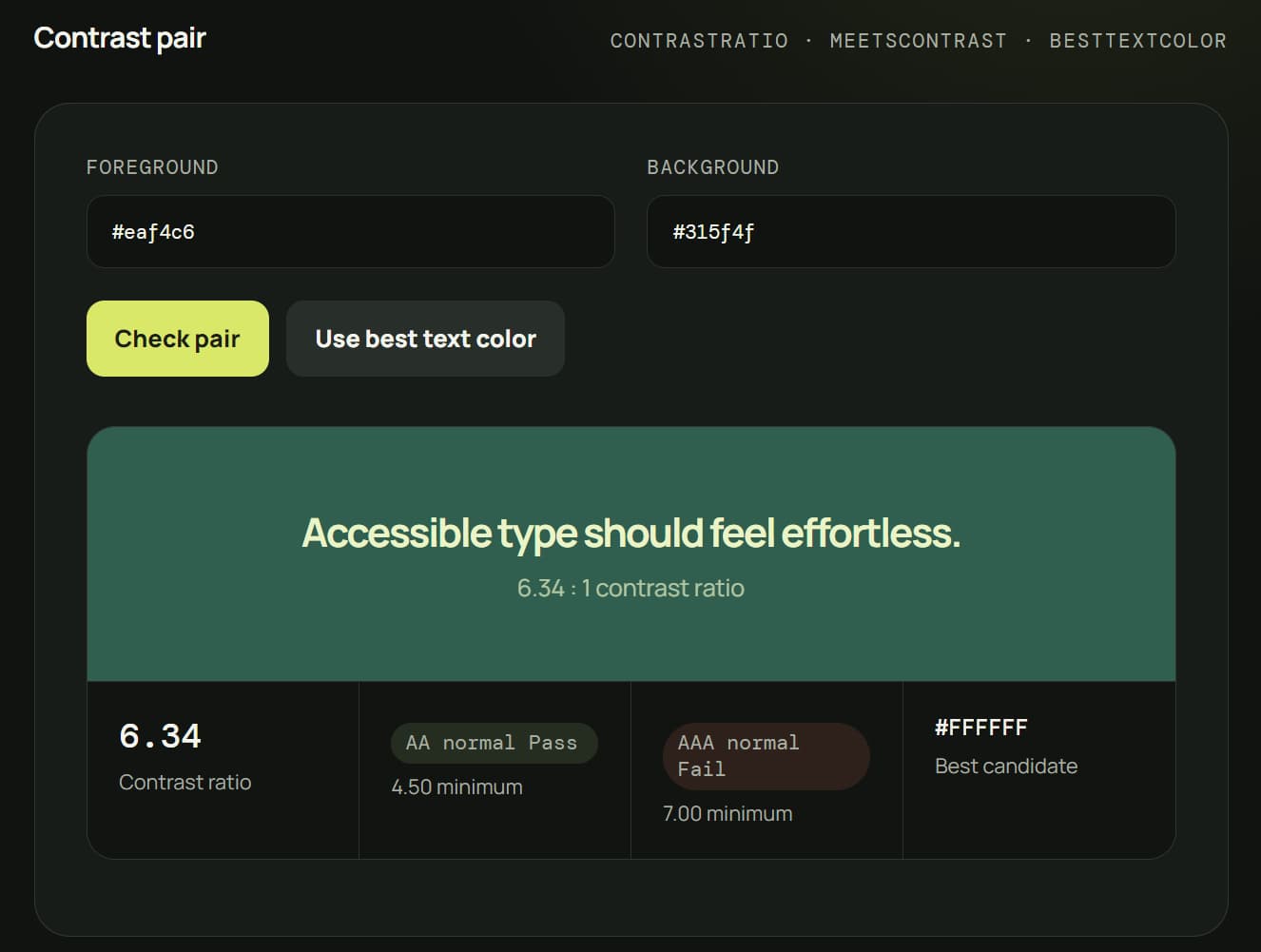
colorContrast.js (formerly colourBrightness.js) is a dependency-free JavaScript library that analyzes CSS color contrast, checks WCAG AA and AAA thresholds, and selects readable foreground colors.
It works well for live contrast checkers, theme editors, dynamic color previews, design-token audits, and interfaces that need readable text across changing backgrounds.
In addition, the package includes a separate jquery.colourbrightness.js file that keeps the original background-brightness behavior available for legacy jQuery projects.
Features:
- Calculates WCAG contrast ratios from 1 to 21.
- Checks AA and AAA thresholds for normal and large text.
- Chooses the strongest foreground color from a custom candidate list.
- Parses HEX, RGB, HSL, named colors, Lab, LCH, Oklab, OKLCH, and CSS
color()syntax. - Composites translucent colors before contrast calculations.
- Analyzes complete color palettes and pairwise contrast combinations.
- Reads computed text colors, backgrounds, font sizes, and font weights from DOM elements.
- Handles translucent ancestor backgrounds during DOM analysis.
How To Use It
Install with npm
Install the color-contrast-js package:
npm install color-contrast-js
Import only the functions your project uses:
import {
  backgroundTone,
  analyzeColor,
  contrastRatio,
  bestTextColor
} from "color-contrast-js";
The package uses ES modules. Use import syntax in applications, libraries, and bundler-based projects.
The default package entry points to the readable build. The minified package entry is available through:
import {
  contrastRatio
} from "color-contrast-js/min";
Use It Directly in the Browser
Download color-contrast.js or color-contrast.min.js and load it as an ES module:
<script type="module">
  import {
    backgroundTone,
    contrastRatio
  } from "./color-contrast.min.js";

  console.log(backgroundTone("#315b8a"));
  console.log(contrastRatio("#ffffff", "#315b8a"));
</script>
Basic Usage
The following example adds either a light or dark class according to the computed background color.
<style>
  .status-card {
    padding: 2rem;
    border-radius: 8px;
  }

  .light {
    color: #000;
  }

  .dark {
    color: #fff;
  }
</style>

<div
  id="status-card"
  class="status-card"
  style="background-color: #315b8a"
>
  Production systems are operational.
</div>

<script type="module">
  import {
    applyBackgroundTone
  } from "./color-contrast.min.js";

  applyBackgroundTone("#status-card");
</script>
applyBackgroundTone() reads the visible background color and adds the appropriate class. The returned tone describes the background itself. A dark result means the background is dark, so the accompanying CSS normally uses light text.
The same behavior can use custom class names:
applyBackgroundTone("#status-card", {
  lightClass: "theme-light-surface",
  darkClass: "theme-dark-surface"
});
Advanced Example: Build a Live WCAG Contrast Checker
This form calculates the contrast ratio as a developer edits the foreground and background colors.
<label>
  Text color
  <input id="foreground-color" type="color" value="#ffffff">
</label>

<label>
  Background color
  <input id="background-color" type="color" value="#315b8a">
</label>

<div id="contrast-preview" style="padding: 2rem; margin-top: 1rem;">
  Preview text
</div>

<p id="contrast-result"></p>

<script type="module">
  import {
    contrastRatio,
    meetsContrast
  } from "./color-contrast.min.js";

  const foregroundInput = document.querySelector("#foreground-color");
  const backgroundInput = document.querySelector("#background-color");
  const preview = document.querySelector("#contrast-preview");
  const result = document.querySelector("#contrast-result");

  function updateContrastPreview() {
    const foreground = foregroundInput.value;
    const background = backgroundInput.value;

    // Update the visual preview.
    preview.style.color = foreground;
    preview.style.backgroundColor = background;

    // Calculate the exact WCAG contrast ratio.
    const ratio = contrastRatio(foreground, background);

    // Check normal-size text against AA and AAA thresholds.
    const passesAA = meetsContrast(foreground, background, {
      level: "AA",
      textSize: "normal"
    });

    const passesAAA = meetsContrast(foreground, background, {
      level: "AAA",
      textSize: "normal"
    });

    result.textContent =
      "Ratio: " +
      ratio.toFixed(2) +
      " | AA: " +
      (passesAA ? "Pass" : "Fail") +
      " | AAA: " +
      (passesAAA ? "Pass" : "Fail");
  }

  foregroundInput.addEventListener("input", updateContrastPreview);
  backgroundInput.addEventListener("input", updateContrastPreview);

  updateContrastPreview();
</script>
Advanced Example: Pick the Best Text Color from a Brand Palette
Black and white are not the only possible foreground colors. bestTextColor() compares any supplied candidate list and returns the strongest contrast match.
<div
  id="campaign-banner"
  style="background-color: #c84b31; padding: 2rem;"
>
  Summer collection
</div>

<script type="module">
  import {
    bestTextColor
  } from "./color-contrast.min.js";

  const banner = document.querySelector("#campaign-banner");
  const background = "#c84b31";

  const approvedTextColors = [
    "#ffffff",
    "#111827",
    "#fff4d6",
    "#2d1b69"
  ];

  // Select the candidate with the highest contrast ratio.
  const textColor = bestTextColor(
    background,
    approvedTextColors
  );

  banner.style.color = textColor;
</script>
Advanced Example: Audit Existing DOM Elements
analyzeElement() reads the computed foreground color, visible background, font size, and font weight from an element.
<article class="audit-card" style="background: #f4c95d; padding: 1.5rem;">
  <p class="audit-target" style="color: #6b5418; font-size: 16px;">
    Account activity from the last 30 days.
  </p>
</article>

<script type="module">
  import {
    analyzeElement
  } from "./color-contrast.min.js";

  const target = document.querySelector(".audit-target");
  const report = analyzeElement(target);

  console.log({
    foreground: report.foregroundColor,
    background: report.backgroundColor,
    fontSize: report.fontSize,
    fontWeight: report.fontWeight,
    textSize: report.textSize,
    contrastRatio: report.contrastRatio,
    passesAA: report.aa,
    passesAAA: report.aaa
  });
</script>
Advanced Example: Generate a Contrast Matrix for Design Tokens
A contrast matrix helps design-system tooling inspect every foreground and background pairing in a palette.
<pre id="matrix-output"></pre>

<script type="module">
  import {
    contrastMatrix
  } from "./color-contrast.min.js";

  const designTokens = [
    "#111827",
    "#ffffff",
    "#2563eb",
    "#f59e0b"
  ];

  const matrix = contrastMatrix(designTokens);

  // Each row represents a foreground color.
  // Each column represents a background color.
  document.querySelector("#matrix-output").textContent =
    JSON.stringify(matrix, null, 2);
</script>
Configuration Options:
-
fallback(String): Sets the opaque fallback color used when transparency cannot resolve to an opaque ancestor. Default:"#fff". -
level("AA"|"AAA"): Sets the WCAG threshold checked bymeetsContrast(). Default:"AA". -
textSize("normal"|"large"): Selects the text-size threshold checked bymeetsContrast(). Default:"normal". -
root(ParentNode): Sets the query root used whenapplyBackgroundTone()receives a CSS selector. Default:document. -
lightClass(String): Sets the class added whenapplyBackgroundTone()detects a light background. Default:"light". -
darkClass(String): Sets the class added whenapplyBackgroundTone()detects a dark background. Default:"dark".
The fallback option applies to functions that resolve transparent colors or DOM backgrounds:
const ratio = contrastRatio(
  "rgb(0 0 0 / 50%)",
  "transparent",
  {
    fallback: "#f5f5f5"
  }
);
API Methods:
import {
  backgroundTone,
  analyzeColor,
  contrastRatio,
  bestTextColor,
  meetsContrast,
  compositeColors,
  parseColor,
  analyzePalette,
  contrastMatrix,
  getBackgroundColor,
  analyzeElement,
  applyBackgroundTone
} from "color-contrast-js";


// Classify a background as "light" or "dark".
backgroundTone("#315b8a");


// Return luminance, black and white contrast,
// recommended text color, background tone,
// and AA/AAA compliance data.
analyzeColor("oklch(65% 0.2 30)");


// Calculate a WCAG contrast ratio from 1 to 21.
contrastRatio("#ffffff", "#315b8a");


// Return the candidate with the strongest contrast.
bestTextColor(
  "#315b8a",
  ["#ffffff", "#111827", "#fef08a"]
);


// Check a foreground/background pair against AA or AAA.
meetsContrast("#ffffff", "#315b8a", {
  level: "AA",
  textSize: "normal"
});


// Composite a translucent foreground over a background.
compositeColors(
  "rgb(0 0 0 / 50%)",
  "#ffffff"
);


// Parse a supported CSS color into numeric sRGB channels.
parseColor("tomato");


// Analyze every color in a palette.
analyzePalette([
  "#111827",
  "#ffffff",
  "#2563eb"
]);


// Calculate every foreground/background pair in a palette.
contrastMatrix([
  "#111827",
  "#ffffff",
  "#2563eb"
]);


// Resolve the visible background color of a DOM element.
getBackgroundColor(
  document.querySelector(".profile-card")
);


// Analyze computed foreground, background,
// font size, font weight, and WCAG results.
analyzeElement(
  document.querySelector(".profile-card__title")
);


// Apply light or dark background-tone classes.
applyBackgroundTone(".profile-card", {
  lightClass: "surface-light",
  darkClass: "surface-dark"
});
Return Data from `analyzeColor()`
analyzeColor() returns a detailed object:
const report = analyzeColor("#ff5733");

console.log(report.color);
console.log(report.resolvedColor);
console.log(report.luminance);
console.log(report.recommendedTextColor);
console.log(report.backgroundTone);
console.log(report.contrastWithBlack);
console.log(report.contrastWithWhite);

console.log(report.blackText.aa);
console.log(report.blackText.aaLarge);
console.log(report.blackText.aaa);
console.log(report.blackText.aaaLarge);

console.log(report.whiteText.aa);
console.log(report.whiteText.aaLarge);
console.log(report.whiteText.aaa);
console.log(report.whiteText.aaaLarge);
Compatibility Aliases
Older naming conventions remain available:
import {
  colorBrightness,
  colourBrightness,
  applyColorBrightness,
  applyColourBrightness,
  analyseColour,
  parseColour,
  bestTextColour,
  compositeColours,
  getBackgroundColour,
  analyseElement,
  analysePalette
} from "color-contrast-js";
The current names are clearer for new code:
backgroundTone();
applyBackgroundTone();
analyzeColor();
parseColor();
bestTextColor();
compositeColors();
getBackgroundColor();
analyzeElement();
analyzePalette();
Events and Integration Hooks:
colorContrast.js does not expose custom events. You can use normal DOM events to rerun calculations after colors, content, or theme settings change.
import {
  contrastRatio,
  applyBackgroundTone
} from "color-contrast-js";


// Integration hook: run after the DOM is ready.
document.addEventListener("DOMContentLoaded", function () {
  applyBackgroundTone(".dynamic-panel");
});


// Integration hook: recalculate after a color input changes.
document
  .querySelector("#theme-background")
  .addEventListener("input", function (event) {
    const background = event.target.value;
    const ratio = contrastRatio("#ffffff", background);

    console.log(ratio);
  });


// Integration hook: rerun tone analysis after your app updates a panel.
document.addEventListener("themechange", function () {
  applyBackgroundTone(".dynamic-panel");
});
Legacy jQuery Usage:
1. Include jQuery javascript library and jQuery colourBrightness plugin on the web page.
<script src="/path/to/jquery.min.js"></script>
<script src="/path/to/jquery.colourBrightness.min.js"></script>
2. Call the plugin with target element.
<script>
  $(document).ready(function(){
    $('.YOURELEMENT').colourBrightness();
  });
</script>
3. Customize the color of your target element in CSS.
.light {
  color: #000;
}
.dark {
  color: #fff;
}
Alternatives & Related Resources:
FAQs:
Q: Does colorContrast.js require jQuery?
A: The current ES module uses vanilla JavaScript and has no jQuery dependency. The separate jquery.colourbrightness.js file supports legacy jQuery projects.
Q: Why does require("color-contrast-js") fail?
A: The package is ESM-only. Use import syntax or configure your build environment to consume ES modules.
Q: Can I load colorContrast.js directly with a normal script tag?
A: Use <script type="module"> and import the readable or minified ES module. A classic script tag does not expose the named exports.
Q: Does analyzeElement() check text placed over background images or gradients?
A: No. DOM background analysis handles solid and translucent CSS background colors. Images, gradients, blend modes, canvas content, and video need separate analysis.
Q: Why does applyBackgroundTone() return dark when I want white text?
A: The result describes the background. A dark background normally receives light text through your .dark CSS rule.
Changelog:
2026-07-15
- Rewritten in TypeScript.
- Renamed to colorContrast.js.
This awesome jQuery plugin is developed by jamiebrittain. For more Advanced Usages, please check the demo page or visit the official website.