Stylish jQuery and CSS3 Based Digital Clock
| File Size: | 9.88KB |
|---|---|
| Views Total: | 10565 |
| Last Update: | |
| Publish Date: | |
| Official Website: | Go to website |
| License: | MIT |
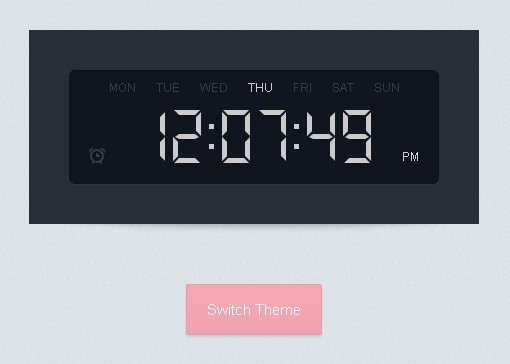
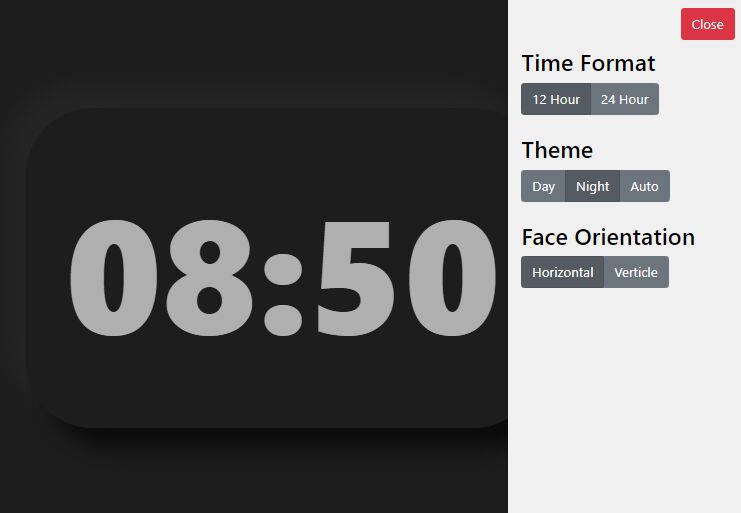
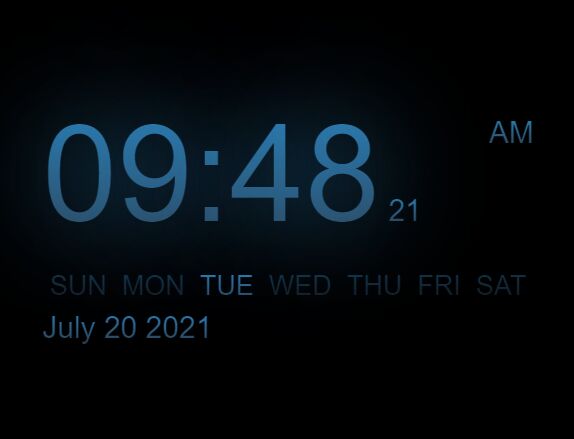
In this tutorial written by Martin Angelov we're going to create a realistic Digital Clock using CSS3 and jQuery, which comes with 2 stylish themes: dark and light.
How to use it:
1. The HTML
<div id="clock" class="light">
<div class="display">
<div class="weekdays"></div>
<div class="ampm"></div>
<div class="alarm"></div>
<div class="digits"></div>
</div>
</div>
2. The CSS
#clock{
	width:370px;
	padding:40px;
	margin:200px auto 60px;
	position:relative;
}

#clock:after{
	content:'';
	position:absolute;
	width:400px;
	height:20px;
	border-radius:100%;
	left:50%;
	margin-left:-200px;
	bottom:2px;
	z-index:-1;
}


#clock .display{
	text-align:center;
	padding: 40px 20px 20px;
	border-radius:6px;
	position:relative;
	height: 54px;
}


/*-------------------------
	Light color theme
--------------------------*/


#clock.light{
	background-color:#f3f3f3;
	color:#272e38;
}

#clock.light:after{
	box-shadow:0 4px 10px rgba(0,0,0,0.15);
}

#clock.light .digits div span{
	background-color:#272e38;
	border-color:#272e38;
}

#clock.light .digits div.dots:before,
#clock.light .digits div.dots:after{
	background-color:#272e38;
}

#clock.light .alarm{
	background:url('../img/alarm_light.jpg');
}

#clock.light .display{
	background-color:#dddddd;
	box-shadow:0 1px 1px rgba(0,0,0,0.08) inset, 0 1px 1px #fafafa;
}


/*-------------------------
	Dark color theme
--------------------------*/


#clock.dark{
	background-color:#272e38;
	color:#cacaca;
}

#clock.dark:after{
	box-shadow:0 4px 10px rgba(0,0,0,0.3);
}

#clock.dark .digits div span{
	background-color:#cacaca;
	border-color:#cacaca;
}

#clock.dark .alarm{
	background:url('../img/alarm_dark.jpg');
}

#clock.dark .display{
	background-color:#0f1620;
	box-shadow:0 1px 1px rgba(0,0,0,0.08) inset, 0 1px 1px #2d3642;
}

#clock.dark .digits div.dots:before,
#clock.dark .digits div.dots:after{
	background-color:#cacaca;
}


/*-------------------------
	The Digits
--------------------------*/


#clock .digits div{
	text-align:left;
	position:relative;
	width: 28px;
	height:50px;
	display:inline-block;
	margin:0 4px;
}

#clock .digits div span{
	opacity:0;
	position:absolute;

	-webkit-transition:0.25s;
	-moz-transition:0.25s;
	transition:0.25s;
}

#clock .digits div span:before,
#clock .digits div span:after{
	content:'';
	position:absolute;
	width:0;
	height:0;
	border:5px solid transparent;
}

#clock .digits .d1{			height:5px;width:16px;top:0;left:6px;}
#clock .digits .d1:before{	border-width:0 5px 5px 0;border-right-color:inherit;left:-5px;}
#clock .digits .d1:after{	border-width:0 0 5px 5px;border-left-color:inherit;right:-5px;}

#clock .digits .d2{			height:5px;width:16px;top:24px;left:6px;}
#clock .digits .d2:before{	border-width:3px 4px 2px;border-right-color:inherit;left:-8px;}
#clock .digits .d2:after{	border-width:3px 4px 2px;border-left-color:inherit;right:-8px;}

#clock .digits .d3{			height:5px;width:16px;top:48px;left:6px;}
#clock .digits .d3:before{	border-width:5px 5px 0 0;border-right-color:inherit;left:-5px;}
#clock .digits .d3:after{	border-width:5px 0 0 5px;border-left-color:inherit;right:-5px;}

#clock .digits .d4{			width:5px;height:14px;top:7px;left:0;}
#clock .digits .d4:before{	border-width:0 5px 5px 0;border-bottom-color:inherit;top:-5px;}
#clock .digits .d4:after{	border-width:0 0 5px 5px;border-left-color:inherit;bottom:-5px;}

#clock .digits .d5{			width:5px;height:14px;top:7px;right:0;}
#clock .digits .d5:before{	border-width:0 0 5px 5px;border-bottom-color:inherit;top:-5px;}
#clock .digits .d5:after{	border-width:5px 0 0 5px;border-top-color:inherit;bottom:-5px;}

#clock .digits .d6{			width:5px;height:14px;top:32px;left:0;}
#clock .digits .d6:before{	border-width:0 5px 5px 0;border-bottom-color:inherit;top:-5px;}
#clock .digits .d6:after{	border-width:0 0 5px 5px;border-left-color:inherit;bottom:-5px;}

#clock .digits .d7{			width:5px;height:14px;top:32px;right:0;}
#clock .digits .d7:before{	border-width:0 0 5px 5px;border-bottom-color:inherit;top:-5px;}
#clock .digits .d7:after{	border-width:5px 0 0 5px;border-top-color:inherit;bottom:-5px;}


/* 1 */

#clock .digits div.one .d5,
#clock .digits div.one .d7{
	opacity:1;
}

/* 2 */

#clock .digits div.two .d1,
#clock .digits div.two .d5,
#clock .digits div.two .d2,
#clock .digits div.two .d6,
#clock .digits div.two .d3{
	opacity:1;
}

/* 3 */

#clock .digits div.three .d1,
#clock .digits div.three .d5,
#clock .digits div.three .d2,
#clock .digits div.three .d7,
#clock .digits div.three .d3{
	opacity:1;
}

/* 4 */

#clock .digits div.four .d5,
#clock .digits div.four .d2,
#clock .digits div.four .d4,
#clock .digits div.four .d7{
	opacity:1;
}

/* 5 */

#clock .digits div.five .d1,
#clock .digits div.five .d2,
#clock .digits div.five .d4,
#clock .digits div.five .d3,
#clock .digits div.five .d7{
	opacity:1;
}

/* 6 */

#clock .digits div.six .d1,
#clock .digits div.six .d2,
#clock .digits div.six .d4,
#clock .digits div.six .d3,
#clock .digits div.six .d6,
#clock .digits div.six .d7{
	opacity:1;
}


/* 7 */

#clock .digits div.seven .d1,
#clock .digits div.seven .d5,
#clock .digits div.seven .d7{
	opacity:1;
}

/* 8 */

#clock .digits div.eight .d1,
#clock .digits div.eight .d2,
#clock .digits div.eight .d3,
#clock .digits div.eight .d4,
#clock .digits div.eight .d5,
#clock .digits div.eight .d6,
#clock .digits div.eight .d7{
	opacity:1;
}

/* 9 */

#clock .digits div.nine .d1,
#clock .digits div.nine .d2,
#clock .digits div.nine .d3,
#clock .digits div.nine .d4,
#clock .digits div.nine .d5,
#clock .digits div.nine .d7{
	opacity:1;
}

/* 0 */

#clock .digits div.zero .d1,
#clock .digits div.zero .d3,
#clock .digits div.zero .d4,
#clock .digits div.zero .d5,
#clock .digits div.zero .d6,
#clock .digits div.zero .d7{
	opacity:1;
}


/* The dots */

#clock .digits div.dots{
	width:5px;
}

#clock .digits div.dots:before,
#clock .digits div.dots:after{
	width:5px;
	height:5px;
	content:'';
	position:absolute;
	left:0;
	top:14px;
}

#clock .digits div.dots:after{
	top:34px;
}


/*-------------------------
	The Alarm
--------------------------*/


#clock .alarm{
	width:16px;
	height:16px;
	bottom:20px;
	background:url('../img/alarm_light.jpg');
	position:absolute;
	opacity:0.2;
}

#clock .alarm.active{
	opacity:1;
}


/*-------------------------
	Weekdays
--------------------------*/


#clock .weekdays{
	font-size:12px;
	position:absolute;
	width:100%;
	top:10px;
	left:0;
	text-align:center;
}


#clock .weekdays span{
	opacity:0.2;
	padding:0 10px;
}

#clock .weekdays span.active{
	opacity:1;
}


/*-------------------------
		AM/PM
--------------------------*/


#clock .ampm{
	position:absolute;
	bottom:20px;
	right:20px;
	font-size:12px;
}
3. Include jQuery library and Moment.js on the page
<script src="http://cdnjs.cloudflare.com/ajax/libs/jquery/1.10.1/jquery.min.js"></script>
<script src="http://cdnjs.cloudflare.com/ajax/libs/moment.js/2.0.0/moment.min.js"></script>
4. The javascript
$(function(){

// Cache some selectors

var clock = $('#clock'),
alarm = clock.find('.alarm'),
ampm = clock.find('.ampm');

// Map digits to their names (this will be an array)
var digit_to_name = 'zero one two three four five six seven eight nine'.split(' ');

// This object will hold the digit elements
var digits = {};

// Positions for the hours, minutes, and seconds
var positions = [
'h1', 'h2', ':', 'm1', 'm2', ':', 's1', 's2'
];

// Generate the digits with the needed markup,
// and add them to the clock

var digit_holder = clock.find('.digits');

$.each(positions, function(){

if(this == ':'){
digit_holder.append('<div class="dots">');
}
else{

var pos = $('<div>');

for(var i=1; i<8; i++){
pos.append('<span class="d' + i + '">');
}

// Set the digits as key:value pairs in the digits object
digits[this] = pos;

// Add the digit elements to the page
digit_holder.append(pos);
}

});

// Add the weekday names

var weekday_names = 'MON TUE WED THU FRI SAT SUN'.split(' '),
weekday_holder = clock.find('.weekdays');

$.each(weekday_names, function(){
weekday_holder.append('<span>' + this + '</span>');
});

var weekdays = clock.find('.weekdays span');


// Run a timer every second and update the clock

(function update_time(){

// Use moment.js to output the current time as a string
// hh is for the hours in 12-hour format,
// mm - minutes, ss-seconds (all with leading zeroes),
// d is for day of week and A is for AM/PM

var now = moment().format("hhmmssdA");

digits.h1.attr('class', digit_to_name[now[0]]);
digits.h2.attr('class', digit_to_name[now[1]]);
digits.m1.attr('class', digit_to_name[now[2]]);
digits.m2.attr('class', digit_to_name[now[3]]);
digits.s1.attr('class', digit_to_name[now[4]]);
digits.s2.attr('class', digit_to_name[now[5]]);

// The library returns Sunday as the first day of the week.
// Stupid, I know. Lets shift all the days one position down,
// and make Sunday last

var dow = now[6];
dow--;

// Sunday!
if(dow < 0){
// Make it last
dow = 6;
}

// Mark the active day of the week
weekdays.removeClass('active').eq(dow).addClass('active');

// Set the am/pm text:
ampm.text(now[7]+now[8]);

// Schedule this function to be run again in 1 sec
setTimeout(update_time, 1000);

})();

});
This awesome jQuery plugin is developed by soffmodd. For more Advanced Usages, please check the demo page or visit the official website.