Nepali Date Picker jQuery Plugin with BS/AD Conversion
| File Size: | 52.9 KB |
|---|---|
| Views Total: | 304 |
| Last Update: | |
| Publish Date: | |
| Official Website: | Go to website |
| License: | MIT |
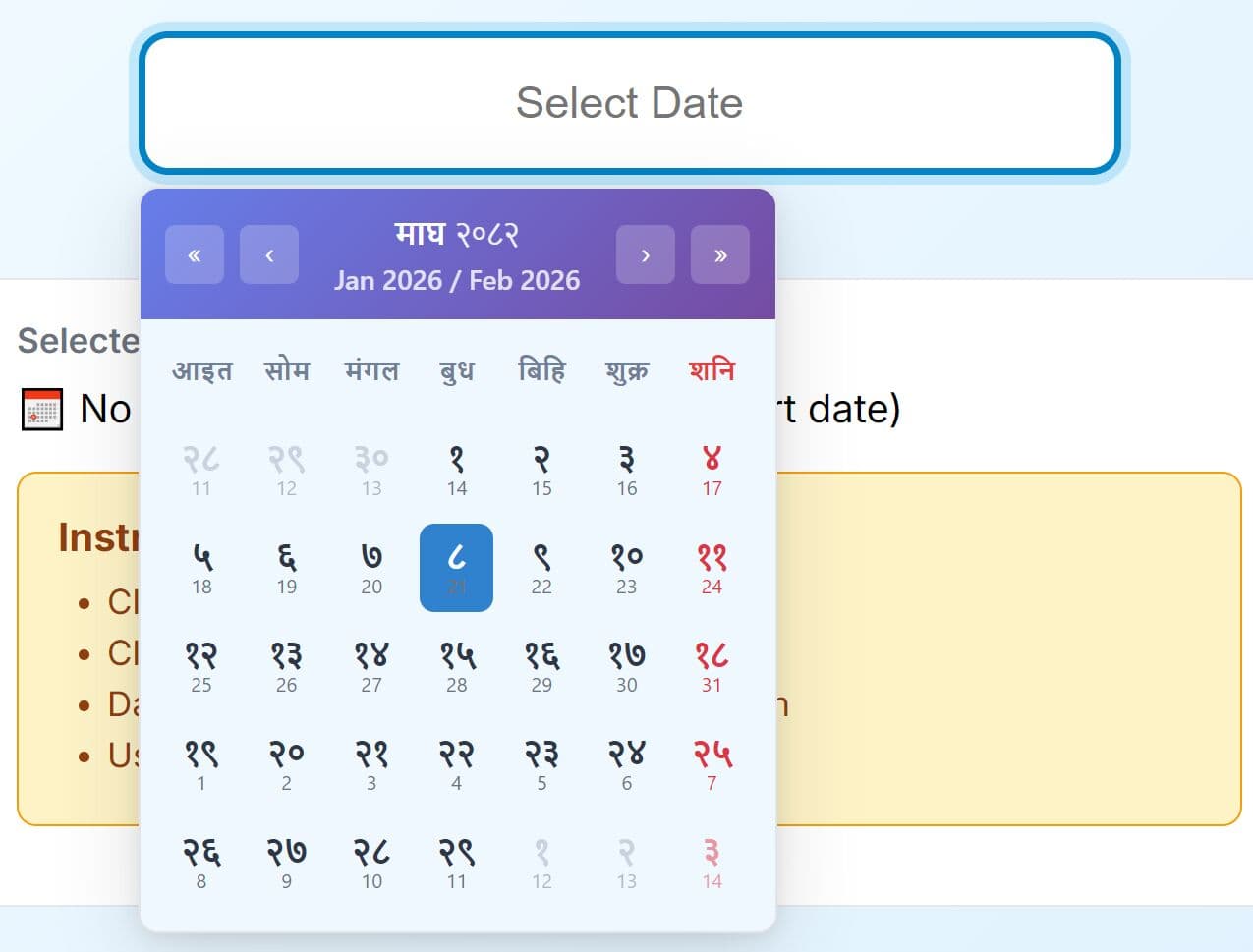
The Nepali Datepicker is a feature-rich jQuery date & date range picker plugin that implements the Bikram Sambat calendar system with automatic conversion between BS and AD date formats.
The plugin provides a native, interactive calendar experience with theme customization, date restrictions, and mobile support. It's ideal for developers building forms, dashboards, or applications that require culturally accurate Nepali date selection.
Features:
- Dual Calendar System: Supports both Bikram Sambat (BS) and Anno Domini (AD) date systems with automatic bidirectional conversion between formats.
- Seven Built-in Themes: Includes Light, Dark, Blue, Red, Purple, Orange, and Green themes with gradient styling and customizable color schemes.
- Bilingual Interface: Displays calendar in Nepali or English with optional English date subscripts on Nepali calendar views.
- Multiple Date Formats: Supports YYYY-MM-DD, DD-MM-YYYY, and MM/DD/YYYY format options for input and output display.
- Date Range Restrictions: Implements minimum and maximum date boundaries, disabled specific dates, and disabled date range functionality.
- Touch-Optimized Interface: Provides mobile-friendly touch interactions with swipe gestures and responsive layout adaptation.
- Keyboard Navigation: Full keyboard control with arrow key navigation, Enter to select, and Escape to close functionality.
- Modal Display Mode: Optional modal overlay presentation with customizable auto-close behavior on date selection.
- SweetAlert2 Popup: Built-in support for date conversion popups displaying both BS and AD equivalents.
Use Cases:
- Government and Administrative Systems: Nepal government portals and administrative systems that require official Bikram Sambat date entry for legal documents, certificates, and official records.
- HR and Payroll Applications: Employee management systems that need to track hiring dates, leave requests, and payroll cycles using the official Nepali calendar.
- Event Booking Platforms: Websites for booking cultural events, temple visits, or festivals that follow the Bikram Sambat calendar require accurate date selection with AD conversion for international users.
- Financial Applications: Banking and accounting software serving Nepali clients that must record transactions in BS dates while maintaining AD equivalents for international compliance.
How To Use It:
1. Download the plugin and include the following files in your HTML document.
<!-- jQuery library (required dependency) -->
<script src="/path/to/cdn/jquery.min.js"></script>

<!-- Nepali Datepicker CSS file -->
<link rel="stylesheet" href="path/to/styles.css">

<!-- Nepali Datepicker JavaScript -->
<script src="path/to/jquery-nepali-datepicker.js"></script>

<!-- SweetAlert2 for date conversion popups (optional) -->
<script src="https://cdn.jsdelivr.net/npm/sweetalert2@11"></script>
2. Initialize the datepicker on any text input element using jQuery selector syntax. The plugin attaches to the input and displays the calendar on focus.
$(document).ready(function() {
  // Initialize basic Nepali datepicker with default options
  $('#datepicker').nepaliDatepicker({
    // options here
  });
});
3. You can initialize the datepicker with an AD date that automatically converts to the BS equivalent. The plugin calculates the corresponding Bikram Sambat date.
$('#datepicker').nepaliDatepicker({
  defaultDate: '2026-01-20', // Provide date in AD format
  dateType: 'AD', // Specify this is an AD date
  language: 'nepali'
});
4. For BS dates, the plugin uses the provided date directly without conversion. This is useful when you already have Bikram Sambat dates in your database.
$('#datepicker').nepaliDatepicker({
  defaultDate: '2081-01-20', // Provide date in BS format
  dateType: 'BS', // Specify this is a BS date
  showEnglishDateSubscript: true  // Show AD equivalent below dates
});
5. Configure how dates display in the input field after selection. The plugin supports three common date format patterns.
$('#datepicker').nepaliDatepicker({
  dateFormat: 'MM/DD/YYYY',
});
6. Limit selectable dates using minimum and maximum boundaries. Users cannot select dates outside the specified range.
$('#datepicker').nepaliDatepicker({
  minDate: '2080-01-01',
  maxDate: '2090-12-30',
});
7. Block specific dates from selection. This is useful for marking holidays or unavailable dates.
$('#datepicker').nepaliDatepicker({
  disabledDates: [
    '2081-01-01',
    '2081-01-02',
  ],
});
8. Display the datepicker in a modal overlay instead of an inline dropdown.
$('#datepicker').nepaliDatepicker({
  modal: true,
});
9. All configuration options.
theme(string): Visual theme for the calendar. Available values are 'light', 'dark', 'blue', 'red', 'purple', 'orange', or 'green'. Default is 'light'.language(string): Display language for month and day names. Accepts 'nepali' or 'english'. Default is 'nepali'.dateFormat(string): Format pattern for the selected date string. Supports 'YYYY-MM-DD', 'DD-MM-YYYY', or 'MM/DD/YYYY'. Default is 'YYYY-MM-DD'.placeholder(string): Placeholder text displayed in the input field before date selection. Default is 'Select Date'.defaultDate(string or object): Initial date to display when opening the calendar. Accepts string in the specified dateFormat or a date object with year, month, and day properties. Default is null.dateType(string): Indicates whether defaultDate is in 'AD' or 'BS' format. This triggers automatic conversion if needed. Case insensitive. Default is null.showToday(boolean): Controls visibility of the "Today" button in the calendar footer. Default is true.showEnglishDateSubscript(boolean): When using Nepali language, displays the AD equivalent date below each BS date in small text. Default is true.autoClose(boolean): Automatically closes the datepicker after a date is selected. Set to false to keep it open for multiple interactions. Default is true.modal(boolean): Displays the datepicker in a modal overlay instead of inline positioning. Default is false.readonly(boolean): Makes the input field read-only, preventing manual text entry. Users can only select dates via the calendar. Default is false.minDate(string or object): Earliest selectable date. Users cannot navigate to or select dates before this value. Accepts string or date object. Default is null.maxDate(string or object): Latest selectable date. Users cannot navigate to or select dates after this value. Accepts string or date object. Default is null.disabledDates(array): Array of specific dates that cannot be selected. Each element should be a date string matching the dateFormat or a date object. Default is an empty array.disabledDateRanges(array): Array of date range objects. Each object must have 'start' and 'end' properties defining an inclusive range of disabled dates. Default is an empty array.
$('#datepicker').nepaliDatepicker({
  theme: 'light',
  language: 'nepali',
  dateFormat: 'YYYY-MM-DD',
  placeholder: 'Select Date',
  showToday: true,
  autoClose: true,
  modal: false,
  onSelect: null,
  onOpen: null,
  onClose: null,
  readonly: false,
  minDate: null,
  maxDate: null,
  disabledDates: [],
  disabledDateRanges: [],
  defaultDate: null,
  showToday: true,
  showEnglishDateSubscript: true,
  range: false,
  rangeSeparator: ' - '
});
10. The plugin provides three callback events for tracking datepicker state and user interactions.
$('#datepicker').nepaliDatepicker({

  // Triggered when user selects a date
  onSelect: function(date, formatted) {
    console.log('Date object:', date);
    console.log('Formatted string:', formatted);
    // Convert to AD format using global converter
    var adDate = window.bs2ad(date, 'string');
    console.log('AD equivalent:', adDate);
  },

  // Triggered when datepicker opens
  onOpen: function() {
    console.log('Calendar opened');
    // Add custom styling or track analytics
  },

  // Triggered when datepicker closes
  onClose: function() {
    console.log('Calendar closed');
    // Validate selection or update related fields
  }

});
11. API Methods.
// Get the datepicker instance
var instance = $('#datepicker').data('nepaliDatepicker');

// Retrieve the currently selected date as an object
var selectedDate = instance.getDate();
console.log(selectedDate);  // {year: 2081, month: 5, day: 12}

// Programmatically set a date
instance.setDate({
  year: 2081,
  month: 1,
  day: 15
});

// Clear the selected date and reset input
instance.clear();

// Manually show the datepicker
instance.show();

// Manually hide the datepicker
instance.hide();

// Completely destroy the datepicker and remove all event handlers
$('#datepicker').nepaliDatepicker('destroy');
12. Event handlers.
// Fires when a date is selected by the user
$('#datepicker').on('select.nepaliDatepicker', function(event, date, formatted) {
  console.log('Date selected:', date);
  console.log('Formatted as:', formatted);
  // Update other form fields based on selection
});

// Fires when the datepicker calendar opens
$('#datepicker').on('open.nepaliDatepicker', function(event) {
  console.log('Calendar opened');
  // Perform actions like tracking analytics
});

// Fires when the datepicker calendar closes
$('#datepicker').on('close.nepaliDatepicker', function(event) {
  console.log('Calendar closed');
  // Validate the selection or trigger form validation
});
FAQs:
Q: How accurate is the BS to AD date conversion?
A: The conversion uses established lookup tables for Bikram Sambat calendar data. These tables are maintained based on official Nepali calendar references. The accuracy depends on the range covered by the internal lookup data.
Q: The datepicker doesn't open when I click the input field. What's wrong?
A: Check that all dependencies loaded correctly. Verify jQuery loads before the plugin script. Inspect the browser console for JavaScript errors. Confirm that you're initializing the datepicker inside a $(document).ready() block or after the DOM fully loads. The input element must exist in the DOM before calling .nepaliDatepicker(). If using AJAX to load content, initialize the plugin after the content renders.
Q: How do I validate that a user selected a date within a specific range?
A: Use the onSelect callback to implement custom validation logic. Compare the selected date object against your required range. You can access the year, month, and day properties from the date parameter. For more complex validation, convert to AD dates using window.bs2ad() and compare those values.
More Resources:
- 7 Best shadcn/ui Date Picker Components for React + TailwindCSS
- 10 Best Date And Timer Pickers In Vanilla JavaScript
- 10 Best Date & Timer Picker Components For React & React Native
This awesome jQuery plugin is developed by surozeee. For more Advanced Usages, please check the demo page or visit the official website.