Toastr: Highly Customizable jQuery Toast Message Plugin
| File Size: | 403 KB |
|---|---|
| Views Total: | 62530 |
| Last Update: | |
| Publish Date: | |
| Official Website: | Go to website |
| License: | MIT |
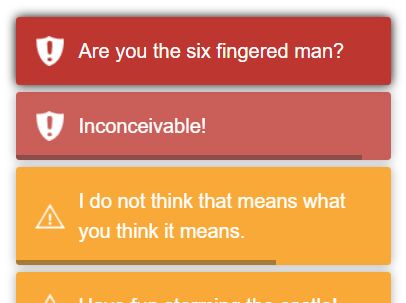
Toastr is a simple yet robust jQuery toast notification plugin which lets you create highly customizable toast messages on your webpage.
Main features:
- Can be placed anywhere on the webpage.
- 4 built-in toast types: success, info, warning and error.
- Custom show/hide animations.
- Auto dismiss with progress bar.
- Allows to prevent duplicates.
Basic usage:
1. Download and include the jQuery Toastr plugin's files into your webpage which has jQuery library installed.
<link href="toastr.css" rel="stylesheet">
<script src="//code.jquery.com/jquery.min.js"></script>
<script src="toastr.js"></script>
2. Display toast messages with default options on the webpage.
// with no title
toastr.warning('Warning')
toastr.success('Success')
toastr.info('Info')
// with a title
toastr.error('Error', 'Error Title')
3. Override the default configuration options.
toastr.error('Error', 'Error Title',{
// tap to dismiss
tapToDismiss: true,
// toast class
toastClass: 'toast',
// container ID
containerId: 'toast-container',
// debug mode
debug: false,
// fadeIn, slideDown, and show are built into jQuery
showMethod: 'fadeIn',
// duration of animation
showDuration: 300,
// easing function
showEasing: 'swing',
// callback function
onShown: undefined,
onHidden: undefined,
// hide animation
hideMethod: 'fadeOut',
// duration of animation
hideDuration: 1000,
// easing function
hideEasing: 'swing',
// close animation
closeMethod: false,
// duration of animation
closeDuration: false,
// easing function
closeEasing: false,
// timeout in ms
extendedTimeOut: 1000,
// you can customize icons here
iconClasses: {
error: 'toast-error',
info: 'toast-info',
success: 'toast-success',
warning: 'toast-warning'
},
iconClass: 'toast-info',
// toast-top-center, toast-bottom-center, toast-top-full-width
// toast-bottom-full-width, toast-top-left, toast-bottom-right
// toast-bottom-left, toast-top-right
positionClass: 'toast-top-right',
// set timeOut and extendedTimeOut to 0 to make it sticky
timeOut: 5000,
// title class
titleClass: 'toast-title',
// message class
messageClass: 'toast-message',
// allows HTML content in the toast?
escapeHtml: false,
// target container
target: 'body',
// close button
closeHtml: '<button type="button">×</button>',
// place the newest toast on the top
newestOnTop: true,
// revent duplicate toasts
preventDuplicates: false,
// shows progress bar
progressBar: false
})
4. Clear current toast messages.
// Without using animation
toastr.remove()

// Using animation
toastr.clear()
Alternatives & Related Resources:
Changelog:
2019-09-19
- JS & Doc update
This awesome jQuery plugin is developed by CodeSeven. For more Advanced Usages, please check the demo page or visit the official website.