jQuery Plugin For Sticky Draggable Notes On The Web - Post It All
| File Size: | 74.9 KB |
|---|---|
| Views Total: | 13816 |
| Last Update: | |
| Publish Date: | |
| Official Website: | Go to website |
| License: | MIT |
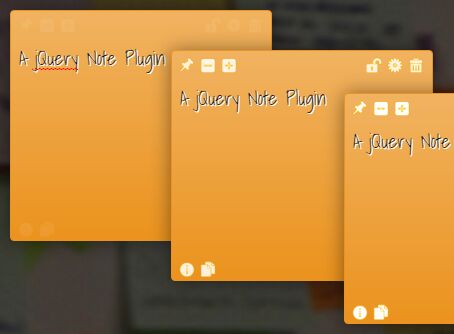
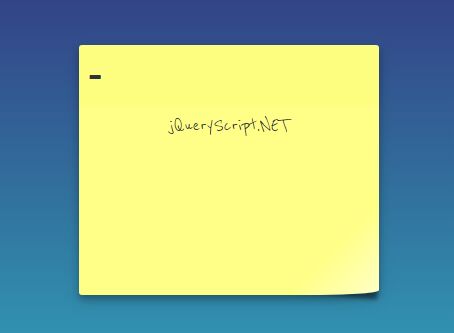
Post It All is a jQuery plugin which allows the visitor to create customizable, floating, draggable and resizable notes on the webpage.
Features:
- Drag and drop support based on jQuery UI.
- Allows to maximize and minimize note windows.
- WYSIWYG editor based on Trumbowyg.
- Tiny color picker based on Minicolors.
- Allows to save notes on client side using HTML5 local storage API.
- Also comes with a Chrome extension.
See also:
Basic usage:
1. Load jQuery library and other required resources in the webpage.
<!-- jQuery Library -->
<script src="jquery.min.js"></script>

<!-- jQuery UI -->
<link rel="stylesheet" href="jquery-ui.css">
<script src="libs/jquery-ui/jquery-ui.min.js"></script>

<!-- Trumbowyg editor -->
<link rel="stylesheet" href="trumbowyg.css">
<script src="trumbowyg.min.js"></script>

<!-- Minicolors -->
<link rel="stylesheet" href="jquery.minicolors.css">
<script src="jquery.minicolors.min.js"></script>
2. Download and include the jQuery Post It All plugin's JS and CSS files in the webpage.
<link rel="stylesheet" href="jquery.postitall.css">
<script src="jquery.postitall.js"></script>
3. Add a new sticky note in the top left corner of the webpage.
$.PostItAll.new("Hello World");
4. Global configurations to enable and disable features and change the notes behaviour.
$.fn.postitall.globals = {

  // Id note prefixe
  prefix          : '#PIApostit_',

  // Options: domain, page, all
  filter          : 'domain',

  // Save postit in local storage
  savable         : false,

  // Random color in new postits
  randomColor     : true,

  // Show or hide toolbar
  toolbar         : true,

  // Animation efect on hover over postit shoing/hiding toolbar options
  autoHideToolBar : true,

  // Set removable feature on or off
  removable       : true,

  // Confirmation before note remove
  askOnDelete     : true,

  // Set draggable feature on or off
  draggable       : true,

  // Set resizable feature on or off
  resizable       : true,

  // Set contenteditable and enable changing note content
  editable        : true,

  // Set options feature on or off
  changeoptions   : true,

  // Postit can not be modified
  blocked         : true,

  // true = minimized, false = maximixed
  minimized       : true,

  // Expand note
  expand          : true,

  // Allow to fix the note in page
  fixed           : true,

  // Create a new postit
  addNew          : true,

  // Show info icon
  showInfo        : true,

  // Allow paste html in contenteditor
  pasteHtml       : true,

  // Html editor (trumbowyg)
  htmlEditor      : true,

  // Automatic reposition of the notes when user resize screen
  autoPosition    : true,

  // Add arrow to notes : none, front, back, all
  addArrow        : 'back'

};
5. Note configurations for properties, style, features and events of the note.
$.fn.postitall.defaults = {

  // Note id
  id              : "",

  // Creation date
  created         : Date.now(),

  // Domain in the url
  domain          : window.location.origin,

  // Page in the url
  page            : window.location.pathname,

  // Browser informtion & OS name,
  osname          : navigator.appVersion,

  // Content of the note (text or html)
  content         : '',

  // Position absolute or fixed
  position        : 'absolute',

  // x coordinate (from left)
  posX            : '10px',

  // y coordinate (from top)
  posY            : '10px',

  // x coordinate (from right). This property invalidate posX
  right           : '',

  // Note total height
  height          : 200,

  // Note total width
  width           : 160,

  // Note resizable min-width
  minHeight       : 210,

  // Note resizable min-height
  minWidth        : 170,

  // Position when minimized/collapsed (internal use)
  oldPosition     : {},

  // Config note style
  style : {

    // General style in 3d format
    tresd           : true,

    // Background color in new postits when randomColor = false
    backgroundcolor : '#FFFA3C',

    // Text color
    textcolor       : '#333333',

    // Shadow in the text
    textshadow      : true,

    // Default font
    fontfamily      : 'verdana',

    // Default font size
    fontsize        : 'small',

    // Default arrow : none, top, right, bottom, left
    arrow           : 'none',
  },

  // By default, copy of global defaults
  features : $.fn.postitall.globals,

  // Note flags
  flags : {

    // If true, the note cannot be edited
    blocked         : false,

    // true = Collapsed note / false = maximixed
    minimized       : false,

    // true = Expanded note / false = normal
    expand          : false,

    // Set position fixed
    fixed           : false,

    // Higlight note
    highlight       : false,
  },

  //  Attach the note to al html element
  attachedTo : {

    // Where to attach
    element         : '',

    // Position relative to elemente : top, right, bottom or left
    position        : 'right',

    // Fix note to element when resize screen
    fixed           : true,

    // Show an arrow in the inverse position
    arrow           : true,
  },


  // Triggered after note creation
  onCreated: function(id, options, obj) { return undefined; },

  // Triggered on each change
  onChange: function (id) { return undefined; },

  // Triggered when note is clicked, dragged or resized
  onSelect: function (id) { return undefined; },

  // Triggered on double click
  onDblClick: function (id) { return undefined; },

  // Triggered on the end of dragging and resizing of a note
  onRelease: function (id) { return undefined; },

  // Triggered when a note is deleted
  onDelete: function (id) { return undefined; }

};
6. API.
// Create a new note.
// $(id).postitall('new', options, callback);
$.PostItAll.new(content, options, object, callback);

// Get or set the options of the created notes.
// $(id).postitall('options');
// $(id).postitall('options',options);
$.PostItAll.options(options);
$.PostItAll.options(id,options);

// Hide note.
// $(id).postitall('hide');
$.PostItAll.hide();
$.PostItAll.hide(id);

// Show note.
// $(id).postitall('show');
$.PostItAll.show();
$.PostItAll.show(id);

// Destroy a specific note or all the notes of your page.
// $(id).postitall('destroy');
$.PostItAll.destroy(inline, storage, domain);

// Change the global or note configuration.
$.PostItAll.changeConfig(type, opt);

// Restore global and/or note configuration to factory defaults.
$.PostItAll.restoreConfig(type);

// load and show all notes from the current domain/page.
$.PostItAll.load(callback, callbacks, highlight);

// save all the notes in the storage
$.PostItAll.save();

// return in the callback function the number of stored notes of the current domain.
$.PostItAll.length(callback);
Changelog:
v1.1.1 (2021-02-18)
- Upgrade jquery dependency to ~3.4.1
- Fix CSS issues with jquery UI
v1.1.0 (2018-01-22)
- Arrows hidden with default note configuration
v1.0.9 (2018-01-21)
- Css improvements & bug fixes
v1.0.9 (2016-08-31)
- bugfix
v1.0.8 (2016-08-30)
- Fixed Issue : "attachedTo" should support jQuery elements, not just selectors
v1.0.7 (2016-02-24)
- Improved hide-note feature
v1.0.6 (2016-02-10)
- Issues corrections
v1.0.5 (2016-01-03)
- Hide note feature & Hidden flag
This awesome jQuery plugin is developed by txusko. For more Advanced Usages, please check the demo page or visit the official website.