Smart Responsive Image Cropping/Resizing On Resize - jQuery FocusPoint
| File Size: | 1.26 MB |
|---|---|
| Views Total: | 3962 |
| Last Update: | |
| Publish Date: | |
| Official Website: | Go to website |
| License: | MIT |
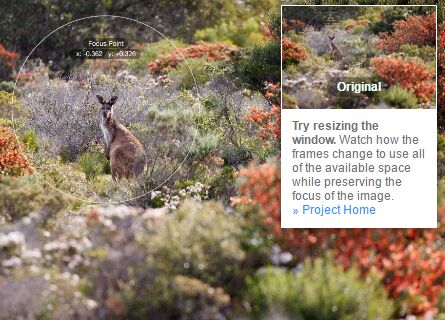
FocusPoint is a jQuery responsive image solution that intelligently crops/resizes/re-positions your image to fit its parent container on window resize. Unlike the CSS background-size:cover property, the plugin has the ability to make the specified 'Focus Points' always be visible when cropping and resizing.
See also:
Basic usage:
1. Put the main stylesheet focuspoint.css in the head section, and the JavaScript focuspoint.js at the bottom of the webpage.
<link rel="stylesheet" href="focuspoint.css">
<script src="//code.jquery.com/jquery.min.js"></script>
<script src="jquery.focuspoint.js"></script>
2. Set the focus point of your image using data attributes as follow:
<div class="focuspoint"
     data-focus-x="0.29"
     data-focus-y="-0.284"
     data-image-w="667"
     data-image-h="1000">
     <img src="image.jpg">
</div>
3. The JavaScript to keep the point of your image within the container when resized.
$('.focuspoint').focusPoint();
4. Set the throttle duration in milliseconds.
$('.focuspoint').focusPoint({
  throttleDuration: 17
});
5. API methods.
// Re-do calculations and re-position an image in it's frame.
// Call if container dimensions change.
$('.focuspoint').focusPoint('adjustFocus');

// Start window event listener and re-focus image when window is resized
$('.focuspoint').focusPoint('windowOn');

//  Stop re-focusing image when window is resized
$('.focuspoint').focusPoint('windowOff');
Change log:
2017-06-13
- JS update
This awesome jQuery plugin is developed by jonom. For more Advanced Usages, please check the demo page or visit the official website.