Dynamic Bootstrap Pagination Plugin with jQuery - bootpag
| File Size: | 15.2 KB |
|---|---|
| Views Total: | 191 |
| Last Update: | |
| Publish Date: | |
| Official Website: | Go to website |
| License: | MIT |
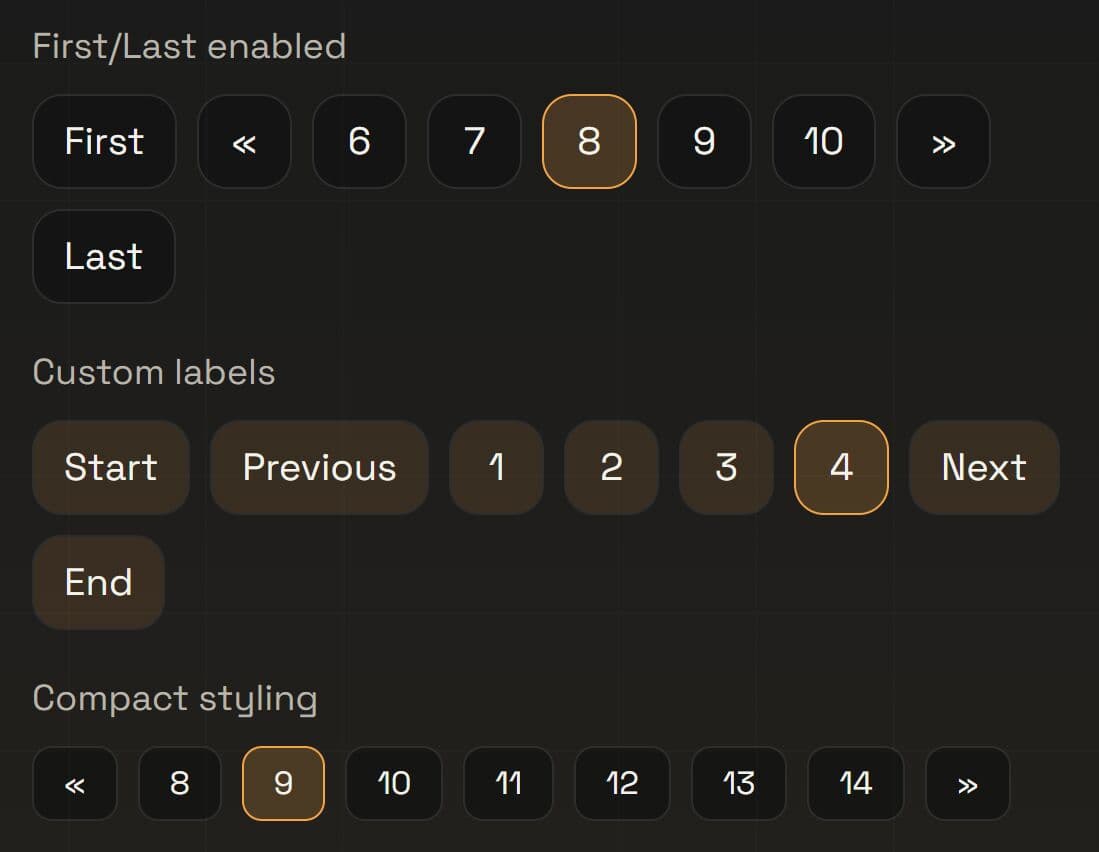
bootpag is a dynamic jQuery pagination plugin that generates dynamic, interactive pagination controls styled with Bootstrap or your own CSS.
The plugin calculates visible page ranges, updates the DOM automatically, and handles user click events to trigger server-side or client-side data fetches.
Features:
- Generates pagination controls that adapt to the total number of pages.
- Limits the number of visible page buttons.
- Shows Next/prev buttons that can jump through ranges when
leapsis enabled. - Supports optional first and last page buttons.
- Allows custom link templates with a variable placeholder for the page number.
- Works with Bootstrap’s pagination classes or any custom CSS.
- Triggers a clear
pageevent when a user clicks a pagination item.
How To Use It:
1. Download and load the bootpag jQuery plugin in your HTML document.
<!-- jQuery is required -->
<script src="/path/to/cdn/jquery.slim.min.js"></script>

<!-- Bootstrap is OPTIONAL but Recommended -->
<link rel="stylesheet" href="/path/to/cdn/bootstrap.min.css" />
<script src="/path/to/cdn/bootstrap.bundle.min.js"></script>

<!-- jQuery bootpag plugin -->
<script src="/path/to/dist/jquery.bootpag.min.js"></script>

<!-- Or from a CDN -->
<script src="https://cdn.jsdelivr.net/npm/bootpag@latest/dist/jquery.bootpag.min.js"></script>
<script src="https://unpkg.com/bootpag@latest/dist/jquery.bootpag.min.js"></script>
2. Place a container element where you want the pagination to appear. A second container holds the page content you plan to update:
<!-- Content area that updates when the user navigates -->
<div id="article-list">Article content loads here.</div>

<!-- bootpag renders its <ul> inside this container -->
<nav id="pagination-container" aria-label="Article navigation"></nav>
3. Call .bootpag() on the container element and chain a page event listener to handle page changes:
$('#pagination-container').bootpag({
  total: 12,        // Total number of pages in the set
  page: 1,          // Start on page 1
  maxVisible: 5,    // Show at most 5 page buttons at once
  leaps: true       // Next/prev buttons jump through full 5-page ranges
}).on('page', function(event, num) {
  // Fires each time the user clicks a page number, next, or prev
  // Use 'num' to request the correct page from your server
  $('#article-list').html('Loading page ' + num + '...');

  // Example: fetch content from a server endpoint
  $.get('/api/articles?page=' + num, function(data) {
    $('#article-list').html(data);
  });
});
4. Generate SEO-Friendly URLs. Pass an href template to generate real URLs for each page link. bootpag replaces the hrefVariable placeholder with the actual page number:
$('#pagination-container').bootpag({
  total: 12,
  page: 1,
  maxVisible: 5,
  // bootpag replaces {{number}} with 1, 2, 3...
  href: '/articles/page/{{number}}',
  // The placeholder string used in the href template
  hrefVariable: '{{number}}'
});
5. Turn on the next/prev controls with firstLastUse. You can supply any HTML string as the button label:
$('#pagination-container').bootpag({
  total: 20,
  page: 1,
  maxVisible: 5,
  firstLastUse: true,
  first: '<span aria-hidden="true">«</span>',
  last: '<span aria-hidden="true">»</span>'
});
6. In projects that do not use Bootstrap, override the default CSS class names to match your own stylesheet:
$('#pagination-container').bootpag({
  total: 8,
  page: 1,
  wrapClass: 'my-pager',       // Class on the <ul> wrapper
  activeClass: 'is-active',    // Class on the current page <li>
  disabledClass: 'is-disabled', // Class on disabled navigation buttons
  itemClass: 'pager-item',     // Class added to every <li>
  linkClass: 'pager-link'      // Class added to every <a>
});
7. All default configuration options:
total(number): Total number of pages in the set.page(number): Current active page on initialization. Uses a 1-based index.maxVisible(number): Maximum number of visible page buttons. Defaults to the value oftotal.leaps(boolean): Whentrue, the next and previous buttons advance by the fullmaxVisiblerange. Defaults totrue.href(string): Href template applied to every page link. Defaults to'javascript:void(0);'.hrefVariable(string): Placeholder insidehrefthat bootpag replaces with each page number. Defaults to'{{number}}'.next(string | null): HTML content for the next button. Set tonullto hide the button. Defaults to'»'.prev(string | null): HTML content for the previous button. Set tonullto hide the button. Defaults to'«'.firstLastUse(boolean): Shows or hides the first and last page buttons. Defaults tofalse.first(string): HTML content for the first-page button. Defaults to'<span aria-hidden="true">←</span>'.last(string): HTML content for the last-page button. Defaults to'<span aria-hidden="true">→</span>'.wrapClass(string): CSS class applied to the generated<ul>element. Defaults to'pagination'.activeClass(string): CSS class applied to the currently active page<li>. Defaults to'active'.disabledClass(string): CSS class applied to disabled navigation buttons. Defaults to'disabled'.nextClass(string): CSS class applied to the next button<li>. Defaults to'next'.prevClass(string): CSS class applied to the previous button<li>. Defaults to'prev'.firstClass(string): CSS class applied to the first-page button<li>. Defaults to'first'.lastClass(string): CSS class applied to the last-page button<li>. Defaults to'last'.itemClass(string): CSS class added to every page number<li>. Defaults to'page-item'for Bootstrap 4+ compatibility.linkClass(string): CSS class added to every page number<a>. Defaults to'page-link'for Bootstrap 4+ compatibility.
$('#pagination-container').bootpag({
total: 0,
page: 1,
maxVisible: null,
leaps: true,
href: 'javascript:void(0);',
hrefVariable: '{{number}}',
next: '»',
prev: '«',
firstLastUse: false,
first: '<span aria-hidden="true">←</span>',
last: '<span aria-hidden="true">→</span>',
wrapClass: 'pagination',
activeClass: 'active',
disabledClass: 'disabled',
nextClass: 'next',
prevClass: 'prev',
lastClass: 'last',
firstClass: 'first',
itemClass: 'page-item',
linkClass: 'page-link'
});
Alternatives:
- 10 Best Pagination Components In JavaScript
- 10 Best JavaScript Plugins To Paginate Large HTML Table
- Discover more jQuery plugins for Bootstrap 5 framework
FAQs:
Q: Does bootpag load content automatically, or does the developer handle that?
A: bootpag fires a page event with the target page number. You handle content loading inside that event listener. The plugin manages only the pagination UI state.
Q: My page numbers are not updating correctly after I reinitialize bootpag with new options.
A: Call .bootpag() again on the same container with the updated options. bootpag merges the new options with the stored settings using jQuery's .data() store. If the new total is lower than the current active page, set page explicitly in the new call to reset the active state.
Q: Can I run two independent pagination components on the same page?
A: Yes. Initialize .bootpag() on two separate container elements. Each instance keeps its own settings in its own jQuery data store. The page event triggers on the owner element only.
Q: The next and previous buttons are not jumping through full ranges. Why?
A: Confirm that leaps is set to true and that maxVisible is less than total. If maxVisible equals or exceeds total, all pages are visible at once. The leap behavior only activates when the visible window is smaller than the full page count.
Q: How do I hide the prev button on the first page and the next button on the last page?
A: bootpag handles this automatically. It adds the disabledClass to the prev button when the active page equals 1, and to the next button when the active page equals total. Style or filter those disabled states in your CSS to hide them entirely.
Changelog:
v5.0.1 (2026-04-13)
- Bugfixes
This awesome jQuery plugin is developed by botmonster. For more Advanced Usages, please check the demo page or visit the official website.