jQuery Plugin For Floating Sidebar Drawer Panel - Side Slider
| File Size: | 4.73 KB |
|---|---|
| Views Total: | 3593 |
| Last Update: | |
| Publish Date: | |
| Official Website: | Go to website |
| License: | MIT |
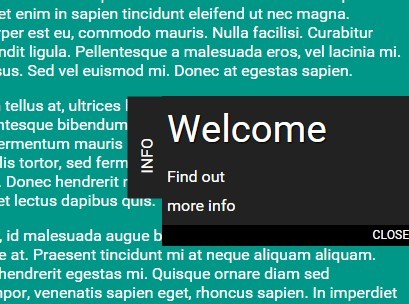
Side Slider is a minimalist jQuery plugin for creating a floating sidebar drawer panel that slides our from the right side of the website on hover.
See also:
- jQuery Plugin To Create Sliding Drawer Panels - cabinet
- jQuery Plugin For Slide Out Tab contact - tabSlideOut
How to use it:
1. Place the side-slider.css stylesheet in the head for basic styles.
<link href="css/side-slider.css" rel="stylesheet">
2. Create a sidebar drawer panel that sticks to the right hand side of your webpage.
<div class="sideslider" id="sideslider">
  <div class="sideslider-tab"> Label </div>
  <a href="#">
    <div id="sideslider-smartbutton">
      <div id="sideslider-text">
        <span class="header">Title</span>
        <span class="line">Content</span>
      </div>
      <div class="sideclear"></div>
    </div>
  </a>
  <div class="sideslider-close sideslider-close_en">Close</div>
</div>
3. Place jQuery library and the jquery.side-slider.js script at the bottom of the web page.
<script src="//code.jquery.com/jquery-1.11.3.min.js"></script>
<script src="js/jquery.side-slider.js"></script>
4. Initialize the plugin.
$('#sideslider').sideSlider();
5. Default settings.
$('#sideslider').sideSlider({

  // animation speed
  speed        : 1,

  // callback
  complete : null

});
This awesome jQuery plugin is developed by montross50. For more Advanced Usages, please check the demo page or visit the official website.