Able Player: Accessible HTML5 Media Player with Captions
| File Size: | 199 KB |
|---|---|
| Views Total: | 142 |
| Last Update: | |
| Publish Date: | |
| Official Website: | Go to website |
| License: | MIT |
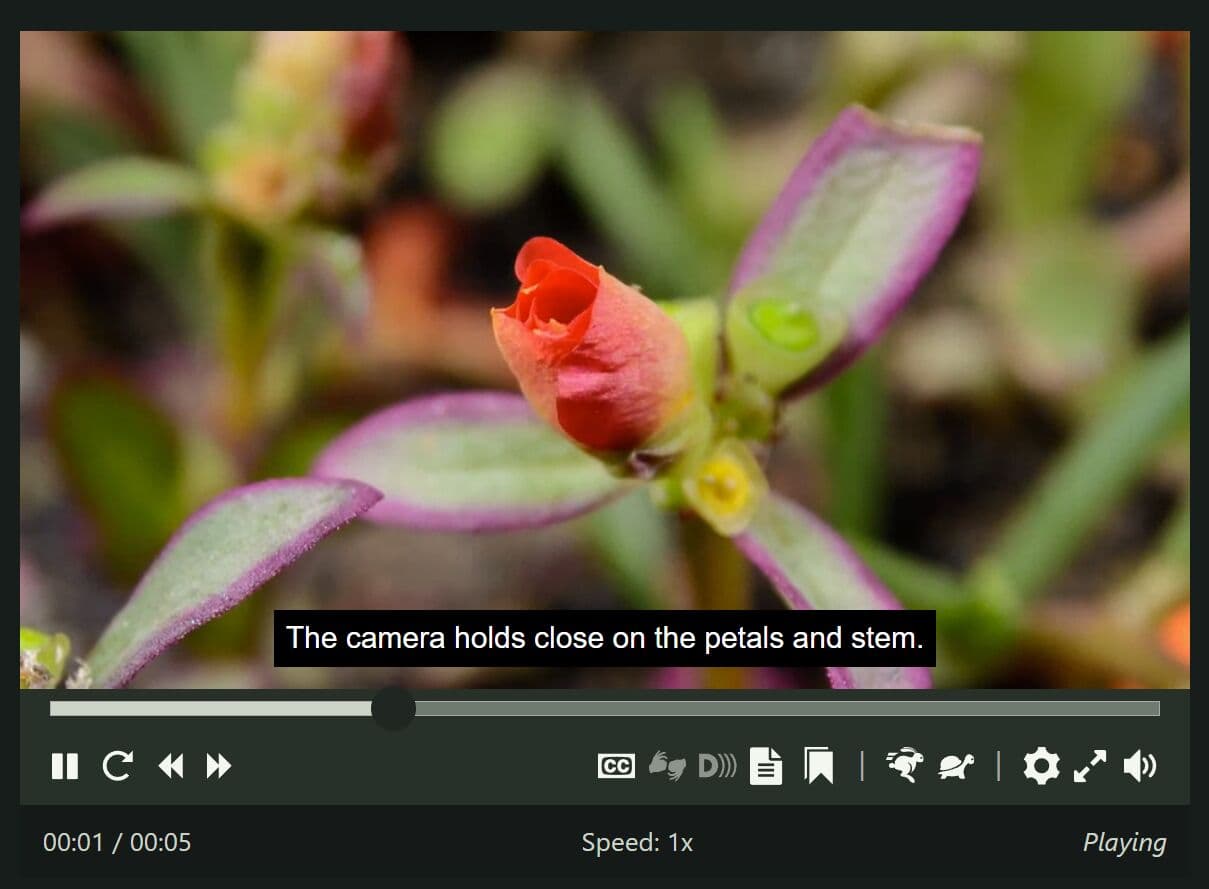
Able Player is a jQuery-based HTML5 media player for accessible audio and video playback. It replaces basic browser controls with keyboard-operable controls, WebVTT captions, chapters, audio descriptions, interactive transcripts, playback-rate controls, and user preferences.
You can use it for self-hosted media, YouTube videos, Vimeo videos, and playlists when a project needs a transcript or timed-text features that native <video> controls do not supply.
Configuration happens through data-* attributes on the media element itself. There's no JavaScript options object to pass in, so most of the setup work is just markup.
Features:
- Plays both audio and video through the native HTML5 media elements.
- Builds a full set of keyboard-controlled player buttons with proper screen reader labels.
- Displays closed captions and subtitles from standard WebVTT files.
- Splits video into chapters for quick navigation through long content.
- Reads audio description aloud using the browser's built-in speech engine.
- Builds an interactive transcript directly from your caption, chapter and description tracks.
- Highlights the active line in the transcript during playback.
- Plays YouTube and Vimeo videos inside the same accessible controller.
- Lets viewers slow down or speed up playback to match their pace.
- Saves every user preference in the browser for repeat visits.
- Falls back to plain HTML5 markup or a custom message if playback fails.
- Syncs a separate video window for sign language interpretation.
- Supports an audio or video playlist with thumbnails and per-item captions.
- 15+ translated languages, including German, Japanese and Brazilian Portuguese.
How To Use It:
Install The Browser Build
Copy the project’s build directory to your site. Load the compiled stylesheet first, then jQuery, then the Able Player script. The standard browser build detects media elements that carry data-able-player; it does not use a $(selector).pluginName() initialization call.
<link rel="stylesheet" href="/vendor/ableplayer/build/ableplayer.min.css">
<script src="/path/to/cdn/jquery.slim.min.js"></script>
<script src="/vendor/ableplayer/build/ableplayer.min.js"></script>
The default bundle already contains DOMPurify. Use the files from build/separate-dompurify only when the site loads DOMPurify as a separate dependency. Add js-cookie before Able Player when media preferences must use cookies. The default preference store uses localStorage.
Install From NPM
The project also includes an ES module bundle for package-based builds.
npm install ableplayer
import 'ableplayer/styles/ableplayer.css';
import AblePlayer from 'ableplayer';

const media = document.getElementById('course-introduction');
const player = new AblePlayer(media);
Self-Hosted Training Video With Captions, Chapters, And Transcript
Add a unique id and the data-able-player attribute to the media element. Each local timed-text track uses WebVTT. The external transcript and chapter containers must use the same IDs named in the player attributes.
<video id="security-briefing"
  data-able-player
  data-lang="en"
  data-transcript-div="security-briefing-transcript"
  data-chapters-div="security-briefing-chapters"
  playsinline
  preload="metadata"
  poster="/media/security-briefing-poster.jpg">
  <source src="/media/security-briefing.webm" type="video/webm">
  <source src="/media/security-briefing.mp4" type="video/mp4">
  <track kind="captions" src="/media/security-briefing.en.vtt"
    srclang="en" label="English" default>
  <track kind="chapters" src="/media/security-briefing-chapters.en.vtt"
    srclang="en" label="Chapters">
  <track kind="descriptions" src="/media/security-briefing-descriptions.en.vtt"
    srclang="en" label="Audio descriptions">
  <p><a href="/media/security-briefing.mp4">Download the training video</a>.</p>
</video>

<div id="security-briefing-chapters"></div>
<div id="security-briefing-transcript"></div>
The caption track adds caption controls. The chapter track populates the chapter container. Caption, chapter, and description cues supply the transcript content.
YouTube Video With Local WebVTT Tracks
Use data-youtube-id on a <video> element to load a YouTube video. Keep caption, subtitle, chapter, and description tracks on the site when the page needs transcript generation, caption search, or the full caption-preference set.
<video id="release-walkthrough"
  data-able-player
  data-youtube-id="REPLACE_WITH_11_CHARACTER_ID"
  data-youtube-nocookie="true"
  data-transcript-div="release-walkthrough-transcript"
  data-captions-position="below"
  playsinline>
  <track kind="captions" src="/media/release-walkthrough.en.vtt"
    srclang="en" label="English" default>
  <track kind="chapters" src="/media/release-walkthrough-chapters.en.vtt"
    srclang="en" label="Chapters">
</video>

<div id="release-walkthrough-transcript"></div>
Local track files take precedence inside Able Player. This route retains the player’s local WebVTT workflow even when the main video comes from YouTube or Vimeo.
Audio Playlist
A playlist points at the media element through data-player. Each item supplies source data through .able-source elements and optional timed-text data through .able-track elements.
<audio id="release-notes-audio"
  data-able-player
  data-show-now-playing="true"
  data-transcript-div="release-notes-transcript">
</audio>

<ol class="able-playlist" data-player="release-notes-audio" data-embedded>
  <li data-poster="/media/episode-12.jpg">
    <span class="able-source" data-type="audio/mpeg"
      data-src="/media/episode-12.mp3"></span>
    <span class="able-source" data-type="audio/ogg"
      data-src="/media/episode-12.ogg"></span>
    <span class="able-track" data-kind="captions"
      data-src="/media/episode-12.en.vtt" data-srclang="en"
      data-label="English"></span>
    <button type="button">Episode 12: Release Notes</button>
  </li>
  <li data-poster="/media/episode-13.jpg">
    <span class="able-source" data-type="audio/mpeg"
      data-src="/media/episode-13.mp3"></span>
    <span class="able-source" data-type="audio/ogg"
      data-src="/media/episode-13.ogg"></span>
    <button type="button">Episode 13: Deployment Notes</button>
  </li>
</ol>

<div id="release-notes-transcript"></div>
Use a single media type per playlist. A playlist may mix local video and YouTube video items. Vimeo items do not work inside Able Player playlists.
Create And Dispose A Player In A Dynamic View
The automatic scan runs once after the browser bundle loads. Dynamic media nodes need direct construction after the node enters the document. Call dispose() before the view removes the player.
const media = document.getElementById('dynamic-event-replay');
const player = new AblePlayer(media);

// Run this before the view removes the player and its media element.
player.dispose();
Client-render the player after window exists. Server-rendered applications need a client-side mount hook for construction.
Media Element Attributes:
Required And General Attributes
id: Supplies the unique media identifier used by playlists and external containers. Type: String. Required: Yes.data-able-player: Marks a static<audio>or<video>element for automatic initialization. Type: Boolean attribute. Required: Yes for automatic initialization.data-debug: Writes player diagnostics to the browser console. Type: Boolean attribute. Default: Off.autoplay: Starts the selected media when browser autoplay rules permit it. Type: Boolean attribute. Default: Off.loop: Repeats a single item or the full playlist. Type: Boolean attribute. Default: Off.playsinline: Keeps supported video playback inside the page context. Type: Boolean attribute. Default: Off.preload: Requests a browser preload mode such asmetadataorauto. Type: String. Default: Browser-controlled.width: Sets the video display width in pixels. Type: Integer. Default: Fits the container when omitted.height: Sets the video display height in pixels. Type: Integer. Applies to:<video>.data-width: Sets a player width for audio or video. Type: Integer. Default: Fits the container when omitted.poster: Defines a video poster image. Type: URL. Applies to:<video>.data-poster: Defines an image for an audio player. Type: URL. Applies to:<audio>.data-poster-alt: Sets alternative text for the audio poster image. Type: String. Applies to:<audio>.data-heading-level: Overrides the off-screen player heading level. Values1through6set a heading level.0suppresses the injected heading. Type: Integer.data-hide-controls: Hides visible controls during playback and reveals them after keyboard or pointer activity. Type: Boolean. Default: Off.data-skin: Selects the control layout. Use2020for the default layout orlegacyfor the older two-row control layout. Type: String. Default:2020.data-speed-icons: Choosesanimalsorarrowsfor slower and faster controls. Type: String. Default:animals.data-start-time: Seeks to a starting time in seconds. Type: Number. Default:0.data-volume: Sets the initial volume on a0through10scale. Type: Number. Default:7.data-seek-interval: Sets a fixed forward and rewind step in seconds. Type: Positive integer. Default: Player-calculated.data-show-now-playing: Controls the selected-track label for a playlist. Type: Boolean. Applies to: Playlists.data-lang: Selects a supported two-character player language code. Type: String. Default: Page language or English.data-allow-fullscreen: Removes the fullscreen control when set tofalse. Type: Boolean. Default:true. Applies to:<video>.data-steno-mode: Keeps player keyboard shortcuts available inside transcription text areas. Type: Boolean. Default: Off.data-steno-iframe-id: Identifies an iframe that receives steno-mode shortcut support. Type: Element ID. Requires:data-steno-mode="true".data-test-fallback: Tests fallback output. Use1to simulate player construction failure or2to simulate missing HTML5 media support. Type: Integer. Use: Testing only.
Captions, Descriptions, And Transcript Attributes
data-captions-position: Places captionsbelowthe video or as anoverlay. Type: String. Default:below.data-state-captions: Starts available captionsonoroff. Stored user preferences take precedence on later visits. Type: String.data-descriptions-audible: Stops browser and screen-reader narration of description-track text when set tofalse. Type: Boolean. Default:true.data-desc-reader: Selectsbrowserorscreenreadernarration for text descriptions. Type: String. Default:browser.data-state-descriptions: Starts available descriptionsonoroff. Type: String. Default:off.data-desc-pause-default: Controls the default pause behavior during text descriptions. Useonoroff. Type: String. Default:on.data-transcript-div: Writes an automatically generated transcript to an external container. Type: Element ID. Requires: Caption or subtitle tracks.data-transcript-src: Uses a manually authored interactive transcript in an existing container. Type: Element ID.data-include-transcript: Removes the popup transcript control when set tofalse. Type: Boolean. Default: Popup transcript when timed text exists and no external transcript target exists.data-transcript-title: Replaces the transcript heading. Type: String. Default:Transcript.data-lyrics-mode: Preserves line breaks inside transcript captions for lyric or poetry content. Type: Boolean. Default: Off.
Chapter, Metadata, And Caption-Search Attributes
data-chapters-div: Writes generated chapters to an external container. Type: Element ID. Requires: A WebVTT chapters track.data-use-chapters-button: Removes the chapter toggle from the controller when set tofalse. Type: Boolean. Default:true.data-chapters-title: Replaces the chapter heading. An empty value removes the title. Type: String. Default:Chapters.data-chapters-default: Starts playback at the named chapter cue. Type: String. Requires: A matching chapter identifier in the WebVTT file.data-seekbar-scope: Uses the fullvideoduration or the activechapterduration for seekbar scope. Type: String. Default:video.data-meta-type: Selectstextorselectorhandling for a WebVTT metadata track. Type: String. Required: Metadata workflow.data-meta-div: Names the external output element fortextmetadata. Type: Element ID. Required: Text metadata workflow.data-search-div: Names the external search-results container. Type: Element ID. Required: Caption-search workflow.data-search: Supplies an initial caption-search term or terms. Type: String.data-search-lang: Selects the two-character subtitle or caption language for search. Type: String. Default: Page language.data-search-ignore-caps: Switches caption search to case-insensitive matching. Type: Boolean. Default: Off.
Hosted Video, Described Media, And Sign-Language Attributes
data-youtube-id: Loads a YouTube video from an 11-character ID or accepted YouTube URL. Type: String. Applies to:<video>.data-youtube-desc-id: Names a described YouTube version for the Description control. Type: String. Applies to:<video>.data-youtube-nocookie: Uses the YouTube no-cookie host when set totrue. Type: Boolean. Applies to:<video>.data-vimeo-id: Loads a Vimeo video from its ID or URL. Type: String. Applies to:<video>.data-vimeo-desc-id: Names a described Vimeo version for the Description control. Type: String. Applies to:<video>.data-sign-div: Places synchronized sign-language video in a fixed page container. Type: Element ID.data-desc-src: Points a<source>element to a described media file in the same format. Type: URL. Applies to:<source>.data-sign-src: Points a<source>element to a synchronized sign-language media file in the same format. Type: URL. Applies to:<source>.data-youtube-sign-src: Names a YouTube sign-language video for local or remote primary video workflows. Type: String. Applies to:<video>or relevant source markup.
Playlist Markup Attributes
class="able-playlist": Marks an ordered or unordered list as a playlist. Type: CSS class. Required: Yes.data-player: References theidof the audio or video element. Type: String. Required: Yes.data-embedded: Places the playlist inside the player layout. Type: Boolean attribute. Default: External list.data-poster: Sets the poster for an individual playlist item. Type: URL. Applies to: Playlist<li>..able-source: Supplies a playlist source through attributes such asdata-src,data-type,data-desc-src, ordata-sign-src. Type:<span>..able-track: Supplies a playlist timed-text track through attributes such asdata-kind,data-src,data-srclang, anddata-label. Type:<span>.
Lifecycle API:
new AblePlayer(media): Creates a player for an existing media element that entered the DOM after the automatic scan. Parameters: DOM media element or jQuery media object. Returns: Able Player instance.player.dispose(): Removes instance-level dialogs and clears the player from Able Player’s global instance collection. Parameters: None. Returns: Nothing.
Implementation Tips:
- Use valid WebVTT files for captions, subtitles, chapters, descriptions, and metadata. Invalid cue timing breaks transcript order and timed-text controls.
- Keep local
<track>files beside YouTube and Vimeo videos when the page needs transcripts, caption search, or caption appearance preferences. - Use
playsinlinefor inline video contexts on supported mobile browsers. The player’s companion controls and transcript remain part of the page layout. - Provide MP4 plus WebM for local video when the project needs broader codec coverage. Provide MP3 plus OGG for local audio under the same constraint.
- Set server MIME types correctly for
.mp4,.webm,.mp3,.ogg, and.vttfiles. Incorrect media MIME types can prevent playback. - Update a strict Content Security Policy before embedding YouTube or Vimeo. The project’s CSP examples list the required script, frame, image, and media origins.
Alternatives And Related Resources:
- MediaElement.js: Review another HTML5 audio and video player when the project needs a broader general-purpose media-control layer.
- Acorn Media Player: Inspect an older jQuery and jQuery UI media player with accessibility-oriented controls and transcript support.
- jQuery video player resources: Browse related video-player plugins for legacy jQuery sites.
- media-chrome: Use Web Components for a custom control interface in framework-neutral applications.
- vLite.js: Compare a vanilla JavaScript option for custom HTML5, YouTube, and Vimeo player interfaces.
This awesome jQuery plugin is developed by ableplayer. For more Advanced Usages, please check the demo page or visit the official website.