Easy jQuery Image Cropper - Cropimg.js
| File Size: | 81.3 KB |
|---|---|
| Views Total: | 4754 |
| Last Update: | |
| Publish Date: | |
| Official Website: | Go to website |
| License: | MIT |
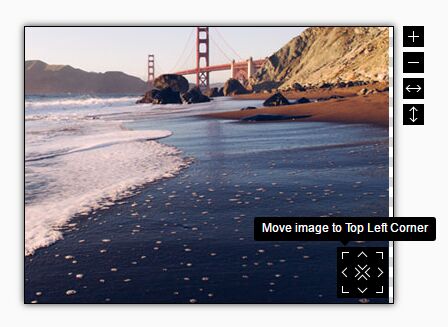
Cropimg.js is a lightweight jQuery image cropping plugin that allows you to zoom, resize, move and crop a given image within a fixed-size crop region.
How to use it:
1. To use the image cropper start with adding the following JavaScript and CSS files in your html file:
<link rel="stylesheet" href="cropimg.css">
<script src="//code.jquery.com/jquery.min.js"></script>
<script src="jquery.mousewheel.js"></script>
<script src="cropimg.jquery.js"></script>
2. Embed an image you want to crop into the webpage.
<img src="cropimg.jpg" alt="crop img" class="cropimg">
3. Activate the image cropper by just calling the function on the image.
$('img.cropimg').cropimg({
  // settings here
});
4. All default settings to customize the image cropper and cropped image.
$('img.cropimg').cropimg({

  // The maximum width of the image container.
  maxContainerWidth: null,

  // Width of the cropped image
  resultWidth: 100,

  // Height of the cropped image
  resultHeight: 100,

  // Prefix of the inputs, where plugin introduce values of cropping.
  inputPrefix: '',

  // Zoom delay in ms
  zoomDelay: 400,

  // one mouse scroll = 10 clicks on Zoom in button
  mouseWheelZoomTimes: 10,

  // Zoom step
  zoomStep: 1,

  // Shows tips on hover
  showBtnTips: true,

  // Disable/enable buttons
  displayZoomingButtons: true,
  displayFixingPositionsButtons: true,
  displayFixingSizeButtons: true,

  // Fading time in ms
  btnTipsFadeTime: 100,

  // Custom text
  textBtnTipZoomIn: 'Zoom in',
  textBtnTipZoomOut: 'Zoom out',
  textBtnTipRTW: 'Resize to container width',
  textBtnTipRTH: 'Resize to container height',
  textBtnTipFPTL: 'Move image to Top Left Corner',
  textBtnTipFPTC: 'Move image to Top Center',
  textBtnTipFPTR: 'Move image to Top Right Corner',
  textBtnTipFPCL: 'Move image to Center Left',
  textBtnTipFPCC: 'Move image to Center of container',
  textBtnTipFPCR: 'Move image to Center Right',
  textBtnTipFPBL: 'Move image to Bottom Left Corner',
  textBtnTipFPBC: 'Move image to Bottom Center',
  textBtnTipFPBR: 'Move image to Bottom Right Corner',

  // Callback functions
  onInit: function() {},
  onChange: function(w, h, x, y, img) {}

});
This awesome jQuery plugin is developed by requtize. For more Advanced Usages, please check the demo page or visit the official website.