Simple jQuery Image Zoom, Pan and Crop Plugin - Cropit
| File Size: | 34.3 KB |
|---|---|
| Views Total: | 29911 |
| Last Update: | |
| Publish Date: | |
| Official Website: | Go to website |
| License: | MIT |
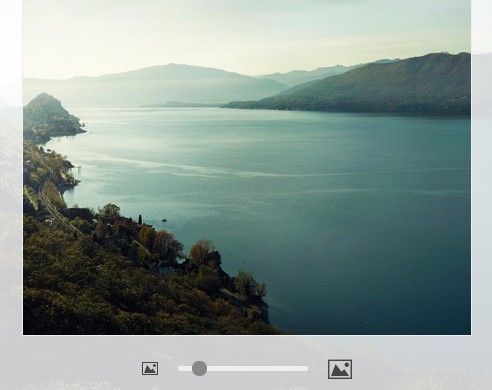
Cropit is a jQuery & canvas based image cropping plugin which allows to crop a local image with image zoom and image pan support. Best for the cases where you want users to upload images of a specific size and ratio.
See also:
- Facebook Style Image Cropping Plugin For jQuery - Drag'n'crop
- Simple jQuery Client Side Image Cropping Plugin - Awesome Cropper
- Easy jQuery Image Cropping Plugin with Live Previews - Image Cropper
- jQuery Client Side Image Cropping Plugin with Canvas and CSS3 - Simple Cropper
- jQuery Plugin For Cropping Images - Fakecrop
- jQuery Plugin for Image Cropping Functionality - imgAreaSelect
Basic Usage:
1. Include the jQuery javascript library and the jQuery cropit plugin in your Html page.
<script src="//ajax.googleapis.com/ajax/libs/jquery/2.1.1/jquery.min.js"></script>
<script src="dist/jquery.cropit.js"></script>
2. Create the Html for a basic image cropper with a zoom slider.
<div class="image-editor">
  <input type="file" class="cropit-image-input">
  <div class="cropit-image-preview-container">
    <div class="cropit-image-preview"></div>
  </div>
  <div class="image-size-label"> Resize image </div>
  <input type="range" class="cropit-image-zoom-input">
</div>
3. Initialize the image cropper with options.
$(function() {
$('.image-editor').cropit({
exportZoom: 1,
imageBackground: true,
imageBackgroundBorderSize: 100,
imageState: {
src: 'http://lorempixel.com/500/400/' // renders an image by default
}
});
});
4. The image cropping plugin is fully customizable via CSS. The sample CSS styles:
.cropit-image-preview {
  background-color: #f8f8f8;
  background-size: cover;
  border: 1px solid #ccc;
  border-radius: 3px;
  margin-top: 7px;
  width: 250px;
  height: 250px;
  cursor: move;
}

.cropit-image-background {
  opacity: .2;
  cursor: auto;
}

.image-size-label { margin-top: 0.6rem; }

input {
  /* Use relative position to prevent from being covered by image background */
  position: relative;
  z-index: 10;
}
5. Options and defaults.
// The ratio between the desired image size to export and the preview size.
exportZoom: 1,

// Width of image preview in pixels.
width: null,

// Height of image preview in pixels.
height: null,

// Displays the background image beyond the preview area.
imageBackground: false,

// Width of background image border in pixels.
imageBackgroundBorderWidth: 0,

// When set to true, you can load an image by dragging it from local file browser onto the preview area.
allowDragNDrop: true,

// This options decides the minimal zoom level of the image.
// If set to 'fill', the image has to fill the preview area, i.e. both width and height must not go smaller than the preview area.
// If set to 'fit', the image can shrink further to fit the preview area, i.e. at least one of its edges must not go smaller than the preview area.
minZoom: 'fill',

// Determines how big the image can be zoomed.
// E.g. if set to 1.5, the image can be zoomed to 150% of its original size.
maxZoom: 1,

// Determines the zoom when an image is loaded.
// When set to 'min', image is zoomed to the smallest when loaded.
// When set to 'image', image is zoomed to 100% when loaded.
initialZoom: 'min',

// When set to true, you can freely move the image instead of being bound to the container borders
freeMove: false,

// When set to 'reject', onImageError would be called when cropit loads an image that is smaller than the container.
// When set to 'allow', images smaller than the container can be zoomed down to its original size, overiding \`minZoom\` option.
// When set to 'stretch', the minimum zoom of small images would follow \`minZoom\` option.
smallImage: 'reject',

// Set to true if you need to crop image served from other domains.
allowCrossOrigin: false,

// Called when user selects a file in the select file input.
onFileChange: function(){},

// Called when FileReader encounters an error while loading the image file.
onFileReaderError: function(){},

// Called when image starts to be loaded.
onImageLoading: function(){},

// Called when image is loaded.
onImageLoaded: function(){},

// Called when image cannot be loaded.
onImageError: function(){},

// Called when image the zoom slider is enabled.
onZoomEnabled: function(){},

// Called when image the zoom slider is disabled.
onZoomDisabled: function(){},

// Called when zoom changes.
onZoomChange: function(){},

// Called when image offset changes.
onOffsetChange: function(){},
6. API.
// Returns the cropped image in Data URI format.
// The second argument `options` takes the following keys:
// - [type='image/png'] exported image type.
// - [quality=.75] exported image quality, only works when type is
//     'image/jpeg' or 'image/webp'.
// - [originalSize=false] when set to true, export cropped part in
//     original size, overriding exportZoom.
// - [fillBg='#fff'] if `type` is 'image/jpeg', this color will be
//     filled as the background of the exported image.
$imageCropper.cropit('export', {
  type: 'image/jpeg',
  quality: .9,
  originalSize: true
});

// Returns whether the current image is big enough to be zoomable.
// Note that an image cannot be zoomed to larger than its original size.
$imageCropper.cropit('isZoomable');

// Returns the source of current image.
// If the image is loaded through the file input, the image source will be
// in Data URI format.
$imageCropper.cropit('imageSrc');

// Sets image source.
$imageCropper.cropit('imageSrc', 'http://placekitten.com/g/1280/800');

// Returns the current image size.
// E.g. { width: 1920, height: 1080 }
$imageCropper.cropit('imageSize');

// Returns the current preview area size.
// E.g. { width: 600, height: 400 }
$imageCropper.cropit('previewSize');

// Sets preview area size.
$imageCropper.cropit('previewSize', { width: 800, height: 450 });

// Returns the image offset of the current cropping, with respect to the
// preview area.
// E.g. { x: -10, y: -15 }
$imageCropper.cropit('offset');

// Sets image offset.
$imageCropper.cropit('offset', { x: -18, y: -54 });

// Returns the current zoom.
$imageCropper.cropit('zoom');

// Sets image zoom.
$imageCropper.cropit('zoom', .75);

// Returns current initialZoom value.
$imageCropper.cropit('initialZoom');

// Sets initialZoom value.
$imageCropper.cropit('initialZoom', 'image');

// Returns current exportZoom value.
$imageCropper.cropit('exportZoom');

// Sets exportZoom value.
$imageCropper.cropit('exportZoom', 2);

// Returns current minZoom value.
$imageCropper.cropit('minZoom');

// Sets minZoom value.
$imageCropper.cropit('minZoom', 'fit');

// Returns current maxZoom value.
$imageCropper.cropit('maxZoom');

// Sets maxZoom value.
$imageCropper.cropit('maxZoom', 1.25);

// Disables the cropper.
// Unbinds event listeners from preview, zoom slider and file input, and
// adds `cropit-disabled` class to `$imageCropper`.
$imageCropper.cropit('disable');

// Re-enables the cropper.
// Does the opposite to `disable` method.
$imageCropper.cropit('reenable');
Change logs:
v0.5.1 (2016-03-02)
- Markup structure and class name changes. Importantly, changed .cropit-image-preview to .cropit-preview, .cropit-image-background-container to .cropit-preview-background-container, and .cropit-image-background to .cropit-preview-background. .cropit-image-preview-container element is no longer needed, and all you need is a .cropit-preview (previously .cropit-image-preview) whether or not you want image background beyond the preview.
- Added rotation APIs rotateCW and rotateCCW, which rotates the image by 90 degrees clockwise/counterclockwise. If, after rotated by 90 degrees, the dimension of the image no longer meets the requirements, it would be rotated by 180 degrees.
- Render image using CSS transformation, which drastically improved performance.
- Now remote images are loaded through AJAX and rendered as data URI strings, which addresses CORS issues. allowCrossOrigin option is no longer necessary and therefore removed.
- Fixed bug that when preview has border and border-box sized, previewSize is wrong
- Fixed bug that setting prevewSize wasn't working
v0.4.5 (2015-09-28)
- Fixed an issue where cropit exports blank images on Safari. Removed progressive resizing, which may degrade cropped image quality. For high quality resizing, using a server-side tool is recommended.
v0.4.2 (2015-09-12)
- Added getters and setters for initialZoom, exportZoom, minZoom and maxZoom
- Added onOffsetChange and onZoomChange callback
- onFileChange now passes back the event object
- Fixed bug where image-loaded class is removed if a small image is loaded and rejected
v0.4.1 (2015-08-02)
- Fixed crossOrigin preventing image from loading in Safari and Firefox.
v0.4.0 (2015-07-09)
- Added option to allow small image to be either zoomed down its original size or stretch to fill/fit container
- Replaced rejectSmallImage option with smallImage. rejectSmallImage: true is now smallImage: 'reject', and rejectSmallImage: false is now smallImage: 'allow'.
v0.3.2 (2015-07-03)
- Added back allowCrossOrigin option
v0.3.1 (2015-06-30)
- Fixed jQuery import in AMD and CommonJS.
v0.3.0 (2015-06-21)
- Center image when uploaded.
- Added maxZoom, minZoom, initialZoom options.
- Added rejectSmallImage option. By default if image is smaller than preview, it won't be loaded and the old image would be preserved
- Added onFileReaderError callback.
v0.2.0 (2014-12-16)
- Renamed option `freeImageMove` -> `freeMove`
- Added demo of using cropit with form submission
v0.1.9 (2014-10-19)
- Moved background border with processing into imageBackground block
v0.1.8 (2014-09-20)
- update. Added touch support.
v0.1.7 (2014-08-29)
- update.
v0.1.6 (2014-08-08)
- update.
v0.1.5 (2014-08-06)
- update.
v0.1.4 (2014-08-05)
- update.
v0.1.3 (2014-07-19)
- Prevent multiple instantiation
v0.1.0 (2014-07-13)
- imageBackgroundBorderSize => imageBackgroundBorderWidth
- Fixed background image border when preview has border
- Update offset after image is loaded
This awesome jQuery plugin is developed by scottcheng. For more Advanced Usages, please check the demo page or visit the official website.