Touch-enabled Spinner Plugin For jQuery - irspinner
| File Size: | 181 KB |
|---|---|
| Views Total: | 1180 |
| Last Update: | |
| Publish Date: | |
| Official Website: | Go to website |
| License: | MIT |
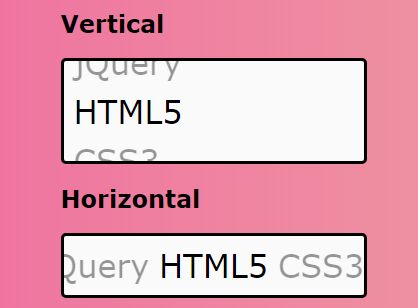
irspinner is a lightweight, touch-enabled jQuery plugin which enables the user to highlight/select items in a dynamic, scrollable, horizontal or vertical spinner with mouse drag and touch swipe support.
How to use it:
1. Import jQuery library and the irspinner plugin's files into the html file.
<script src="//code.jquery.com/jquery-3.2.1.min.js"></script>
<script src="dist/jquery.irspinner.min.js"></script>
<link rel="stylesheet" href="dist/jquery.irspinner.min.css">
2. Create a placeholder element for the spinner.
<div id="mySpinner"></div>
3. Initialize the plugin to generate a default vertical spinner and add your own list items to the spinner in the list array.
$("#mySpinner").irSpinner({
  list: ["jQuery", "HTML5", "CSS3", "AngularJS"]
});
4. The plugin also supports any embedded html elements such as images.
$("#mySpinner").irSpinner({
  list: ["<img src=\"1.jpg\">", "<img src=\"2.jpg\">", "<img src=\"3.jpg\">", "<img src=\"4.jpg\">", "<img src=\"5.jpg\">"]
});
5. To change the direction to 'Horizontal', follow this step:
$("#mySpinner").irSpinner({
  list: ["jQuery", "HTML5", "CSS3", "AngularJS"],
  vertical: false
});
6. All default configuration options.
$("#mySpinner").irSpinner({

  /**
   * Specifies a custom theme for this element.
   * By default the irSpinner class is assigned to this element, this theme
   * is an additional class to be added to the element.
   * \type String
   */
  theme: "",

  /**
   * Current value of the element
   */
  value: null,

  /**
   * Sensitivity factor, 1 being the normal sensitivym hihgher number will give higher sensitivity and lower, less.
   */
  sensitivity: 1

});
7. API methods.
// previous item
$("#mySpinner").irSpinner('previous');

// next item
$("#mySpinner").irSpinner('next');

// select an item
$("#mySpinner").irSpinner('select', DATA);
This awesome jQuery plugin is developed by blaizard. For more Advanced Usages, please check the demo page or visit the official website.