Minimalist Animated jQuery Decision Tree Plugin - Tree.js
| File Size: | 5.57 KB |
|---|---|
| Views Total: | 8560 |
| Last Update: | |
| Publish Date: | |
| Official Website: | Go to website |
| License: | MIT |
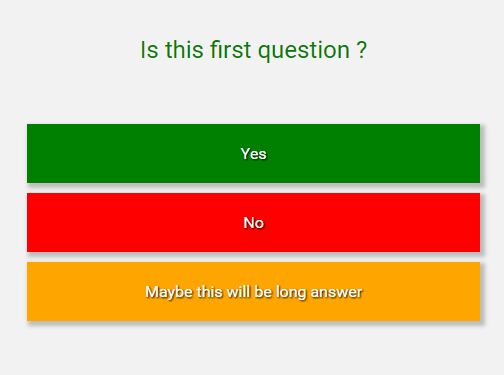
Tree.js is a minimal, dynamic, flowchart-like jQuery decision tree plugin which shows various outcomes from a series of decisions when the user clicks on Yes or No buttons.
How to use it:
1. Load the main JavaScript file tree.js after the latest version of jQuery library.
<script src="//code.jquery.com/jquery-3.1.1.js"></script>
<script src="js/tree.js"></script>
2. Create a container element on which you want to place the Decision Tree.
<div class="main"></div>
3. Create a series of decisions and outcomes in the data array as follows:
var data = {
    message: "<div style='color:green;'>Is this first question ?</div>",
    decisions: [
      {
        answer: "Yes",
        class: "green",
        message: "Is this second question ?",
        decisions: [
          {
            answer: "Yes",
            class: "green",
            message: "This is the end !"
          },
          {
            answer: "No",
            class: "red",
            message: "This is the end !"
          }
        ]
      },
      {
        answer: "No",
        class: "red",
        message: "You are wrong !"
      },
      {
        answer: "Maybe this will be long answer",
        class: "orange",
        message: "Maybe can't be an answer as you need to be sure about what are you doing ]:->"
      }
  ]
};
4. Render a default Decision Tree inside the container you just created.
$('.main').decisionTree({data: data});
5. Style the Decision Tree in the CSS.
.dc-tree {
  position: relative;
  text-align: center;
  background-color: #f2f2f2;
  height: 100%;
  overflow: hidden;
}

.dc-tree * { box-sizing: border-box; }

.dctree-card {
  text-align: center;
  padding: 20px;
  position: absolute;
  margin: 0 auto;
  background-color: #f2f2f2;
  display: none;
}

.dctree-message {
  padding: 10px;
  margin-bottom: 50px;
  font-size: 1.5em;
}
 [class^="dctree-answer"] {
 padding: 20px;
 text-align: center;
 margin: 10px 20px;
 box-shadow: 3px 3px 5px 2px #BDBDBD;
 text-shadow: 1px 1px 2px black;
}

.red {
  background-color: red;
  color: white;
}

.green {
  background-color: green;
  color: white;
}

.orange {
  background-color: orange;
  color: white;
}
6. Customize the Decision Tree with the following options.
$('.main').decisionTree({
  animationSpeed: "fast",
  animation: "slide-left",
  containerClass: "dc-tree",
  cardClass: "dctree-card",
  messageClass: "dctree-message"
});
This awesome jQuery plugin is developed by marsoltys. For more Advanced Usages, please check the demo page or visit the official website.