Make Webpage Easy To Navigate With A Table Of Contents - toctoc.js
| File Size: | 135 KB |
|---|---|
| Views Total: | 2216 |
| Last Update: | |
| Publish Date: | |
| Official Website: | Go to website |
| License: | MIT |
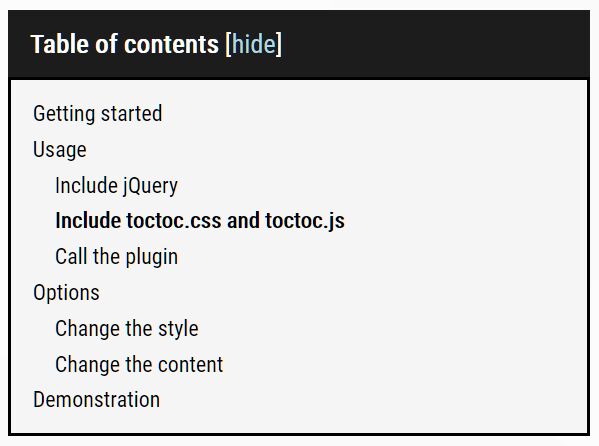
A tiny jQuery TOC plugin that makes a long webpage (like a documentation page) easy to navigate through a customizable, SEO-friendly table of contents.
The plugin generates a collapsible TOC box containing a list of anchor links where the ID and Href are generated from all heading elements found within the document.
How to use it:
1. Load the stylesheet toctoc.css for the default style of the table of contents.
<link rel="stylesheet" href="toctoc.css" />
2. Create an empty container in which the TOC box will be placed.
<div id="toctoc"></div>
3. Load jQuery JavaScript library and the jQuery toctoc.js plugin at the end of the document.
<script src="/path/to/cdn/jquery.min.js"></script>
<script src="/path/to/toctoc.js"></script>
4. Initialize the plugin to generate a basic table of contents.
$(function(){
  $.toctoc();
});
5. Customize the appearance of the table of contents.
$.toctoc({
  headBackgroundColor: '#1c1c1c',
  headTextColor: '#fff',
  headLinkColor: '#add8e6',
  bodyBackgroundColor: '#f5f5f5',
  bodyLinkColor: '#000',
  borderStyle: 'solid',
  borderColor: '#000',
  borderWidth: '2px'
});
6. Customize the title of the TOC box.
$.toctoc({
  headText: 'Table of contents'
});
7. Customize the show/hide labels.
$.toctoc({
  headLinkText: ['show', 'hide']
});
8. Determine whether to collapse the TOC box on page load. Default: true.
$.toctoc({
  minimized: false
});
9. Determine the container in which the plugin looks for heading elements. Default: 'body'.
$.toctoc({
  target: 'article'
});
10. Determine whether or not to enable Smooth Scroll. Default: true.
$.toctoc({
  smooth: true,
});
Changelog:
2022-06-11
- new option : smooth scroll
2021-05-08
- Fixed : get text from title (not entire HTML)
2021-05-02
- Added SCSS
2021-05-01
- Optimize script
- Update styles
2021-04-30
- JS & CSS update
This awesome jQuery plugin is developed by Athios-dev. For more Advanced Usages, please check the demo page or visit the official website.