Modal Style Dialog Popup Plugin For jQuery - Dialogx
| File Size: | 41.4 KB |
|---|---|
| Views Total: | 2354 |
| Last Update: | |
| Publish Date: | |
| Official Website: | Go to website |
| License: | MIT |
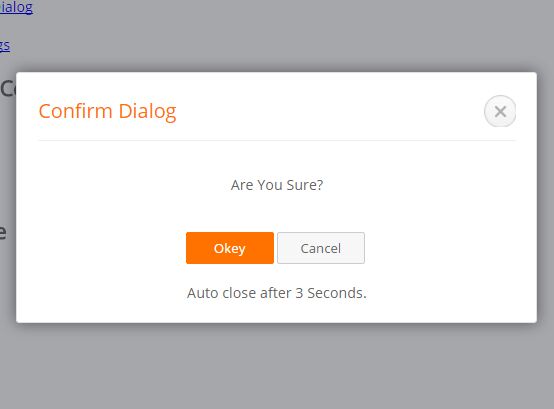
Dialogx is a super tiny jQuery plugin that helps you create modal-style dialog popups to replace the default JavaScript alert and confirmation dialog boxes.
Key Features:
- Allows to popup multiple dialog boxes at a time.
- Allows to auto close after a specific timeout.
- Callback functions for confirm dialog.
How to use it:
1. Include the stylesheet jquery.dialogx.css in the head section of the html document.
<link rel="stylesheet" href="jquery.dialogx.css">
2. Include jQuery library and the JavaScript jquery.dialogx.js at the end of the document.
<script src="//code.jquery.com/jquery-1.12.0.min.js"></script>
<script src="js/jquery.dialogx.js"></script>
3. Display a default dialog popup in your screen.
$.dialogx({
  'title':'Dialog Title',
  'content':'Dialog Content'
});
4. Display an alert dialog in your screen.
$.errorAlertx('Alert Title','Alert Content');
5. Display a confirmation dialog in your screen.
$.confirmx('Confirm Title','Confirm Content');
6. Display an alert dialog that will auto dismiss after 5 seconds.
$.alertx('Alert','Alert Content').delayClose(5);
7. Default options.
// dialog title
'title':'Title',

// dialog content
'content':'Content',

// CSS class for dialog wrapper
'ctnWrapClass':'elastic-pupop-payrs',

// callbacks
'beforeRenderFunc':function(thisTemp){},
'afterRenderFunc':function(thisTemp){
  thisTemp.htmlJqObj.find('.js-yes-btn').off('click').on('click', function () {
    thisTemp.close();
  });

  thisTemp.htmlJqObj.find('.js-cancle-btn').off('click').on('click', function () {
    thisTemp.close();
  });
},

// parent container
'ctxSelect':'body',

// custom trigger
'trigger':null
This awesome jQuery plugin is developed by zhouzhian. For more Advanced Usages, please check the demo page or visit the official website.