jQuery On-Screen Virtual Keyboard Plugin - OAK
| File Size: | 18.1KB |
|---|---|
| Views Total: | 2786 |
| Last Update: | |
| Publish Date: | |
| Official Website: | Go to website |
| License: | MIT |
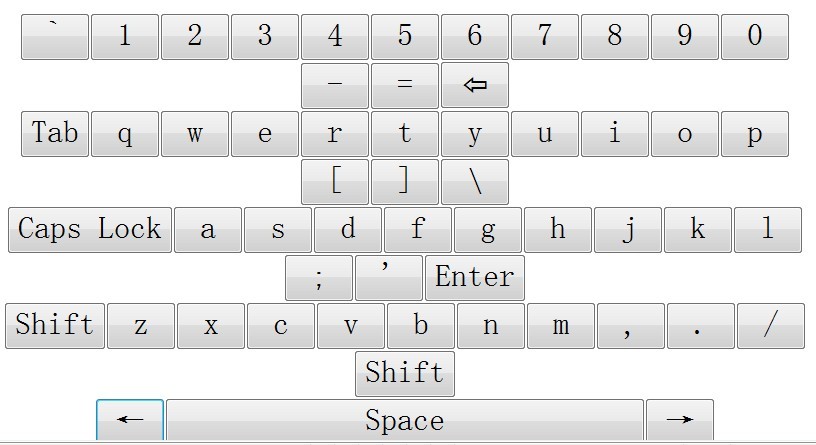
OAK is a lightweight and fast jQuery plugin that displays an on-screen virtual keyboard attached to the text area elements. It is useful for those who cannot input characters using a computer keyboard. There're 3 preset keyboard layouts (Simple, US basic, and US international) in this plugin, you can load these JSON data via javascript as you need.
You Might Also Be Interested In:
- Virtual Keyboard Emulator
- jQuery Virtual Keyboard Plugin - Keyboard
- jQuery Plugin for Simple Virtual Keyboard - keypad
Basic Usage:
1. Include necessary javascript files in the header of your web page
<script type="text/javascript" src="http://code.jquery.com/jquery.min.js"></script>
<script type="text/javascript" src="http://code.accursoft.com/caret/raw/tip/jquery.caret.js"></script>
<script type="text/javascript" src="jquery.osk.js"></script>
2. The HTML
<button id="basic">US Basic</button>
<button id="international">US International</button>
<p><textarea rows="5" cols="20" id="text"></textarea></p>
<div id="osk"></div>
3. The Javascript
<script type="text/javascript">
function callback(key) {
        var box = $('#text');
        var text = box.val();
        var pos = box.caret();
        switch (key) {
            case '\b':
                box.val(text.substring(0, pos-1) + text.substring(pos));
                box.caret(pos-1);
                break;
            case '\3':
                box.caret(pos-1);
                break;
            case '\4':
                box.caret(pos+1);
                break;
            default:
                box.val(text.substring(0, pos) + key + text.substring(pos));
                box.caret(pos+1);
        }
}

$(function() {
    $('#basic').click(function() {$('#osk').loadLayout('layouts/us-basic.json', callback)});
    $('#international').click(function() {$('#osk').loadLayout('layouts/us-international.json', callback)});
});
</script>
This awesome jQuery plugin is developed by accursoft. For more Advanced Usages, please check the demo page or visit the official website.