Lightweight jQuery Email Input Autocomplete Plugin
| File Size: | 4.49 KB |
|---|---|
| Views Total: | 1189 |
| Last Update: | |
| Publish Date: | |
| Official Website: | Go to website |
| License: | MIT |
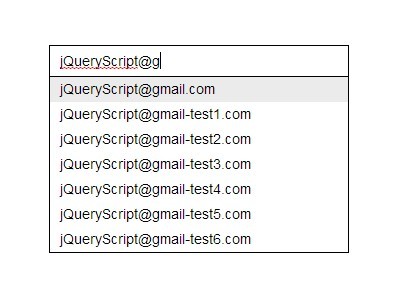
Yet another jQuery email autocomplete plugin to display a dropdown suggestion list which helps you quickly insert an email address.
See also:
- jQuery Plugin For Email Address Auto Complete - mailtip
- Auto-Complete Email Addresses with jQuery Auto Email Plugin
- Simple jQuery Email Autocomplete & Suggestion Plugin
How to use it:
1. Insert an email input into your document.
<input id="emailautocomplete" class="emailautocomplete" name="email" type="email" maxlength="50" autocomplete="off">
2. Include the jQuery library and the jQuery Email Autocomplete plugin in the document.
<script src="//ajax.googleapis.com/ajax/libs/jquery/1.11.1/jquery.min.js"></script>
<script src="jquery.emailautocomplete.js"></script>
3. Call the plugin on the email input and custom the email domain list for autocomplete.
$(function(){
$(".emailautocomplete").emailautocomplete({
domains: ["gmail.com", "hotmail.com", "outlook.com", "live.com"]
});
});
4. The sample CSS to style the plugin.
.autocompletecon {
  width: 300px;
  margin: 0;
  font-family: Arial, “Helvetica Neue”, Helvetica, sans-serif;
  font-size: 14px;
  line-height: 18px;
  position: relative;
}

.autocompletecon .emailautocomplete {
  border: 1px solid #000;
  margin: 0;
  padding: 6px 10px;
  font: inherit;
  display: inline-block;
  width: 278px;
  height: 18px;
  box-shadow: none;
  border-radius: 0;
  outline: none;
}

.autocompletecon .autocomplete {
  display: block;
  position: absolute;
  top: 32px;
 *top: 33px;
  left: 0;
  list-style: none;
  z-index: 50;
  background-color: #fff;
  margin: 0;
  padding: 0;
  border-left: 1px solid #000;
  border-right: 1px solid #000;
  border-bottom: 1px solid #000;
  overflow: hidden;
  width: 298px;
}

.autocompletecon .autocomplete li {
  display: block;
  text-align: left;
  color: #000;
  padding-left: 10px;
  height: 25px;
  line-height: 25px;
}

.autocompletecon .autocomplete li.selected { background-color: #ebebeb; }
This awesome jQuery plugin is developed by tracylv. For more Advanced Usages, please check the demo page or visit the official website.