Simple Flat Select Element Replacement With jQuery - Custom Select
| File Size: | 43.4 KB |
|---|---|
| Views Total: | 3569 |
| Last Update: | |
| Publish Date: | |
| Official Website: | Go to website |
| License: | MIT |
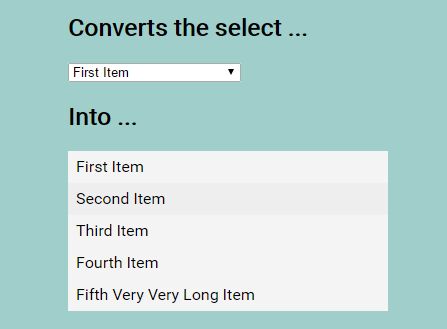
Just another custom select box plugin which replaces the native select element with a flat, animated dropdown list with custom styles.
Features:
- Searchable dropdown select.
- Custom CSS styles.
- Keyboard control.
- Callback function.
- jQuery based slideUp/Down animations.
How to use it:
1. Include the style sheet jquery.custom-select.min.css in the document's head section.
<link href="jquery.custom-select.min.css" rel="stylesheet">
2. Include jQuery library and the JavaScript file jquery.custom-select.js at the bottom of the html document.
<script src="//code.jquery.com/jquery-1.12.3.min.js"></script>
<script src="jquery.custom-select.js"></script>
3. Call the function on the regular select element and done.
$('.custom-select').customSelect();
4. Possible plugin options with default values.
$('.custom-select').customSelect({

  // Adds input to filter options
  search: false,

  // Class name (BEM block name)
  block: 'custom-select',

  // Fires after dropdown closes
  hideCallback: false,

  // Shows chosen value option in dropdown, if enabled also cancels dropdown options refresh
  includeValue: false,

  // True to enable keyboard control
  keyboard: false,

  // Additional class, e.g. BEM modifier
  modifier: false,

  // Input placeholder
  placeholder: false,

  // Fires after dropdown opens
  showCallback: false,

  // jQuery slideUp/Down speed
  transition: 100

});
5. Adjust or override the default CSS (SCSS) to create your own styles.
//
// Custom Select jQuery Plugin Base SCSS
//

$custom-select-class: "custom-select";
$white: #fff !default;

@mixin custom-select($block) {
  .#{$block} {
    position: relative;
    background-color: $white;

    &__option {
      overflow: hidden;
      box-sizing: border-box;
      display: block;
      width: 100%;
      padding: 0 5px;
      background-color: transparent;
      border: 0;
      border-radius: 0;
      white-space: nowrap;
      text-align: left;
      text-overflow: ellipsis;
      cursor: pointer;
      user-select: none;
      -webkit-appearance: none;
      -moz-appearance: none;
      appearance: none;
    }

    &__dropdown {
      position: absolute;
      box-sizing: border-box;
      width: 100%;
      top: 100%;
      left: 0;
      background-color: $white;
    }

    &__input {
      box-sizing: border-box;
      display: block;
      width: 100%;
      padding: 0 5px;
      border-width: 1px 0;
      border-style: solid;
      border-radius: 0;
    }
  }
}

@include custom-select($custom-select-class);
Changelog:
v1.6.4 (2019-08-08)
- Update disabled state on select
v1.6.3 (2019-05-25)
- Change event.keyCode to event.which
v1.6.1 (2018-12-04)
- Update disabled value after reset
v1.6.0 (2018-09-15)
- Fix outside click
v1.5.9 (2018-08-16)
- Update
v1.5.7 (2018-08-01)
- Fix placeholder reset
v1.5.6 (2018-07-31)
- Fix placeholder if value of select was cleared
v1.5.4 (2018-07-10)
- Add styles to disabled options
v1.5.3 (2018-06-25)
- Fix adding of selected modifier
- Fix for IE11
v1.5.2 (2018-06-13)
- Fix init with reset of not inited
v1.5.0 (2018-06-12)
- Add reset method
v1.4.2 (2018-05-13)
- Fix copying to value original option class
v1.4.0 (2018-04-11)
- Remove input box-shadow
- Do not scroll wrap on keyboard if no input value
- Add appearance none to input
- Refine options background colors
v1.3.4 (2018-03-09)
- Update search input font size
v1.3.3 (2017-11-20)
- Remove duplicated modifiers declaration
v1.3.2 (2017-11-19)
- Add `type="button"` to options
v1.3.0 (2017-11-17)
- Fix wrap scroll when searching
- Fix removed from DOM `_$options` last item
v1.3.0 (2017-11-15)
- Fix moving CSS class for selected option
- Update dependencies & run npm scripts
v1.2.4 (2017-11-10)
- Change dropdown position if no space below
- Add dropdown position update on scroll
v1.2.2 (2017-11-08)
- Bugfix
v1.2.1 (2017-11-08)
- Add placeholder option
v1.0.4 (2017-11-01)
- Bugfix
v1.0.3 (2017-10-30)
- Change keyboard option default value to true
v1.0.2 (2017-10-28)
- Reset input border radius
This awesome jQuery plugin is developed by kvlsrg. For more Advanced Usages, please check the demo page or visit the official website.