jQuery Location Autocomplete with Google Maps Places Library - Placepicker
| File Size: | 15.9 KB |
|---|---|
| Views Total: | 39332 |
| Last Update: | |
| Publish Date: | |
| Official Website: | Go to website |
| License: | MIT |
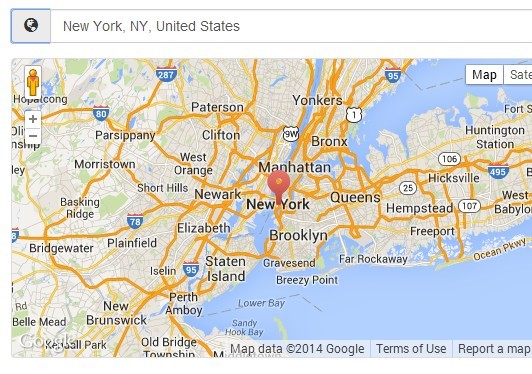
Placepicker is a simple jQuery plugin that enables you to pick a place/address/location from a dropdown suggestion box and display the place on the Google Maps, based on Google Maps API's places library.
See also:
How to use it:
1. Load the jQuery library and jQuery placepicker plugin in the document.
<script src="http://ajax.googleapis.com/ajax/libs/jquery/1.11.0/jquery.min.js"></script>
<script src="src/js/jquery.placepicker.js"></script>
2. Load the Google Maps API in the document.
<script type="text/javascript" src="https://maps.googleapis.com/maps/api/js?sensor=true&libraries=places"></script>
3. Load the Bootstrap 3 framework to style the place input.
<link href="http://netdna.bootstrapcdn.com/bootstrap/3.1.1/css/bootstrap.min.css" rel="stylesheet">
<script src="http://netdna.bootstrapcdn.com/bootstrap/3.1.1/js/bootstrap.min.js"></script>
4. Create an input field to accept the place/address/location and a button to toggle a Google Map.
- data-latitude: Preset the map's latitude
- data-longitude: Preset the map's longitude
- data-latitude-input: Set the DOM ID of the input field to populate with the latitude
- data-longitude-input: Set the DOM ID of the input field to populate with the longitude
- data-map-container-id: Set the ID of the element containing the map's destination element. Configuring this will automatically inject an open/close button to show/hide the map. The container must have the "collapse" CSS class.
<div class="form-group">
  <input class="placepicker form-control" data-map-container-id="collapseOne"/>
</div>
<div id="collapseOne" class="collapse">
  <div class="placepicker-map thumbnail"></div>
</div>
5. The JavaScript
$(".placepicker").placepicker();
6. Options.
// Map selector or map-element
map: "",

// Google Maps API options
mapOptions: {
  zoom: 15
},

// Google Places API options
places: {
  icons: false
},

// Google Autocomplete API options
autoCompleteOptions: {
},

// callbacks
placeChanged: null,
location: null,
preventSubmit: true
7. Methods.
// Reloads map
$(".placepicker").placepicker('reload');

// Resizes map
$(".placepicker").placepicker('resize');

// Set value to html5 geo-location
$(".placepicker").placepicker('geoLocation');

// Returns an object containing the current location
$(".placepicker").placepicker('getLocation');

// Returns an object of type google.maps.LatLng containing the current location
$(".placepicker").placepicker('getLatLng');
Change logs:
2016-09-20
- Make it possible to change the globe icon's CSS class
2016-04-21
- Select first suggestion on return keypress
2015-10-27
- Fixed getLocation should return option values if latlng is not available
2015-07-06
- Fixed map icons
2014-11-21
- Correct an issue with DOM manipulation when the target input element has siblings
2014-06-03
- Added callbacks
2014-05-29
- Added getLocation and getLng-methods
This awesome jQuery plugin is developed by benignware. For more Advanced Usages, please check the demo page or visit the official website.