jQuery Plugin For Responsive Side Menu - sidr
| File Size: | 80.4 KB |
|---|---|
| Views Total: | 37753 |
| Last Update: | |
| Publish Date: | |
| Official Website: | Go to website |
| License: | MIT |
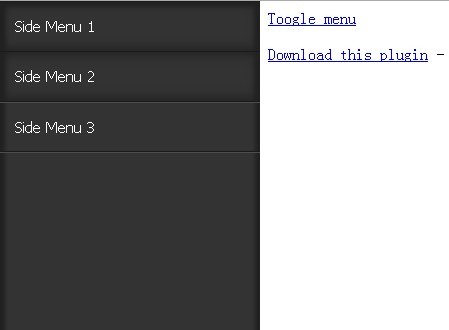
sidr is a jQuery plugin that make it easy to create responsive side menus with cool themes on your web page.
You might also like:
Basic Usage:
1. Inlcude jQuery library and sidr.js in the head section
<script src="https://ajax.googleapis.com/ajax/libs/jquery/1.9.1/jquery.min.js"></script>
<script src="dist/jquery.sidr.js"></script>
2. Include sidr THEME CSS
<link href="dist/stylesheets/jquery.sidr.dark.css" rel="stylesheet" type="text/css">
3. Markup (By default, the menu wont't be visible and it will be displayed or hidden by clicking on the link.)
<a id="demo" href="#sidr">Toogle menu</a>
<div id="sidr">
<ul>
<li><a href="#">Side Menu 1</a></li>
<li class="active"><a href="#">Side Menu 2</a></li>
<li><a href="#">Side Menu 3</a></li>
</ul>
</div>
4. Call the plugin
<script>
$(document).ready(function() {
  $('#demo').sidr();
});
</script>
5. Options with defaults.
$('#demo').sidr({

  // Name for the sidr.
  name: 'sidr',

  // How long the animation will run.
  speed: 200,

  // Left or right, the location for the sidebar.
  side: 'left',

  // A jQuery selector, an url or a callback function.
  source: null,

  // When filling the sidr with existing content, choose to rename or not the classes and ids.
  renaming: true,

  // For doing the page movement the 'body' element is animated by default, you can select another element to animate with this option.
  body: 'body',

  // Displace the body content or not
  displace: true,

  // Timing function for CSS transitions
  timing: 'ease',

  // The method to call when element is clicked
  method: 'toggle',

  // The event(s) to trigger the menu
  bind: 'touchstart click',

  // Callback when sidr opened
  onOpen: function onOpen() {},

  // Callback when sidr closed
  onClose: function onClose() {},

  // Callback when sidr end opening
  onOpenEnd: function onOpenEnd() {},

  // Callback when sidr end closing
  onCloseEnd: function onCloseEnd() {}

});
Change Logs:
v3.0.0 (2017-12-11)
- jQuery is not needed anymore, now, Sidr is just a JS library which is available also as a jQuery Plugin
- Allow to keep menus opened.
- Option 'bind' (event that triggers the menu) allows only a single event
- Default value for 'bind' (event that triggers the menu) is now click (it was touchstart click, both)
- Drop support for browsers not supporting animations
- Classes added to the menus change from left and right to sidr-left and sidr-right to avoid collisions
- Adding reload method and refactor.
v2.2.0 (2016-02-16)
- Adding new options bind and new status method
v2.1.0 (2016-01-20)
- Now it works with CSS3 transitions by default and fallbacks to jQuery.animate when not supported
- Added timing option that can be used to indicate the transition timing function for the CSS3 transitions
- Added onOpenEnd option to add a callback that will be fired when the menu ends opening
- Added onCloseEnd option to add a callback that will be fired when the menu ends closing
v2.0.1 (2016-01-18)
- Fixed: Launch callback when a menu open is delayed until another one is closed
- Fixes bug introduced in 2.0.0 that added a method called 'undefined' in addition to the methods close, open, toggle
- Added method option to change the default behaviour of the button (that is currently the toggle method)
- Now it works with CSS3 transitions by default and fallbacks to jQUery.animate when not supported
- Added timing option that can be used to indicate the transition timing function for the CSS3 transitions
- ES2015 syntax supported
- jquery.sidr.js file split
v2.0.0 (2016-01-10)
- Fixing tap event on touchscreen devices
- Removing unnecessary compass mixins
- Fixes reinitalization
- Adding example
- Fixing bower structure
- Adding continous integration
- Fixing adding body classes when no displacing
- Removing only the needed styles from html and body tag
v1.2.1 (2013-03-12)
- Fixing tap on mobile
v1.1.1 (2013-03-12)
- Fix bug when closing sidr programatically
v1.1.0 (2013-03-12)
- Adding 'body' option
This awesome jQuery plugin is developed by artberri. For more Advanced Usages, please check the demo page or visit the official website.