Bootstrap File Input Enhancement Plugin With jQuery
| File Size: | 110 KB |
|---|---|
| Views Total: | 2789 |
| Last Update: | |
| Publish Date: | |
| Official Website: | Go to website |
| License: | MIT |
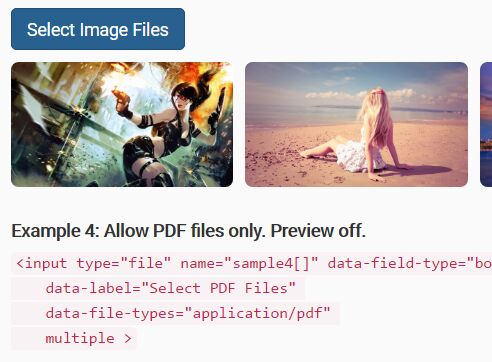
Bootstrap File Field is a jQuery plugin which lets you create a highly customizable file input with file preview and multiple selection using Bootstrap styles.
Key features:
- Custom file picker using Bootstrap button styles.
- Based on HTML5 file API.
- Custom button labels.
- Image preview.
- Restricts file types and sizes.
- Allows to multi-select a specified number of files.
- User friendly error fallback.
- You'll receive the files with submitted form (with
enctype="multipart/form-data"). No ajax used.
How to use it:
1. Include the needed Bootstrap's stylesheet on the webpage.
<link rel="stylesheet" href="bootstrap.min.css">
2. Include jQuery library together with the jQuery Bootstrap File Field plugin's JavaScript and Stylesheet on the webpage.
<link rel="stylesheet" href="bootstrap_file_field.css">
<script src="//code.jquery.com/jquery.min.js"></script>
<script src="bootstrap_file_field.js"></script>
3. Adding the data-field-type="bootstrap-file-filed" attribute to your input to create a basic file input.
<input type="file" data-field-type="bootstrap-file-filed" name="demo">
4. The plugin also supports multi selection:
<input type="file" data-field-type="bootstrap-file-filed" name="demo[]" multiple>
5. Customize the file input by passing the options via data attributes as follows:
<input type="file" name="demo"
       data-field-type="bootstrap-file-filed"
       data-preview="on"
       data-file-types="image/jpeg,image/png">
6. You can also pass the options as an JS object on init.
$('.my-input').bootstrapFileField({
  // options here
});
7. All customization options with default values.
$('.my-input').bootstrapFileField({

  // label text for file input
  label: "Select File",

  // default button class
  btnClass: 'btn-default',

  // enable/disable file preview
  preview: 'off',

  // restric file types by mime type
  fileTypes: false,

  // max/min file size
  maxFileSize: false,
  minFileSize: false,

  // max totle size
  maxTotalSize: false,

  // max/min number of files
  maxNumFiles: false,
  minNumFiles: false

});
This awesome jQuery plugin is developed by ajaxray. For more Advanced Usages, please check the demo page or visit the official website.