Cool Animated SVG Search Field with jQuery and CSS3
| File Size: | 4.55 KB |
|---|---|
| Views Total: | 2852 |
| Last Update: | |
| Publish Date: | |
| Official Website: | Go to website |
| License: | MIT |
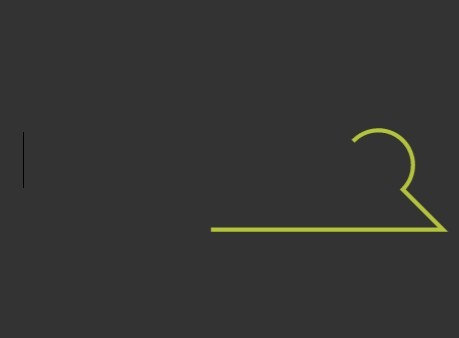
A SVG search icon that transitions to underline on focus, made using jQuery, SVG path animation and CSS3 transitions & transforms. Inspired by Anish Chandran's small little animation of search interaction.
How to use it:
1. Create a SVG search icon.
<svg version="1.1" viewBox="0 0 142.358 24.582">
  <path id="search-path" fill="none" d="M131.597,14.529c-1.487,1.487-3.542,2.407-5.811,2.407
    c-4.539,0-8.218-3.679-8.218-8.218s3.679-8.218,8.218-8.218c4.539,0,8.218,3.679,8.218,8.218
    C134.004,10.987,133.084,13.042,131.597,14.529c0,0,9.554,9.554,9.554,9.554H0"/>
</svg>
2. Create a search input.
<label for="search" class="search-label"></label>
<input type="search" id="search" autocomplete="off" class="input-search">
3. Wrap them into a 'search' container.
<div class="search">
...
</div>
4. The core CSS/CSS3 styles.
svg {
  position: absolute;
  transform: translateX(-246px);
  width: 600px;
  height: auto;
  stroke-width: 8px;
  stroke: #b3c33a;
  stroke-width: 1px;
  stroke-dashoffset: 0;
  stroke-dasharray: 64.6 206.305;
  transition: all 0.5s ease-in-out;
}

.input-search {
  position: absolute;
  width: calc(100% - 148px);
  height: 64px;
  top: 0;
  right: 20px;
  bottom: 0;
  left: 0;
  border: none;
  background-color: transparent;
  outline: none;
  padding: 20px;
  font-size: 50px;
}

.search-label {
  position: absolute;
  display: block;
  width: 108px;
  height: 108px;
  top: 0;
  left: 50%;
  margin-left: -54px;
  z-index: 100;
  transition: 0.5s ease-in-out;
}

.isActive .search-label { transform: translateX(246px); }

.isActive svg {
  stroke-dashoffset: -65;
  stroke-dasharray: 141.305 65;
  transform: translateX(0);
}

.isActive.full svg {
  stroke-dashoffset: -65;
  stroke-dasharray: 141.305 65;
  transform: translateX(0);
}

.full .search-label { transform: translateX(246px); }

.full svg {
  stroke-dashoffset: 0;
  stroke-dasharray: 64.6 206.305;
  transform: translateX(0);
}

.search {
  position: absolute;
}
5. The jQuery script to enable the animated search field on focus.
var searchField = $('.search');
var searchInput = $("input[type='search']");

var checkSearch = function(){
    var contents = searchInput.val();
    if(contents.length !== 0){
      searchField.addClass('full');
    } else {
      searchField.removeClass('full');
    }
};

$("input[type='search']").focus(function(){
    searchField.addClass('isActive');
  }).blur(function(){
    searchField.removeClass('isActive');
    checkSearch();
});
This awesome jQuery plugin is developed by WithAnEs. For more Advanced Usages, please check the demo page or visit the official website.