Turn Duration Into Human-friendly Minutes - jQuery bsTimeDuration
| File Size: | 20.4 KB |
|---|---|
| Views Total: | 1 |
| Last Update: | |
| Publish Date: | |
| Official Website: | Go to website |
| License: | MIT |
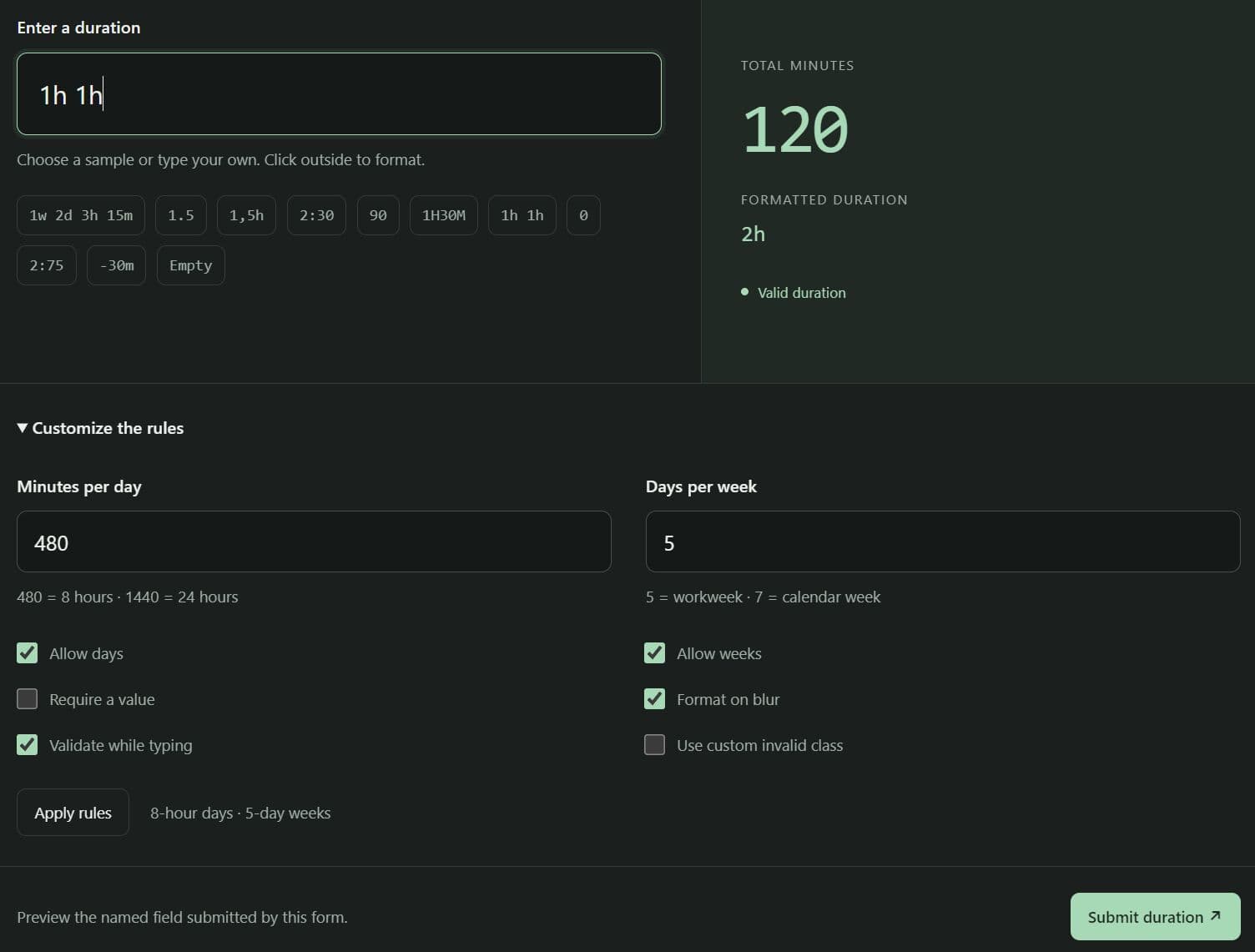
bsTimeDuration is a jQuery duration input plugin for Bootstrap 5 that turns duration such as 2h 45m into integer minute values.
It accepts weeks, days, decimal hours, and clock-style durations, with configurable workday lengths for timesheets and project estimates.
Features
- Accept unit expressions, decimal hours, clock notation, and raw minute values.
- Keep readable input text separate from the named form value.
- Preserve Bootstrap input sizes, classes, and associated labels.
- Work with floating labels and input groups.
- Format valid durations into unit-based text on blur.
- Mark invalid entries and emit validation events.
- Configure working-day and working-week lengths.
- Read, update, clear, and restore duration fields programmatically.
Use Cases
- Timesheet forms record billable effort as minutes for payroll or invoicing.
- Project planners accept task estimates written in weeks, days, and hours.
- A support-ticket editor captures resolution time through short text entries.
- Service-window forms measure elapsed time in fixed 24-hour day units.
How To Use It
Install and Load the Required Files
Download the plugin and copy dist/bs-time-duration.min.js into your project's js directory. Load jQuery 3 or later before the plugin. Bootstrap 5 CSS is required for the form appearance.
Basic Usage
<!-- Bootstrap 5 CSS is optional for plugin behavior. -->
<link rel="stylesheet" href="css/bootstrap.min.css">

<form id="estimate-form" method="get">
  <label for="estimated-effort" class="form-label">Estimated effort</label>
  <input
    type="text"
    id="estimated-effort"
    name="estimatedMinutes"
    class="form-control"
    placeholder="Try 2h 45m"
    autocomplete="off">
  <button type="submit" class="btn btn-primary mt-2">Save</button>
</form>

<!-- Always load jQuery before the plugin file. -->
<script src="js/jquery.min.js"></script>
<script src="js/bs-time-duration.min.js"></script>
<script>
  $(function () {
    $('input[name="estimatedMinutes"]').bsTimeDuration();
  });
</script>
Accepted Duration Formats
| Input | Result |
|---|---|
2h 45m |
165 minutes |
1w 2d |
3,360 minutes with the default workday settings |
1.5 or 1,5 |
90 minutes |
1,25h |
75 minutes |
2:30 |
150 minutes |
90 |
90 minutes |
1h30m |
90 minutes |
Advanced Examples
These examples use the jQuery and plugin files loaded in Basic Usage. Include Bootstrap CSS for the styled fields.
1. Validate a Required Timesheet Entry Before Submission
A timesheet can check the actual text before it processes the minute value. Native HTML required validation only catches an empty visible field; this submit handler checks malformed nonempty durations too.
<form id="work-log-form">
  <label for="logged-time" class="form-label">Hours worked</label>
  <input id="logged-time" name="workedMinutes" type="text"
         class="form-control" placeholder="3h 20m" required>
  <button class="btn btn-primary mt-2" type="submit">Record time</button>
  <p id="work-log-message" role="status" aria-live="polite"></p>
</form>

<script>
  $(function () {
    // Keep a reference to the original input, which becomes hidden.
    var $worked = $('input[name="workedMinutes"]').bsTimeDuration({
      required: true
    });

    $('#work-log-form').on('submit', function (event) {
      event.preventDefault(); // Preview submitted values in this example.
      var text = $('#logged-time').val(); // The ID belongs to the visible input.
      var result = $worked.bsTimeDuration('parse', text);

      if (!result.valid || result.minutes === null) {
        $('#work-log-message').text('Enter a valid work duration.');
        return;
      }

      // The named hidden field now holds the integer minute value.
      $('#work-log-message').text('Form data: ' + $(this).serialize());
    });
  });
</script>
2. Enter Calendar-Day Durations in a Bootstrap Input Group
A service window measured in fixed 24-hour blocks uses different units from a standard workweek. Set one day to 1,440 minutes and one week to seven days.
<label for="delivery-window" class="form-label">Delivery window</label>
<div class="input-group">
  <span class="input-group-text">Duration</span>
  <input id="delivery-window" name="deliveryWindowMinutes" type="text"
         class="form-control" placeholder="1d 4h">
  <span class="input-group-text">w / d / h / m</span>
</div>

<script>
  $(function () {
    $('input[name="deliveryWindowMinutes"]').bsTimeDuration({
      minutesPerDay: 1440, // 24 hours per day
      daysPerWeek: 7       // Seven-day week
    });
  });
</script>
3. Load a Saved Estimate and Update a Live Summary
An edit screen can fill a duration field from stored minute data and refresh its summary whenever the submitted value changes.
<label for="ticket-effort" class="form-label">Ticket effort</label>
<input id="ticket-effort" name="ticketEffortMinutes" type="text"
       class="form-control" placeholder="Enter an estimate">
<button id="load-ticket-effort" type="button">Load saved estimate</button>
<button id="clear-ticket-effort" type="button">Clear</button>
<p id="ticket-effort-summary" role="status" aria-live="polite">No estimate</p>

<script>
  $(function () {
    var $effort = $('input[name="ticketEffortMinutes"]');

    // Bind to the original named element, before initialization.
    $effort.on('change.bs.timeDuration', function (event, minutes, formatted) {
      $('#ticket-effort-summary').text(
        minutes === null ? 'No estimate' : formatted + ' (' + minutes + ' min)'
      );
    });

    $effort.bsTimeDuration();

    $('#load-ticket-effort').on('click', function () {
      // Simulate a value retrieved from an existing record.
      $effort.bsTimeDuration('minutes', 195);
    });

    $('#clear-ticket-effort').on('click', function () {
      $effort.bsTimeDuration('minutes', null);
    });
  });
</script>
Configuration Options
minutesPerDay(number, default480): Sets the minutes represented by1d; the value must be a positive safe integer.daysPerWeek(number, default5): Sets the number of days represented by1w; the value must be a positive safe integer.allowDays(boolean, defaulttrue): Accepts day units in user entries and uses them in formatted output.allowWeeks(boolean, defaulttrue): Accepts week units and uses them in formatted output.required(boolean, defaultfalse): Marks an empty entry invalid during plugin parsing.normalizeOnBlur(boolean, defaulttrue): Rewrites valid entries into unit-based text when focus leaves the field.validateOnInput(boolean, defaulttrue): Updates the parsed value and invalid state during input events; setting it tofalsedefers synchronization until change or blur.decimalSeparator(string, default'.'): Appears in the 1.0.0 source defaults, but the parser does not read this option. Both comma and period decimal input work regardless of its value.invalidClass(string, default'is-invalid'): Selects the CSS class applied to invalid visible entries.
API Methods
// Initialize the original named input and keep its reference.
var $duration = $('input[name="estimatedMinutes"]').bsTimeDuration();

// Parse a string; returns { valid: true, minutes: 135 }.
$duration.bsTimeDuration('parse', '2h 15m');

// Format an integer minute count; returns '2h 15m'.
$duration.bsTimeDuration('format', 135);

// Get the current numeric minute value, or null for an empty/invalid entry.
$duration.bsTimeDuration('minutes');

// Set the current duration using an integer number of minutes.
$duration.bsTimeDuration('minutes', 135);

// Clear the input through the numeric setter.
$duration.bsTimeDuration('minutes', null);

// Set the duration through the string-based method.
$duration.bsTimeDuration('value', '2h 15m');

// Read the submitted hidden-field string, such as '135'.
$duration.bsTimeDuration('value');

// Use the documented value alias with a number or a duration string.
$duration.bsTimeDuration('val', 135);
$duration.bsTimeDuration('val', '2h 15m');

// Read the hidden-field string through the alias.
$duration.bsTimeDuration('val');

// Remove the generated input and restore the original input.
$duration.bsTimeDuration('destroy');
The numeric minutes(value) setter formats its display immediately. value(value) and val(value) accept parseable strings, numbers, or null; numeric input remains unformatted until blur. Calling a plugin method before initialization throws an error.
Events
var $duration = $('input[name="estimatedMinutes"]');

// Runs when the submitted value changes, including when it becomes empty.
$duration.on('change.bs.timeDuration', function (event, minutes, formatted) {
  console.log(minutes, formatted);
});

// Runs when the plugin encounters an invalid value.
$duration.on('invalid.bs.timeDuration', function (event, rawValue) {
  console.log('Invalid:', rawValue);
});

// Runs for a trusted user input event, even when the text is invalid.
$duration.on('userChange.bs.timeDuration', function (event, rawValue, minutes, formatted, valid) {
  console.log(rawValue, minutes, formatted, valid);
});

// Runs for each plugin event above; eventName is its full event name.
$duration.on('all.bs.timeDuration', function (event, eventName) {
  console.log('Plugin event:', eventName, Array.prototype.slice.call(arguments, 2));
});

// Initialize after attaching the event listeners.
$duration.bsTimeDuration();
Alternatives and Related Resources
- Set Duration In Days, Hours And Minutes - durationPicker.js
- Convert Seconds Into Human-readable Durations - Timer2
- Easy Time Duration Picker Plugin with jQuery and jQuery UI
- 7 Best Duration Pickers In JavaScript
FAQs
Q: Why is the duration missing from submitted form data?
A: Add a name attribute to the original input before initialization. The plugin keeps that name on the hidden element that carries the minute value.
Q: Why does the form submit handler not run for an empty duration?
A: The HTML required attribute on the visible input can block the submit event through native constraint validation. The plugin's required: true option only changes its own parser validation. Use novalidate on the form if JavaScript needs to handle every validation error.
Q: Why does initializing the same CSS class twice create another input?
A: The generated text field inherits the original classes, and the hidden original loses them. Repeating $('.js-duration').bsTimeDuration() selects the generated field. Keep the original jQuery reference or select uninitialized inputs by their name and visible input type.
Q: Can clock-style duration entries exceed 24 hours?
A: Yes. An entry such as 27:15 represents 1,635 minutes. The minutes portion must stay between 00 and 59.
Q: How do I change the working-day configuration after initialization?
A: The plugin ignores a second initialization call on the original input. Save the current minute count, call destroy on the original jQuery reference, reinitialize with new options, and restore the minutes if the duration must stay unchanged.
This awesome jQuery plugin is developed by ThomasDev-de. For more Advanced Usages, please check the demo page or visit the official website.
- Prev: Range Slider Plugin With Dual Handles and Ticks - CuiSlider
- Next: None