jQuery Plugin For Searchable And Scrollable Select Lists - searchSelect
| File Size: | 47.5KB |
|---|---|
| Views Total: | 5696 |
| Last Update: | |
| Publish Date: | |
| Official Website: | Go to website |
| License: | MIT |
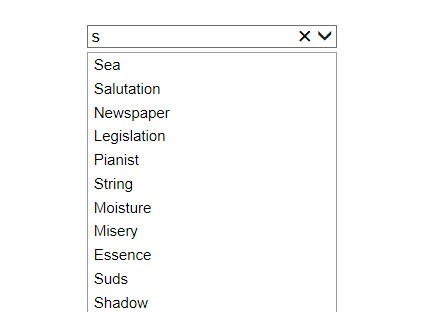
searchSelect is a tiny jQuery plugin that turns the default html select lists into searchable and scrollable lists (jQuery slimScroll plugin needed) without altering default select style.
See also:
- Simle Html List Filter Plugin with jQuery - listfilter
- jQuery Plugin For Searchable Select List Box - Searchit
- jQuery Plugin For Sorting and Filtering Html Lists - listplus
- Tiny Filterable Accordion List Plugin For jQuery - Collapsable List
How to use it:
1. Include jQuery javascript library and jQuery searchSelect plugin on the web page
<script src="http://code.jquery.com/jquery-latest.min.js"></script>
<script src="jquery.searchselect.min.js"></script>
<link rel="stylesheet" href="jquery.searchselect.css">
2. Include required jQuery slimScroll plugin after jQuery library
<script src="jquery.slimscroll.min.js"></script>
3. Create a select element
<select>
</select>
4. Add the items of the select list and call the plugin with options
<script>
var items = [
"king",
"residue",
"water",

...

"limb"];

$(function() {
$('select').append('<option value="all" selected="selected">All</option>');
for (var i = 0; i < items.length; i++) {
$('select').append('<option value="' + (i + 1) + '">' + items[i].charAt(0).toUpperCase() + items[i].substring(1) + '</option>');
i++;
};

$('select').searchSelect(
{
emptyMessage: 'No results..', // Text to display when result is empty.
slimScrollWidth: 'none', //Width of visible scroll area. Stretch to parent if not set.
slimScrollHeight: 'auto', // Height of visible scroll area. Supports auto for parent size.
slimScrollSize: '7px', // Width of scrollbar.
slimScrollPosition: 'right', // Sets the position of scrollbar.
slimScrollColor: '#000000', // Color of scrollbar.
slimScrollAlwaysVisible: false, // Disables scrollbar hide.
slimScrollDistance: 0, // Distance from parent element. Used with position property.
slimScrollStart: 'top', // Initial position of scrollbar: top, bottom, $(element).
slimScrollWheelStep: 20, // Integer value for mouse wheel delta.
slimScrollRailVisible: true, // Enables scrollbar rail.
slimScrollRailColor: '#F0F0F0', // Sets scrollbar rail color.
slimScrollRailOpacity: 1, // Sets scrollbar rail opacity.
slimScrollAllowPageScroll: false, // Scroll page when bar reaches top or bottom.
slimScrollDisableFadeOut: false, // Disables scrollbar auto fade.
slimScrollTouchScrollStep: 200 // Sensitivity for touch scroll events.
});
});
</script>
Change log:
v1.1.1 (2013-09-27)
- iOS click fix
This awesome jQuery plugin is developed by oddhill. For more Advanced Usages, please check the demo page or visit the official website.