Minimalist jQuery Drop Down Menu Plugin - jVanilla
| File Size: | 102 KB |
|---|---|
| Views Total: | 6027 |
| Last Update: | |
| Publish Date: | |
| Official Website: | Go to website |
| License: | MIT |
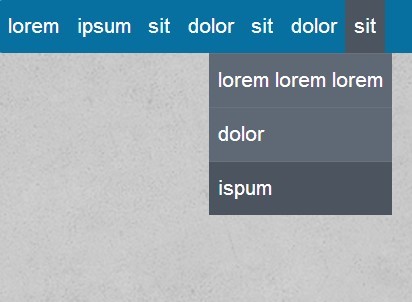
jVanilla is an extremely lightweight jQuery menu plugin that turns nested unordered list into a multi-level drop down menu with some simple animations.
Features:
- Currently supports one submenu level
- Custom trigger events: mouse hover or click.
- 2 simple animations: sliding and fading.
- Allows to align right the last submenu.
- Custom the speed of animations and the delay time on mouseout.
How to use it:
1. Create a navigation menu using Html unordered lists.
<nav> <ul class="menu-hover"> <li> <a href="https://www.jqueryscript.net/"> Home </a> </li> <li> <a href="https://www.jqueryscript.net/jquery-plugins/"> Categories </a> <ul> <li><a href="https://www.jqueryscript.net/jquery-plugins/">All jQuery Plugins</a></li> <li><a href="https://www.jqueryscript.net/accordion/">Accordion</a> (19)</li> <li><a href="https://www.jqueryscript.net/animation/">Animation</a> (120)</li> <li><a href="https://www.jqueryscript.net/chart-graph/">Chart & Graph</a> (19)</li> <li><a href="https://www.jqueryscript.net/css3-html5/">CSS3 & Html5</a> (28)</li> <li><a href="https://www.jqueryscript.net/form/">Form</a> (212)</li> <li><a href="https://www.jqueryscript.net/gallery/">Gallery</a> (82)</li> <li><a href="https://www.jqueryscript.net/layout/">Layout</a> (141)</li> <li><a href="https://www.jqueryscript.net/lightbox/">LightBox</a> (63)</li> <li><a href="https://www.jqueryscript.net/loading/">Loading</a> (32)</li> <li><a href="https://www.jqueryscript.net/menu/">Menu</a> (118)</li> <li><a href="https://www.jqueryscript.net/mobile/">Mobile</a> (18)</li> <li><a href="https://www.jqueryscript.net/other/">Others</a> (326)</li> <li><a href="https://www.jqueryscript.net/rotator/">Rotator</a> (18)</li> <li><a href="https://www.jqueryscript.net/slider/">Slider</a> (116)</li> <li><a href="https://www.jqueryscript.net/slideshow/">Slideshow</a> (64)</li> <li><a href="https://www.jqueryscript.net/social-media/">Social Media</a> (40)</li> <li><a href="https://www.jqueryscript.net/table/">Table</a> (41)</li> <li><a href="https://www.jqueryscript.net/text/">Text</a> (78)</li> <li><a href="https://www.jqueryscript.net/time-clock/">Time & Clock</a> (61)</li> <li><a href="https://www.jqueryscript.net/tooltip/">Tooltip</a> (25)</li> <li><a href="https://www.jqueryscript.net/zoom/">Zoom</a> (41)</li> </ul> </li> <li> <a href="https://www.jqueryscript.net/jquery-plugins/"> jQuery Plugins </a> <ul> <li><a href="https://www.jqueryscript.net/jquery-plugins/"> Latest </a></li> <li><a href="https://www.jqueryscript.net/additions/"> Additions </a></li> </ul> </li> <li> <a href="https://www.jqueryscript.net/popular/"> Popular </a> </li> <li> <a href="https://www.jqueryscript.net/recommended/"> Recommended </a> <li> <a href="https://www.jqueryscript.net/submit/"> Publishing </a> </li> <li> <a href="https://www.jqueryscript.net/blog/"> Blog </a> <ul> <li><a href="#"> Test 1 </a></li> <li><a href="#"> Test 2 </a></li> <li><a href="#"> Test 3 </a></li> </ul> </li> </ul> </nav>
2. Load the jQuery javascript library and jQuery jVanilla plugin at the bottom of your page.
<script src="http://ajax.googleapis.com/ajax/libs/jquery/1.10.2/jquery.min.js"></script>
<script src="res/js/jquery.jVanilla.js" type="text/javascript"></script>
3. Initialize the plugin.
<script type="text/javascript">
$(document).ready(function (){
$('.menu-hover').jVanilla({
speed   : 50, //  the speed of animations
animation   : 'sliding', // sliding or fading
eventType   : 'hover', // hover or click
delay   : 100, // the delay time on mouseout
isHoverClickable: true, // set to true if you want to enable the click on the first level link
isLastRightAlign: true // set to false if you want to align left the last submenu
});
});
</script>
4. Put styles in your CSS and change it to your taste.
/* jVanilla Styles
-----------------------------------------------------------------------------------------------*/
ul ul {
display: none;
background: #4b545f;
}
ul li:hover > ul {
display: block;
}
ul {
background: #086FA1;
border-radius: 2px;
list-style: none;
position: relative;
}
ul:after {
content: "";
clear: both;
display: block;
}
ul li {
float: left
}
ul li:hover {
background: #4b545f
}
ul li:hover a {
color: #fff
}
ul li a {
display: block;
padding: 8px 5px;
color: #FFF;
text-decoration: none
}
ul ul {
background: #5f6975;
border-radius: 0px;
padding: 0;
position: absolute;
top: 100%
}
ul ul li {
float: none;
border-top: 1px solid #6b727c;
position: relative
}
ul ul li a {
color: #fff;
}
ul ul li a:hover {
background: #4b545f;
}
ul ul ul {
position: absolute;
left: 100%;
top: 0;
}
.js-enabled ul li:hover > ul {
display: none;
}
This awesome jQuery plugin is developed by giacomopaita. For more Advanced Usages, please check the demo page or visit the official website.