Textarea Character/Line Count And Limit Plugin - jQuery textArea.js
| File Size: | 15.2 KB |
|---|---|
| Views Total: | 6053 |
| Last Update: | |
| Publish Date: | |
| Official Website: | Go to website |
| License: | MIT |
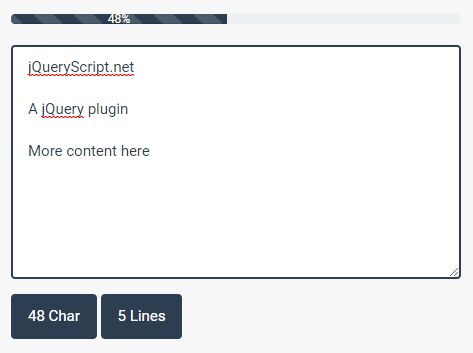
textArea.js is a jQuery plugin that adds live-updating character and line counters to your textarea element, as well as limiting the max number of characters and lines to be entered with a progress bar. Compatible with Bootstrap framwork.
How to use it:
1. Create a character countdown progress bar to display how many characters left until max length is reached.
<div class="progress">
  <div id="progress-percent" class="progress-bar progress-bar-striped active" role="progressbar" aria-valuenow="0" aria-valuemin="0" aria-valuemax="100" style="width: 0%;">
    <span id="progPercentage" class = "current-value">0</span>
  </div>
</div>
2. Create character and line counters.
<div class = "count"><span id="charCount">0</span> Char</div>
<div class = "count"><span id="lineCount">1</span> Lines</div>
3. Import jQuery library and the jQuery textArea.js script into the web page.
<script src="https://code.jquery.com/jquery.min.js"></script>
<script src="jquery.textArea.js"></script>
4. Enable the plugin on the target textarea and done.
$("#textarea").textareaCounter({

  // CSS selectors
  txtElem:'textarea',
  charElem:'charCount',
  lineElem:'lineCount',
  progElem:'progress-percent',
  progPerc:'progPercentage',

  // max number of characters
  txtCount:'100',

  // max number of lines
  lineCount:'10',

  // how many character per line
  charPerLine:'10',

});
Changelog:
2022-02-11
- Update jquery.textArea.js
This awesome jQuery plugin is developed by harisouras. For more Advanced Usages, please check the demo page or visit the official website.