jQuery Autocomplete & Typeahead with Ghost-Text - fastsearch-suggest
| File Size: | 28.9 KB |
|---|---|
| Views Total: | 148 |
| Last Update: | |
| Publish Date: | |
| Official Website: | Go to website |
| License: | MIT |
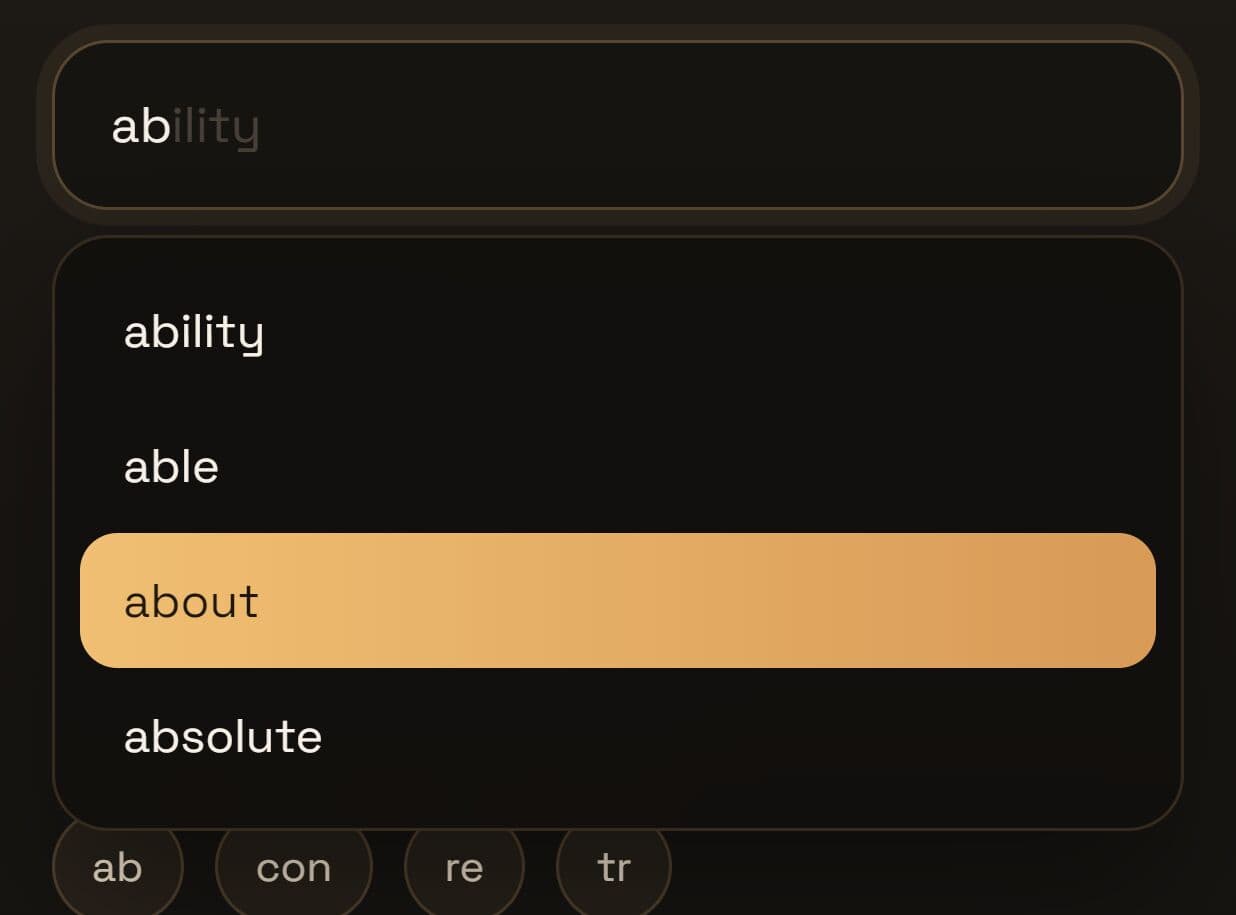
fastsearch-suggest is a lightweight jQuery autocomplete plugin that adds ghost-text typeahead and a dropdown suggestion list to regular text field. It currently supports three data-source modes: a pre-loaded string array, a remote JSON file fetched once at initialization, and a live AJAX endpoint queried on each keystroke.
The plugin is ideal for small and medium search UIs where you want quick typeahead behavior with very little setup. It works well for search bars, product finders, glossary inputs, and admin tools that need simple string suggestions.
Features:
- Show inline ghost text inside the input.
- Open a suggestion list for multiple matches.
- Navigate results with the keyboard.
- Read suggestions from a local string array.
- Fetch a JSON word list at startup.
- Request live suggestions from an endpoint.
- Delay remote requests with debouncing.
- Replace only the last typed word in multi-word inputs.
- Limit when suggestions start and how many items appear.
- Let you restyle the wrapper, ghost layer, and dropdown with CSS.
Use Cases:
- Search bars on documentation sites get instant prefix-matched suggestions from a pre-loaded keyword list.
- Tag input fields use word-by-word mode to autocomplete each entry independently, with prior tags left intact.
- Product search on e-commerce pages queries a live AJAX endpoint for real-time catalog matches.
- Country or city selectors fetch a remote JSON file once at page load and filter locally from that point forward.
Keyboard Shortcuts:
| Key | Action |
|---|---|
| Tab / → | Accept ghost-text suggestion (→ only when cursor is at the field end) |
| ↑ / ↓ | Navigate dropdown items |
| Enter | Select the highlighted dropdown item, or accept ghost text when no dropdown is open |
| Escape | Dismiss ghost text and close the dropdown |
How To Use It:
1. Add the plugin stylesheet, jQuery, and the plugin script to your page.
<!-- Load the plugin stylesheet -->
<link rel="stylesheet" href="dist/jquery.fastsearch-suggest.css">

<!-- Load jQuery first -->
<script src="/path/to/cdn/jquery.min.js"></script>

<!-- Load the plugin script -->
<script src="dist/jquery.fastsearch-suggest.min.js"></script>
2. Create a standard input field. The plugin will wrap this input with its own container:
<input type="text" id="city-input" placeholder="Start typing...">
3. Initialize fastsearch-suggest and pass a string array to the data option. The plugin filters it locally on every keystroke.
$('#city-input').fastsearchSuggest({
  data: ['Amsterdam', 'Barcelona', 'Copenhagen', 'Dublin', 'Edinburgh'],
  minChars: 2, // Wait until the user has typed 2 characters
  maxSuggestions: 5 // Show at most 5 items in the dropdown
});
4. Use dataUrl when your dataset is too large to inline but does not change on every request. The plugin fetches the file once at initialization, then filters the cached array locally.
$('#city-input').fastsearchSuggest({
  dataUrl: '/data/cities.json'
});
5. Use url when you need results from a server-side database or search index. The plugin sends a GET request with the typed value as the query parameter.
$('#city-input').fastsearchSuggest({

  // Receives GET /api/cities?query=typed
  url: '/api/cities',

  // Custom parameter name (default is 'q')
  param: 'query',

  // Wait 400ms after the last keystroke before firing
  debounce: 400

});
6. Set matchLastWord: true on any tag or multi-word input. The plugin targets only the last space-separated token and reconstructs the full value on selection.
$('#cities-input').fastsearchSuggest({
  data: ['Amsterdam', 'Barcelona', 'Copenhagen', 'Dublin', 'Edinburgh'],
  matchLastWord: true,
  onSelect: function(value) {
    // Fires with the full reconstructed string
    console.log('Selected value:', value);
  }
});
7. All default configuration options.
url(string | null): The AJAX endpoint URL. The plugin sends a GET request here on each keystroke after the debounce delay.param(string): The query parameter name appended to the AJAX request URL.data(string[] | null): A pre-loaded string array for local prefix filtering.dataUrl(string | null): A URL pointing to a remote JSON file. Fetched once at initialization, then filtered locally.minChars(number): The minimum number of characters before suggestions appear.maxSuggestions(number): The maximum number of items shown in the dropdown list.debounce(number): Milliseconds to wait after the last keystroke before firing an AJAX request.matchLastWord(boolean): Whentrue, the plugin matches against the last space-separated word. On selection, it replaces only that word and restores all preceding text.onSelect(function | null): A callback fired when the user selects a suggestion. Receives the selected string as its only argument:function(value) {}.
$('#cities-input').fastsearchSuggest({
  url:            null,
  param:          'q',
  data:           null,
  dataUrl:        null,
  minChars:       2,
  maxSuggestions: 5,
  debounce:       300,
  matchLastWord:  false,
  onSelect:       null
});
8. Remove the plugin from an input, restore the original element, and detach all event listeners and generated DOM nodes
$('#city-input').fastsearchSuggest('destroy');
9. Override any of these CSS to create your own styles.
| Class | Element |
|---|---|
.fss-wrapper |
<div> wrapping the original input |
.fss-ghost |
Ghost-text overlay span |
.fss-dropdown |
<ul> suggestion list |
.fss-item |
<li> for each suggestion |
.fss-item.fss-active |
Currently highlighted dropdown item |
Alternatives:
This awesome jQuery plugin is developed by dev-lop77. For more Advanced Usages, please check the demo page or visit the official website.