form2js: Form to JSON for jQuery and Vanilla JavaScript
| File Size: | 226 KB |
|---|---|
| Views Total: | 0 |
| Last Update: | |
| Publish Date: | |
| Official Website: | Go to website |
| License: | MIT |
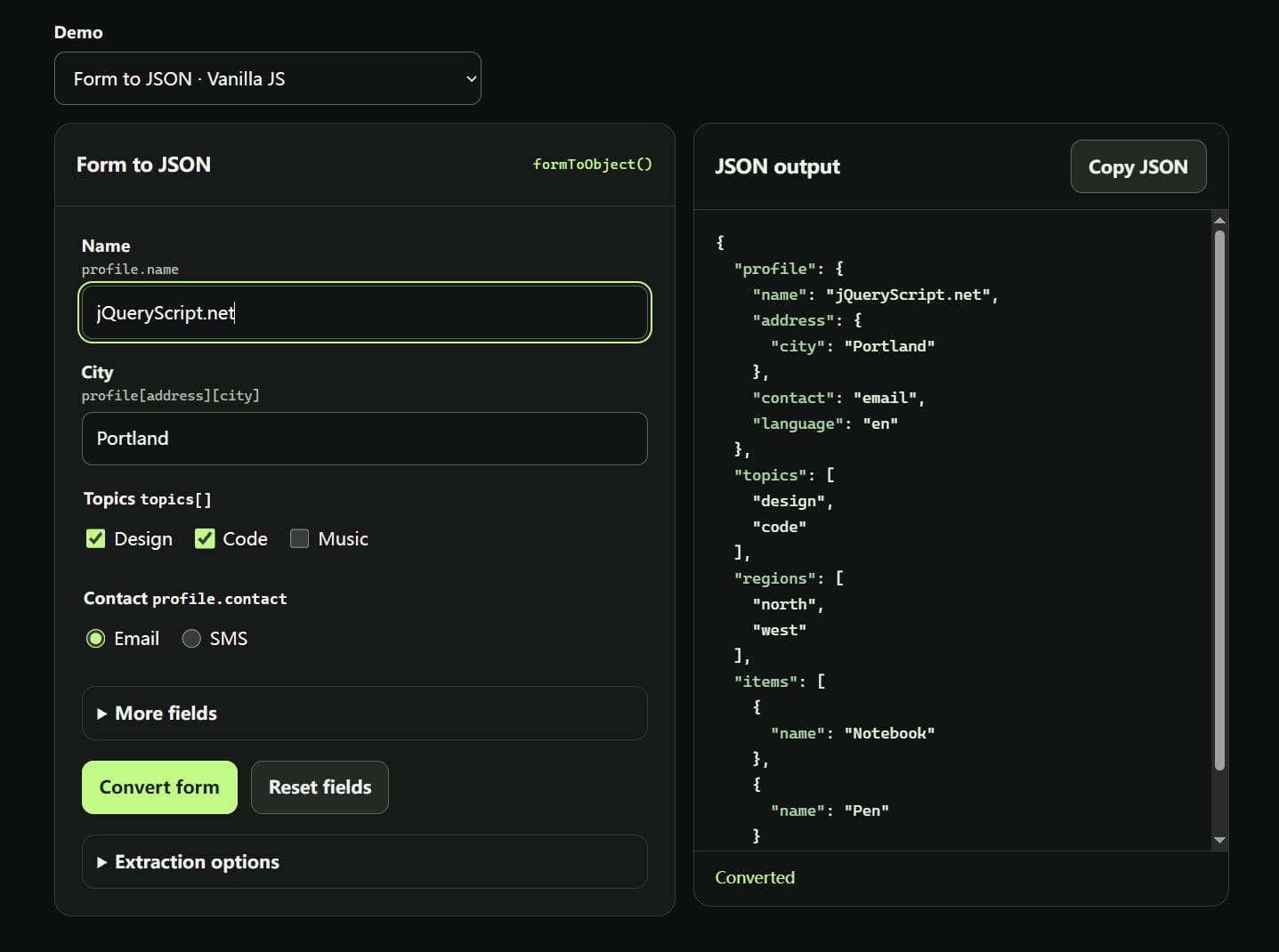
form2js is an open-source JavaScript library for converting HTML form data into nested objects and arrays.
It works with jQuery and vanilla JavaScript and builds the output structure from the names of your form fields.
Features
- Dot notation and Rails-style bracket notation for nested field names.
- Checkbox groups, radio buttons, select menus, text inputs, and textareas.
- Multiple forms or field groups in a single extraction.
- Configurable handling of empty values and disabled fields.
- Callbacks for changing field names and converting values.
- Optional form population from existing data through the js2form module.
How to Use It
1. Basic Usage
Create an order form with nested field names, a checkbox group, and indexed line items.
<form id="orderForm">
  <label>Name <input name="customer.name" value="Maya"></label>

  <label>
    <input type="checkbox" name="extras[]" value="gift-wrap" checked>
    Gift wrap
  </label>
  <label>
    <input type="checkbox" name="extras[]" value="signature" checked>
    Signature on delivery
  </label>

  <label>SKU <input name="items[0].sku" value="A12"></label>
  <label>Quantity <input type="number" name="items[0].quantity" value="2"></label>
  <label>SKU <input name="items[1].sku" value="B34"></label>
  <label>Quantity <input type="number" name="items[1].quantity" value="1"></label>

  <button type="submit">Read Form Data</button>
</form>

<pre id="output"></pre>
jQuery
Load jQuery and the form2js plugin after the form.
<script src="/path/to/cdn/jquery.min.js"></script>
<script src="https://cdn.jsdelivr.net/npm/@form2js/jquery/dist/standalone.global.min.js"></script>
<script>
  $('#orderForm').on('submit', function (event) {
    event.preventDefault();
    const data = $(this).toObject();
    $('#output').text(JSON.stringify(data, null, 2));
  });
</script>
Vanilla JavaScript
Load the standalone DOM package after the form.
<script src="https://cdn.jsdelivr.net/npm/@form2js/dom/dist/standalone.global.min.js"></script>
<script>
  const form = document.getElementById('orderForm');

  form.addEventListener('submit', function (event) {
    event.preventDefault();
    const data = formToObject(form);
    document.getElementById('output').textContent =
      JSON.stringify(data, null, 2);
  });
</script>
Result
Both methods return a JavaScript object. Use JSON.stringify() when your API expects JSON.
{
  "customer": {
    "name": "Maya"
  },
  "extras": ["gift-wrap", "signature"],
  "items": [
    { "sku": "A12", "quantity": "2" },
    { "sku": "B34", "quantity": "1" }
  ]
}
2. Install With npm
Install the jQuery adapter and register it on your imported jQuery instance.
npm install @form2js/jquery jquery
import $ from 'jquery';
import { installToObjectPlugin } from '@form2js/jquery';

installToObjectPlugin($);

const data = $('#orderForm').toObject();
For vanilla JavaScript, install the DOM adapter.
npm install @form2js/dom
import { formToObject } from '@form2js/dom';

const data = formToObject('orderForm');
3. Name Fields to Build Nested Objects and Arrays
The name attribute determines where each value goes in the result. A name ending in [] appends field values to an array. Shared indexes group related fields in one array element; sparse indexes are compacted in encounter order.
Checked checkboxes and radio buttons contribute their string values. A multi-select returns an array of selected option values; use either colors or colors[] as its name. Button, reset, submit, and image inputs are excluded.
| Field names and values | Resulting object |
|---|---|
user.name = Ada |
{ user: { name: "Ada" } } |
user[address][city] = Boston |
{ user: { address: { city: "Boston" } } } |
roles[] = editor, roles[] = author |
{ roles: ["editor", "author"] } |
items[5].id = A, items[8].id = B |
{ items: [{ id: "A" }, { id: "B" }] } |
4. Parse Multiple Forms
Combine billing and shipping forms into one payload.
<form class="checkout-form">
  <label>Billing city <input name="billing.city" value="Boston"></label>
</form>

<form class="checkout-form">
  <label>Shipping city <input name="shipping.city" value="Seattle"></label>
</form>
Select both forms with jQuery and choose an extraction mode.
// Parse the first matched form (default).
$('.checkout-form').toObject({ mode: 'first' });

// Return one object per form in an array.
$('.checkout-form').toObject({ mode: 'all' });

// Merge both forms into one object.
$('.checkout-form').toObject({ mode: 'combine' });
For vanilla JavaScript, pass all matching form elements to formToObject().
const data = formToObject(
  document.querySelectorAll('.checkout-form')
);
5. Convert Field Values
The DOM parser preserves number input values as strings. Use nodeCallback to return numeric quantities in the order form.
const options = {
  nodeCallback(node) {
    if (
      node instanceof HTMLInputElement &&
      node.type === 'number' &&
      node.name.endsWith('.quantity') &&
      node.value !== ''
    ) {
      return {
        key: node.name,
        value: node.valueAsNumber
      };
    }
  }
};
Pass the options to the adapter you installed.
// jQuery
const order = $('#orderForm').toObject(options);

// Vanilla JavaScript
const orderData = formToObject('orderForm', options);
6. Configuration Options
Both .toObject(options) and formToObject(rootNode, options) accept the following options:
delimiter(string, default:'.'): Separator for nested property names.skipEmpty(boolean, default:true): Skip empty strings and null values.allowUnsafePathSegments(boolean, default:false): Permit otherwise rejected property names such as__proto__,prototype, andconstructor. Keep disabled for untrusted input.useIdIfEmptyName(boolean, default:false): Fall back to the field's ID when its name is missing or empty.getDisabled(boolean, default:false): Include disabled controls and controls within disabled fieldsets when enabled.nodeCallback(function, optional): Override field extraction through a callback.
jQuery-only option:
mode(string, default:'first'): Parse the first match ('first'), return an array of parsed matches ('all'), or combine all matches into one object ('combine').
DOM-only option:
document(Document, default: global document): Document used to resolve a root element ID, including when running in a DOM shim.
7. API Methods
jQuery
// Return an object or array; omit options for the default behavior.
$(selector).toObject(options);

// Install $.fn.toObject; preserves an existing method of that name.
installToObjectPlugin($);

// Install on a jQuery-like scope if detected (default: globalThis).
maybeAutoInstallPlugin(scope);
Vanilla JavaScript
// Return a nested object.
formToObject(rootNode, options);

// Return flat { key, value } entries (module API).
// Options: nodeCallback, useIdIfEmptyName, getDisabled, document.
extractPairs(rootNode, options);

// Legacy positional wrapper; returns the parsed object.
form2js(
  rootNode,
  delimiter,
  skipEmpty,
  nodeCallback,
  useIdIfEmptyName,
  getDisabled,
  allowUnsafePathSegments
);
Extraction Callback
The extraction callback receives a DOM node. Return:
{ key: 'field.name', value: data }or{ name: 'field.name', value: data }to supply a custom entry.false,null, orundefinedto continue default extraction.SKIP_NODEto exclude the node. The standalone DOM build exposes this symbol globally.
To exclude nodes with jQuery, use the npm adapter and import SKIP_NODE from a matching version of @form2js/dom.
npm install @form2js/[email protected]
import $ from 'jquery';
import { installToObjectPlugin } from '@form2js/jquery';
import { SKIP_NODE } from '@form2js/dom';

installToObjectPlugin($);

const data = $('#orderForm').toObject({
  nodeCallback(node) {
    if (node instanceof HTMLInputElement && node.name === 'customer.name') {
      return SKIP_NODE;
    }
  }
});
8. Populate a Form From an Object
Install the @form2js/js2form module to restore the order form from saved data. It clears existing field state by default before applying the supplied values.
npm install @form2js/js2form
import { objectToForm } from '@form2js/js2form';

objectToForm('orderForm', {
  customer: {
    name: 'Jamie'
  },
  extras: ['gift-wrap'],
  items: [
    { sku: 'C56', quantity: 4 },
    { sku: 'D78', quantity: 3 }
  ]
});
Options
delimiter(string, default:'.'): Separator for nested property names.nodeCallback(function, optional): Receives a node before value assignment; returnfalseto skip assignment. SetshouldClean: falseto retain the node's current value.useIdIfEmptyName(boolean, default:false): Match controls by ID when no name is present.shouldClean(boolean, default:true): Clear existing field state before assigning values. Set tofalseto preserve existing values during partial updates, including current checkbox selections.document(Document, default: global document): Document used to resolve root IDs.
API
| Function | Description |
|---|---|
objectToForm(rootNode, data, options?) |
Populate matching form controls; do nothing if the root is unresolved. |
js2form(rootNode, data, delimiter?, nodeCallback?, useIdIfEmptyName?) |
Legacy positional wrapper for objectToForm(). |
flattenDataForForm(data) |
Flatten an object into { key, value } entries. |
mapFieldsByName(rootNode, options?) |
Return a normalized name-to-field map. Accepts delimiter, useIdIfEmptyName, shouldClean, and document. Clears fields by default; set shouldClean: false for lookup only. |
normalizeName(name, delimiter, arrayIndexes) |
Normalize field names and compact indexed arrays. Pass {} for a fresh index map; reuse it across related names. |
Alternatives
- Generate Nested JSON From Form Data - parseJsonFromForm
- Convert Form Data To A JSON Object - formToJson.js
- Form To JSON And JSON To Form Converter – form-data-json
This awesome jQuery plugin is developed by maxatwork. For more Advanced Usages, please check the demo page or visit the official website.
- Prev: jQuery Form: AJAX Form Submission & File Upload Plugin
- Next: None