Responsive Timeline Plugin with Horizontal & Vertical Layouts - Vantl
| File Size: | 5.42 MB |
|---|---|
| Views Total: | 292 |
| Last Update: | |
| Publish Date: | |
| Official Website: | Go to website |
| License: | MIT |
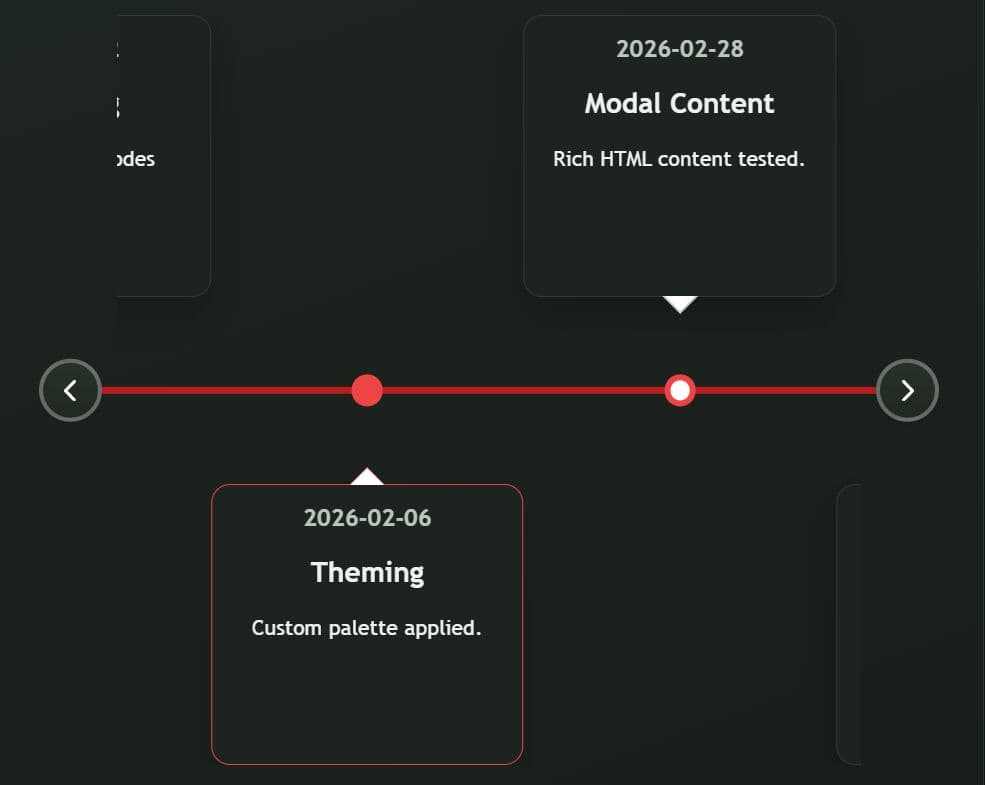
Vantl is a lightweight JavaScript timeline library that allows you to generate interactive, responsive, customizable horizontal and vertical timelines.
It supports inline HTML data, JSON data loading, and programmatic rendering from JavaScript arrays. Works with vanilla JS and supports jQuery plugin initialization for older stacks.
Features:
- Dual layout: Supports vertical scroll mode and horizontal carousel mode.
- Responsive: Switches layout based on
minWidthandmaxWidthsettings. - Rich Content: Supports date text, headings, summaries, images, and rich modal HTML.
- Navigation: Supports arrow controls, keyboard access, and programmatic node navigation.
- Deep linking: Supports URL params for timeline targeting and node targeting.
- Data workflow: Supports inline markup, JSON auto-init, JSON fetch, and data-array rendering.
- Caching layer: Stores JSON responses in
localStoragewith update checks based onlastupdated. - Color system: Supports node, line, and nav colors through API or data attributes.
- Optional adapter: Supports Swiper integration through a dedicated adapter path.
Use Cases:
- Product changelog pages: Map release milestones into a horizontal timeline with deep links for support docs.
- Company history sections: Use vertical mode on content-heavy pages where scrolling flow is primary.
- Case study storytelling: Attach modal content and images to each node for richer technical context.
- Internal dashboards: Render timeline data from API payloads and refresh views through programmatic methods.
How to Use It:
1. Install and import Vantl into your project.
# NPM
$ npm install @kendawson-online/vantl
import { timeline } from '@kendawson-online/vantl';
import '@kendawson-online/vantl/dist/timeline.min.css';
2. Or download the package and include the stylesheet in your <head> and the JavaScript file before your closing </body> tag.
<!-- Vantl stylesheet -->
<link rel="stylesheet" href="/dist/timeline.min.css" />

<!-- Vantl script -->
<script src="/dist/timeline.min.js"></script>
3. Create the HTML structure for your timeline. You can set the layout mode using the data-mode attribute.
<!-- Set the timeline to horizontal mode -->
<div class="timeline" data-mode="horizontal">
  <div class="timeline__wrap">
    <div class="timeline__items">
      <!-- First timeline node -->
      <div class="timeline__item">
        <div class="timeline__content">
          <h5>Q1 2024</h5>
          <p>Launched the new payment gateway API.</p>
        </div>
      </div>
      <!-- Second timeline node -->
      <div class="timeline__item">
        <div class="timeline__content">
          <h5>Q2 2024</h5>
          <p>Expanded server infrastructure to the EU region.</p>
       </div>
      </div>
      <!-- Third timeline node -->
      <div class="timeline__item">
        <div class="timeline__content">
          <h5>Q3 2024</h5>
          <p>Reached one million active daily users.</p>
        </div>
      </div>
    </div>
  </div>
</div>
4. You can also load your timeline data entirely from a JSON file. Add the data-json-config attribute to an empty container. The script will fetch the data and build the DOM nodes automatically.
<!-- The script will populate this container automatically -->
<div class="timeline" data-json-config="/api/v1/data.json"></div>
// data.json
{
  "timelineName": "Engineering Roadmap",
  "layoutMode": "horizontal",
  "minWidth": 760,
  "nodeColor": "#1f9d55",
  "lineColor": "#146c43",
  "navColor": "#274233",
  "lastupdated": "2026-03-03T12:00:00.000Z",
  "nodes": [
    {
      "id": "phase-1",
      "date": "2026-01-12",
      "heading": "Foundations",
      "summary": "Core services moved to stable contracts.",
      "content": "<p>Cross-team rollout plan completed.</p>"
    }
  ]
}
5. Initialize the timeline by passing your target elements to the timeline() function.
// Select all timeline containers on the page
const myTimelines = document.querySelectorAll('.timeline');

// Initialize the library
timeline(myTimelines);

// Or initialize the library as a jQuery plugin
jQuery(function () {
  $('.timeline').timeline({
    mode: 'horizontal',
    // more options here
  });
});
6. You can configure the timeline via JavaScript options, HTML data attributes, or JSON properties.
All available options:
mode(string): Sets the layout direction. Accepts'vertical'or'horizontal'.minWidth(number): Sets the minimum viewport width in pixels to maintain horizontal mode.maxWidth(number): Sets the maximum viewport width in pixels to maintain vertical mode.moveItems(number): Defines the number of items to scroll when clicking navigation buttons in horizontal mode.startIndex(number): Sets the initial item index to display in horizontal mode.horizontalStartPosition(string): Sets the vertical alignment of the first item in horizontal mode. Accepts'top'or'bottom'.verticalStartPosition(string): Sets the horizontal alignment of the first item in vertical mode. Accepts'left'or'right'.sameSideNodes(string|boolean): Forces all nodes to appear on the same side. Accepts'top','bottom','left','right',true, orfalse.verticalTrigger(string): Sets the distance from the bottom of the viewport where items animate into view. Accepts percentages or pixels.rtlMode(boolean): Activates right-to-left layout support for horizontal timelines.useSwiper(string|boolean): Activates SwiperJS integration for the horizontal carousel. Accepts'false','true', or'auto'.swiperOptions(object): Passes configuration options directly to the Swiper instance.swiperAdapter(function|object): Provides a custom adapter instance or factory for Swiper.nodeColor(string): Sets the CSS color for the timeline node circles.lineColor(string): Sets the CSS color for the center timeline line.navColor(string): Sets the CSS background color for the navigation buttons.
Timeline Container Attributes:
data-json-config: Specifies the JSON file path.data-mode: Maps to the JavaScriptmodeoption.data-min-width: Maps to the JavaScriptminWidthoption.data-max-width: Maps to the JavaScriptmaxWidthoption.data-move-items: Maps to the JavaScriptmoveItemsoption.data-start-index: Maps to the JavaScriptstartIndexoption.data-horizontal-start-position: Maps to the JavaScripthorizontalStartPositionoption.data-vertical-start-position: Maps to the JavaScriptverticalStartPositionoption.data-same-side-nodes: Maps to the JavaScriptsameSideNodesoption.data-vertical-trigger: Maps to the JavaScriptverticalTriggeroption.data-rtl-mode: Maps to the JavaScriptrtlModeoption.data-node-color: Maps to the JavaScriptnodeColoroption.data-line-color: Maps to the JavaScriptlineColoroption.data-nav-color: Maps to the JavaScriptnavColoroption.data-timeline-name: Sets the timeline heading automatically from the JSON data.
Timeline Item Attributes:
data-node-id: Sets a unique ID for deep linking on specific timeline items.data-modal-title: Defines the modal heading text.data-modal-content: Defines the modal body text.data-modal-image: Defines the modal image URL.data-modal-html: Defines additional raw HTML for the modal.data-modal-bound: Acts as an internal flag. The script sets this automatically.
7. API methods.
// Initializes one or more timeline containers
timeline(document.querySelectorAll('.timeline'), { mode: 'horizontal' });

// Destroys all initialized timelines and cleans up global listeners
destroyTimelines();

// Fetches a JSON file and initializes the timeline inside the target container
loadDataFromJson('/api/v1/company-history.json', '#main-timeline');

// Renders timeline DOM nodes from a data array without initializing behavior
renderTimelineFromData('#main-timeline', myDataArray, { nodeColor: '#ff0000' });

// Renders timeline DOM nodes and immediately initializes the timeline behavior
timelineFromData('#main-timeline', myDataArray, { mode: 'vertical' });

// Alias for renderTimelineFromData
processTimelineData('#main-timeline', myDataArray, { nodeColor: '#ff0000' });

// Removes all cached JSON entries from localStorage
clearTimelineCache();

// Removes a specific cached JSON entry from localStorage
clearTimelineCache('/api/v1/company-history.json');

// Creates the global modal DOM node and wires close handlers
createTimelineModal();

// Opens the modal using data attributes from the provided item element
openTimelineModal(document.querySelector('.timeline__item'));

// Closes the currently open modal
closeTimelineModal();

// Removes the global modal and overlay elements from the DOM
destroyTimelineModal();

// Scrolls a horizontal timeline to the specified zero-based index
navigateTimelineToNodeIndex(document.getElementById('main-timeline'), 3);
8. Event handlers.
// Fires when a timeline instance completes initialization
$(document).on('timeline:initialized', function (e) {
  console.log('Timeline initialized:', e.originalEvent.detail);
});

// Same initialization event on a specific container
$('#projectTimeline').on('timeline:initialized', function (e) {
  console.log('Container ready:', e.originalEvent.detail.id);
});

// Fires on global error dispatch from loader or init flow
$(window).on('timeline:error', function (e) {
  console.log('Timeline error payload:', e.originalEvent.detail);
});

// Node click opens modal when modal data exists on the item
$(document).on('click', '#projectTimeline .timeline__item', function () {
  console.log('Node clicked:', $(this).data('node-id'));
});

// Keyboard enter/space on node triggers modal behavior
$(document).on('keydown', '#projectTimeline .timeline__item', function (e) {
  if (e.key === 'Enter' || e.key === ' ') {
    console.log('Keyboard activation:', $(this).data('node-id'));
  }
});
Alternatives:
FAQs:
Q: How do I force the timeline to stay vertical on desktop?
A: Set the maxWidth option to a very high number like 9999. This prevents the script from switching to horizontal mode.
Q: Why are my JSON updates not showing up?
A: The library caches JSON data in LocalStorage. You must call clearTimelineCache() or update the lastupdated field in your JSON file to force a refresh.
Q: Deep link params exist in URL, yet node focus does not move. How do I fix it?
A: Add an id to the timeline container and data-node-id values on nodes. Confirm query params follow ?timeline=containerId&id=nodeId.
Changelog:
v2.2.0 (2026-08-01)
- Bugfixes
This awesome jQuery plugin is developed by kendawson-online. For more Advanced Usages, please check the demo page or visit the official website.
- Prev: Github-like Interactive Data Heatmaps using jQuery - Heatmap.js
- Next: None