Simple Side-by-side Combo Box Plugin With jQuery - pickList
| File Size: | 15.8 KB |
|---|---|
| Views Total: | 6649 |
| Last Update: | |
| Publish Date: | |
| Official Website: | Go to website |
| License: | MIT |
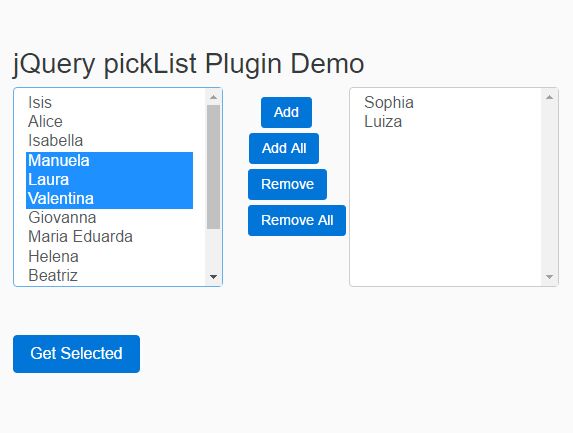
pickList is a jQuery plugin that helps you generate a responsive, side-by-side, multi-select combo box using Bootstrap styles. The user may move items between the left and right option lists and get the selected values.
How to use it:
1. Load the needed jQuery library and Bootstrap's stylesheet in the html page.
<link rel="stylesheet" href="bootstrap.min.css">
<script src="//code.jquery.com/jquery.min.js"></script>
2. Load the jQuery pickList plugin's files after jQuery.
<link href="pickList.css"  rel="stylesheet">
<script src="pickList.js"></script>
3. Create an empty container to place the combo box.
<div id="pickList"></div>
4. Create an object of predefined values for the combo box.
var val = {
    01: {id: 01, text: 'Isis'},
    02: {id: 02, text: 'Sophia'},
    03: {id: 03, text: 'Alice'},
    04: {id: 04, text: 'Isabella'},
    05: {id: 05, text: 'Manuela'},
    06: {id: 06, text: 'Laura'},
    07: {id: 07, text: 'Luiza'},
    08: {id: 08, text: 'Valentina'},
    09: {id: 09, text: 'Giovanna'},
    10: {id: 10, text: 'Maria Eduarda'},
    11: {id: 11, text: 'Helena'},
    12: {id: 12, text: 'Beatriz'},
    13: {id: 13, text: 'Maria Luiza'},
    14: {id: 14, text: 'Lara'},
    15: {id: 15, text: 'Julia'}
 };
5. Initialize the plugin to render a combo box inside the container you created.
var pick = $("#pickList").pickList({data: val});
6. Get the user selected value(s).
console.log(pick.getValues());
7. Change the default text for the controls.
var pick = $("#pickList").pickList({
    add: 'Add',
    addAll: 'Add All',
    remove: 'Remove',
    removeAll: 'Remove All'
});
Change log:
2016-10-13
- Multiple Picklists
This awesome jQuery plugin is developed by Gabrielr47. For more Advanced Usages, please check the demo page or visit the official website.