jQuery Currency Input Filed Mask Plugin - maskmoney
| File Size: | 27.4 KB |
|---|---|
| Views Total: | 54874 |
| Last Update: | |
| Publish Date: | |
| Official Website: | Go to website |
| License: | MIT |
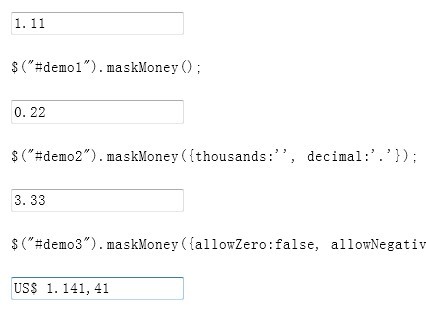
maskmoney is a super simple jQuery plugin that make it easy to mask input filed text in the form of currency.
Features:
- Lightweight and easy to use
- Support for decimal and thousands separator
- Support for customizable decimal places
- Support for currency symbol
Related Plugins:
- Easy Number Formatting Plugin with jQuery - number
- Input Field Data Formatting Plugin - Mask
- Price Format jQuery Plugin - Price Format
- Easy Numbers and Currency Formatting Plugin - autoNumeric
- Automatic Input Field Data Formatting Plugin - jQuery mask
How to use it:
1. Include jQuery library and jQuery maskmoney plugin on the web page
<script src="http://ajax.googleapis.com/ajax/libs/jquery/1.9.1/jquery.min.js" type="text/javascript"></script>
<script src="jquery.maskMoney.js" type="text/javascript"></script>
2. Create an input element for currency mask
<input type="text" id="demo1" />
3. Call the plugin with options.
$("#demo").maskMoney({

  // The symbol to be displayed before the value entered by the user
  prefix:'US$ ',

  // The suffix to be displayed after the value entered by the user(example: "1234.23 €").
  suffix: "",

  // Delay formatting of text field until focus leaves the field
  formatOnBlur: false,

  // Prevent users from inputing zero
  allowZero:false,

  // Prevent users from inputing negative values
  allowNegative:true,

  // Allow empty input values, so that when you delete the number it doesn't reset to 0.00.
  allowEmpty: false,

  // Select text in the input on double click
  doubleClickSelection: true,

  // Select all text in the input when the element fires the focus event.
  selectAllOnFocus: false,

  // The thousands separator
  thousands: '.',

  // The decimal separator
  decimal: '.' ,

  // How many decimal places are allowed
  precision: 2,

  // Set if the symbol will stay in the field after the user exits the field.
  affixesStay : false,

  // Place caret at the end of the input on focus
  bringCaretAtEndOnFocus: true

});
Change log:
v3.1.1 (2017-09-02)
- update to latest version.
v3.0.2 (2014-01-18)
- update to latest version.
v3.0.0 (2013-12-31)
- bugs fixed.
v2.9.6 (2013-12-29)
- bugs fixed.
v2.9.0 (2013-12-28)
- symbol` ~> `prefix`
- `symbolStay` ~> `affixesStay`
- `symbolPosition` no longer exists and to put the symbol at the right, you should use `suffix`
- `affixesStay` is now default to `true`
v2.7.0 (2013-12-26)
- adding the option to configure maskMoney parameters as data-* in the input itself.
v2.5.0 (2013-12-17)
- bugs fixed.
This awesome jQuery plugin is developed by plentz. For more Advanced Usages, please check the demo page or visit the official website.