jQuery Based Strong Secure Password Generator
| File Size: | 1.78 KB |
|---|---|
| Views Total: | 1413 |
| Last Update: | |
| Publish Date: | |
| Official Website: | Go to website |
| License: | MIT |
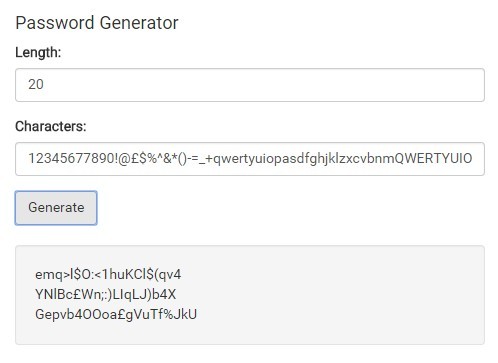
A jQuery based password generator that enables you to generate a complex, random password with very high level of security.
See also:
- jQuery Password Generator Plugin - pGenerator
- jQuery Based Strong Password Generator Tool
- Real Time Password Generation and Validation Plugin For jQuery - Passy
- Generate Secure Random Passwords with jQuery - passwordGenerator
How to use it:
1. Specify the character set and password length for the password generator.
<label for="">Length:</label>
<input id="length" type="number" value="12">

<label for="">Characters:</label>
<input type="text" value="12345677890..." id="charset">
2. Create a button to generate a password using specified character set and password length.
<button id="generate">Generate</button>
3. Create an empty container that displays the user generated passwords.
<div id="passwords">
</div>
4. Include the necessary jQuery JavaScript library in the document.
<script src="//code.jquery.com/jquery-1.11.3.min.js"></script>
5. The core JavaScript to generate a random password once you click on the 'Generate' button.
$("#generate").click(function(){
var charset = $('#charset').val();
var password = '';
var password_length = parseInt($('#length').val());
for(var i = 0; i < password_length; i ++){
var random_position = Math.floor(Math.random() * charset.length);
password += charset[random_position];
}
if(password.length == password_length){
password = password.replace(/</g, "<").replace(/>/g, ">");
$('#passwords').prepend(password + '<br/>');
}else{
console.log(password.length , password_length);
}
});
This awesome jQuery plugin is developed by EightArmsHQ. For more Advanced Usages, please check the demo page or visit the official website.